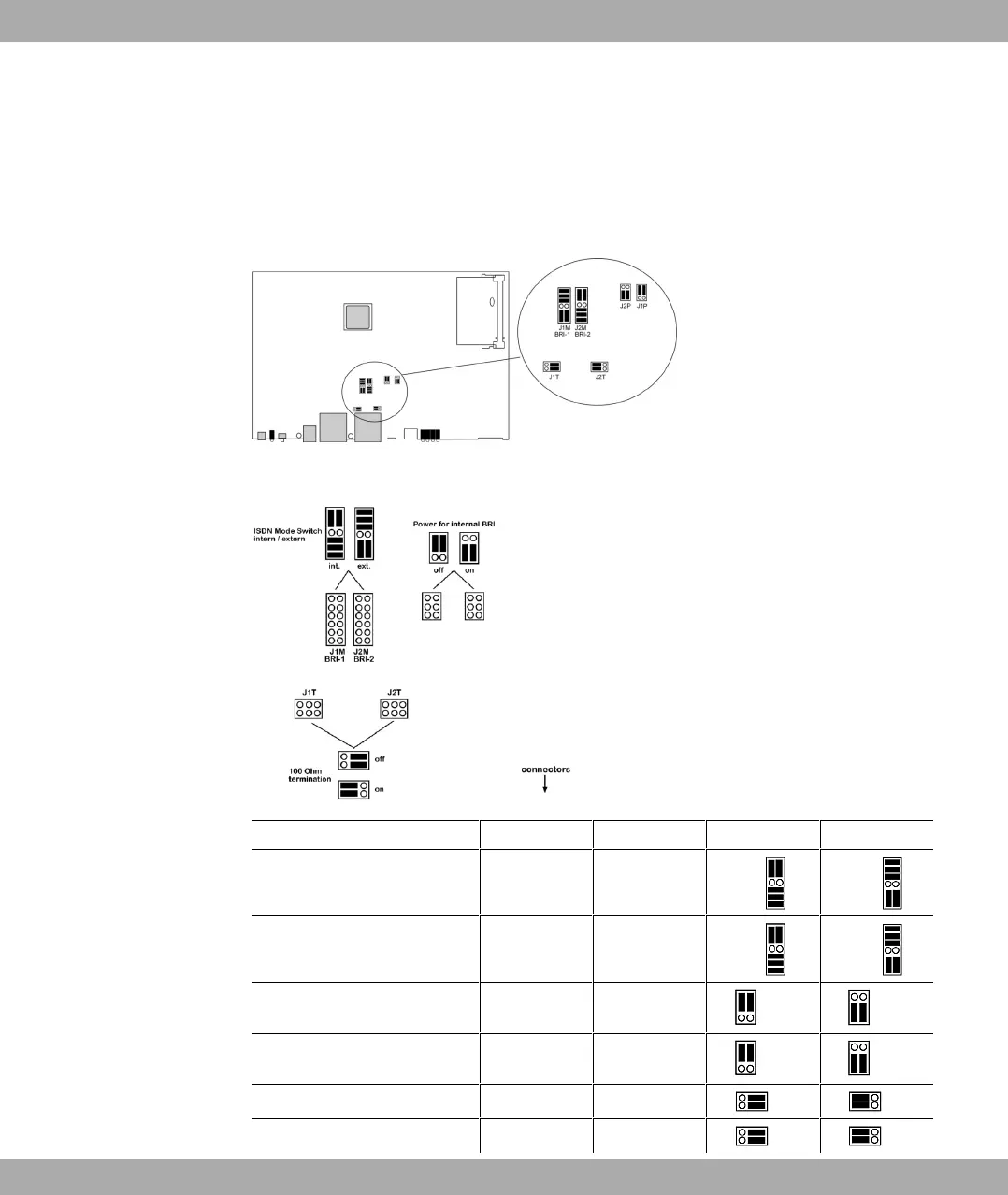
To carry out the switch proceed as follows:
Unscrew the two screws on the back of the device and slide the cover upwards.
The link plugs for the BRI-1 and BRI-2 interfaces can be found on all devices on the main
PCB behind the terminal block.
Insert the link plugs for interfaces BRI-1 and BRI-2 as shown in the following figure:
Use Interface Link plug area Position Position
Internal/external switching
BRI-1 J1M Internal external
Internal/external switching BRI-2 J2M Internal external
Power supply for internal con-
nection
BRI-1 J1P Off On
Power supply for internal con-
nection
BRI-2 J2P Off On
100 Ohm terminator BRI-1 J1T Off On
100 Ohm terminator BRI-2 J2T Off On
7 Variable switching of S0 interfaces Funkwerk Enterprise Communications GmbH
46 bintec Rxxx2/RTxxx2



 To Next Page