SpectroEye™ 53
2
2.5.2 Reference libraries
A reference library is a collection of “personal” reference data
which come from different sources and may be saved as a
library: references can be obtained from the standard color
guides or they can be measured directly. This means that
a self defined selection will be available for your daily job.
2.5.2.1 Creating a new library
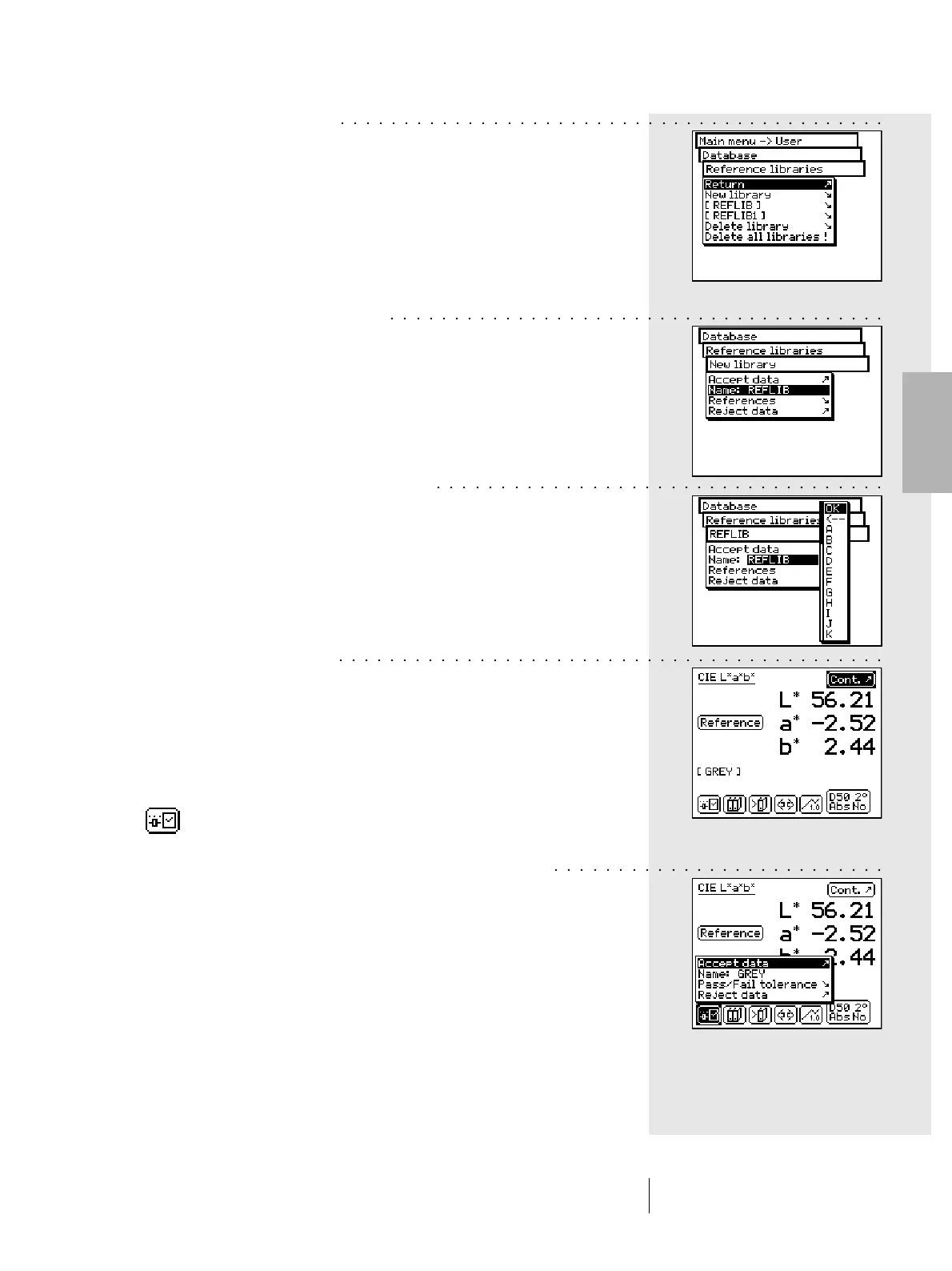
To create a new personal library, select the following from
the main menu:
Database > Reference libraries > New library
To create a library, proceed as follows:
• Enter the reference library name
SpectroEye automatically assigns a name to the new
reference library; however you can change it by selecting the
Name: menu item.
• Enter the reference
Select References > New reference menu; the references
window will appear. Check first whether the measurement
conditions meet your requirements.
Measure, the desired reference. As soon as the desired
measurement value is shown on the display, the reference
name automatically assigned by SpectroEye will appear,
and the toolbar buttons will include the Reference
parameters icon.
Select this icon to change the name of the color and to
define the tolerances for subsequent pass/fail evaluation.
Change the name deleting that pre-assigned to the
Name: menu item and entering a new reference name.
To define the tolerances for these references select the
Pass/Fail tolerance menu item.
You can define both the density and colorimetry tolerances
for a subsequent evaluation. Confirm your settings using
Accept data.
2 • Use
○○○○○○○○○○○○○○○○○○○○○○○○○○○○○○○○○○○○○○○○○○○
○○○○○○○○○○○○○○○○○○○○○○○○○○○○○○○○○○○○○○○
○○○○○○○○○○○○○○○○○○○○○○○○○○○○○○○○○○○
○○○○○○○○○○○○○○○○○○○○○○○○○○○○○○○○○○○○○○○○○○○
○○○○○○○○○○○○○○○○○○○○○○○○○○



 To Next Page