Chapter 3 Ellipse Management
© 2013 Harmonic Inc. Harmonic All rights reserved. 39 Ellipse 3000 Release 3.0, Rev. B
Ellipse Management Interfaces
3.1.1.1 Front Panel Controls and Displays
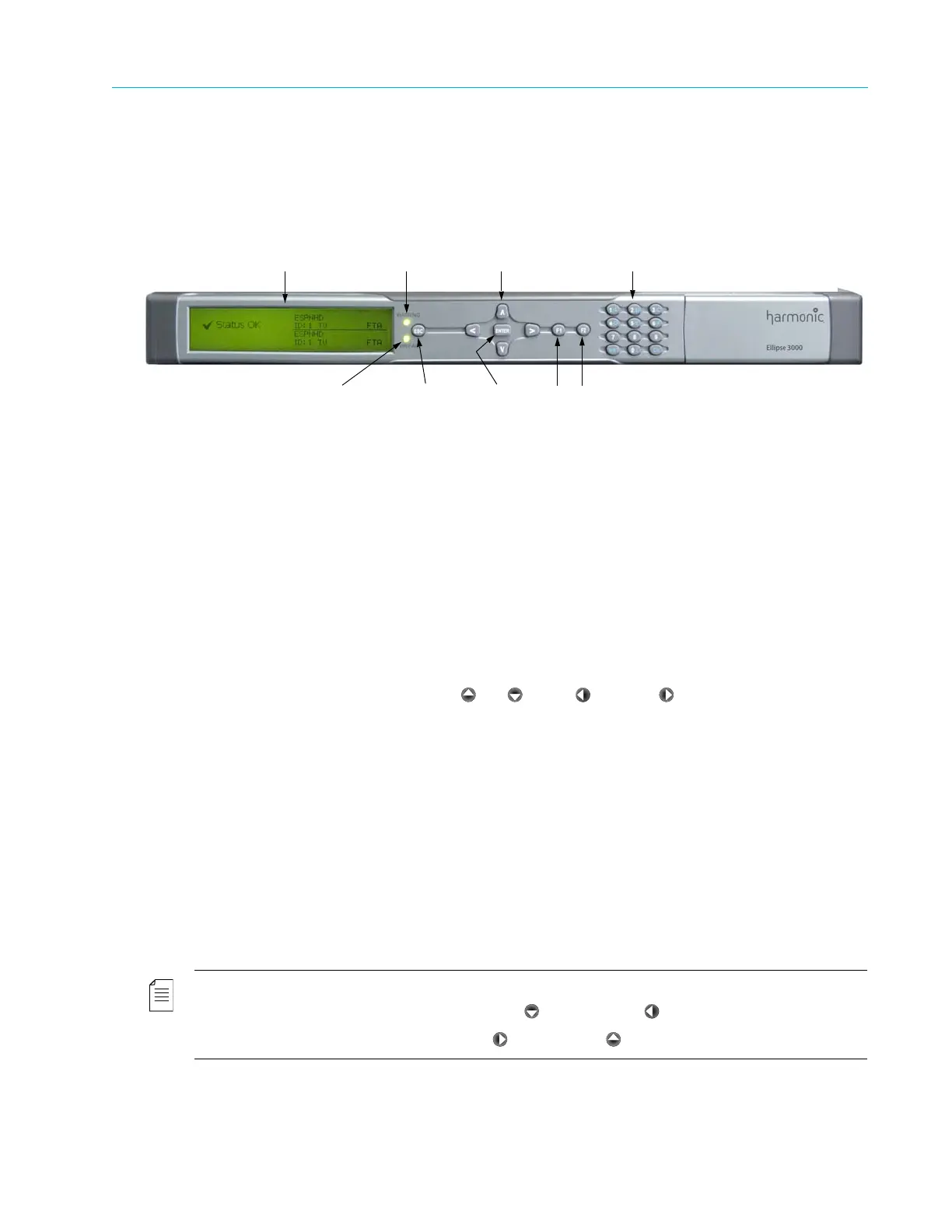
The Ellipse front panel interface allows setting the encoder parameters through the control
elements, indicators, and display, located on the front panel (see Figure 3–1).
Figure 3–1: Ellipse Front Panel
The front panel contains the following display and control elements:
■ LCD (Liquid Crystal Display) – Used for displaying enhanced menus containing various graphical
elements, such as charts, radio buttons, tables, and icons. These elements create easy-to-use
graphical interface.
■ Warning LED –Lit green when the status is OK and lit orange when a warning alarm is raised.
The Warning LED is used as a status LED.
After configuring a parameter, this LED blinks as a reminder to save the changes.
■ Power/fail LED – Lit green when the status is OK and lit red when a critical alarm is raised. The
PWR/Fail LED is used as a status LED.
■ Four-Way Touch Pad – Includes the Up, Down, Left, and Right arrow keys for
navigating between menus, sub-menus, and within menu items. They are also used for
parameter selection and setting parameter values during unit setup and configuration.
■ ENTER button – Uses for selecting menu items and for confirming and setting parameter values
during configuration and setup.
■ ESC button – Uses for exiting a menu or screen, returning one level up. This menu also allows:
exiting an Edit screen, canceling the edit, and returning to the parameter’s menu.
■ Function buttons – Serve as short cut keys. The configured functions are the following:
❑ F1 short cut key (Save/Drop Key) – The F1 key is also referred to as the Save/Drop key. Press
F1 during configuration to save or drop changes to the encoder configuration.
❑ F2 short cut key – Combined with the arrow keys, this key allows configuring DSNG
parameters.
NOTE: The F2 short cut key is currently used only for DSNG units to perform the following:
■ Controlling the DSNG Modulation (Off / F2 + Down or On / F2 + Left ).
■ Controlling the DSNG Carrier (Off / F2 + Right or On / F2 + Up ).
LCD
Warning
LED
Four-way
touch pad
Alphanumeric
touch pad
Power/fail LED <ESC><ENTER> Function
buttons



 To Next Page