2-27
2.11 Language Change
●Use this function to change the language used for screen display.
●Copy the display language from the memory card to IJ printer.
●If customer is using password to restrict the functions for maintenance work, release
the restriction on functions and, after setting this function is finished, reset the
restriction on function.
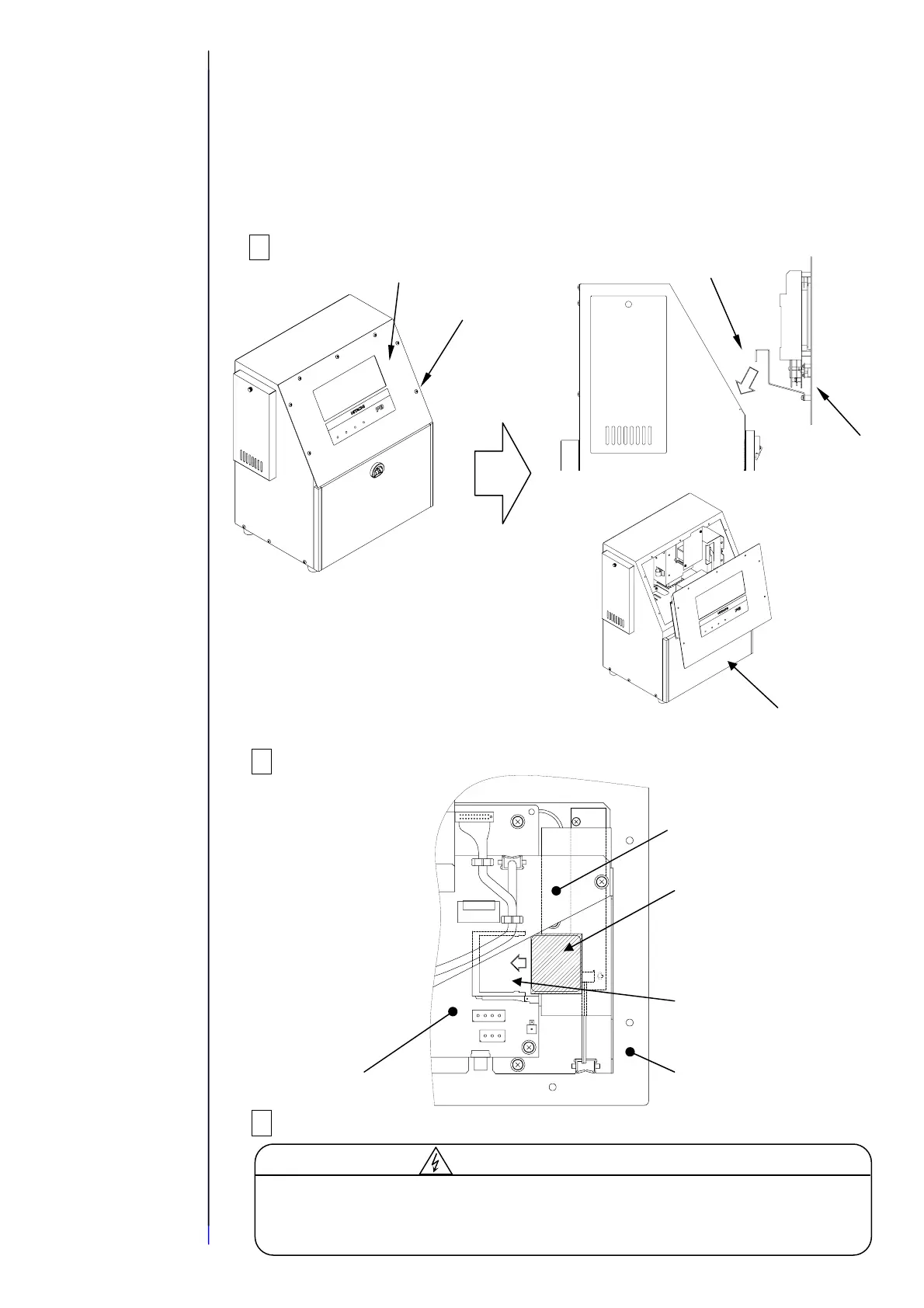
1 Turn power off, remove the operation panel, and then hang it on the unit.
2 Insert the memory card (CF card) into the slot.
3 Turn power on.
CF card
Slot
Inside of operation
panel viewed from
top
Cover
EZJ102 board
Operation
It is necessary to supply power with the operation panel open for this work.
During turning on, take great care of electric shock since a high voltage is
applied to some portions in this printer.
Cautionforelectricshock
Caution:
Be careful that the wire harness does
not get caught on anything.
Do not hang the panel with the
maintenance cover open for a long time
(less than 10 minutes allowed): Leaving
it hanging more than 10 minutes could
deform the packing.
Operation panel
Screw
Hang
Operation panel
Maintenance cover



 To Next Page