Honeywell
2. Change site code settings.
3. Click【OK】to accept changes.
Deleting Site Codes
1. Check all the boxes in front of the site codes to be deleted in the list.
2. Click【Delete】above the list.
3. Click【OK】on the prompt window.
Access Levels
The access level specifies the time zone, or time schedule, during which the card holder
can be granted access at specific doors. For example, an access level embedded in an
employee’s card might allow the employee to enter the facility only through door 2 from
6:00 a.m. to 6:00 p.m., Monday through Friday.
Note Door and Time Zone must be configured before configuring an access level.
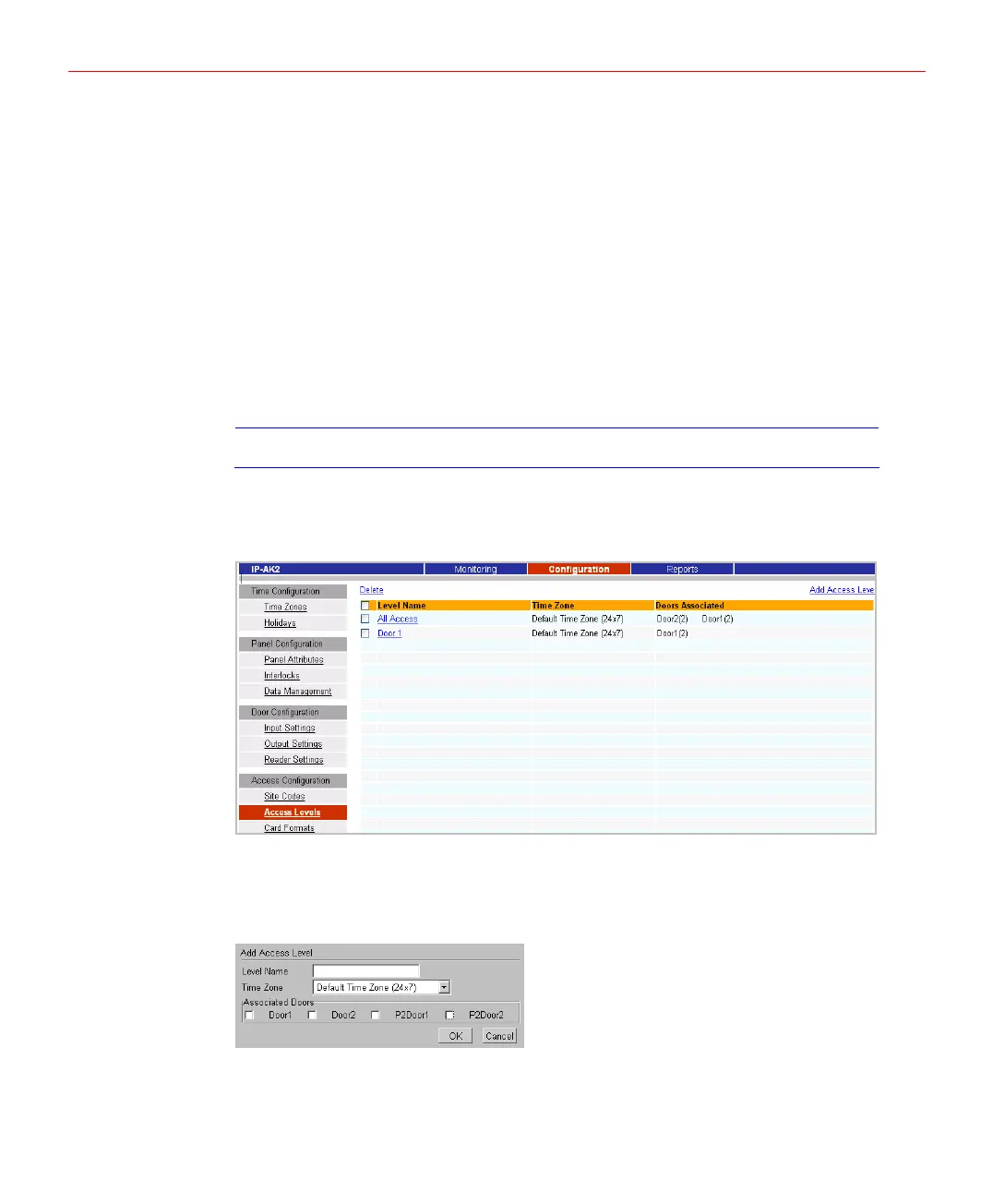
Click Access Levels to display the page below and view existing access levels, create a
new access level, modify an existing access level, or delete access levels.
Figure 5-39 Access Levels Page
Creating Access Level
1. Click【Add Access Level】above the list, the page below will pop up:
Figure 5-40 Add Access Level
2. Configure the parameters as below:
• Level Name: enter the name of the new access level.
35


 To Next Page