134 Google Apps
8.2 Using Gmail/Google Mail
Gmail/Google Mail is Google’s web-based email service. Gmail/Google Mail is
configured when you first set up your phone. Depending on your synchronization
settings, Gmail/Google Mail on your phone is automatically synchronized with
your Gmail/Google Mail account on the web. For more information about
synchronization, see “Synchronizing Google Apps” in this chapter.
To open Gmail/Google Mail
Press HOME, then tap , and then tap Gmail/Google Mail.
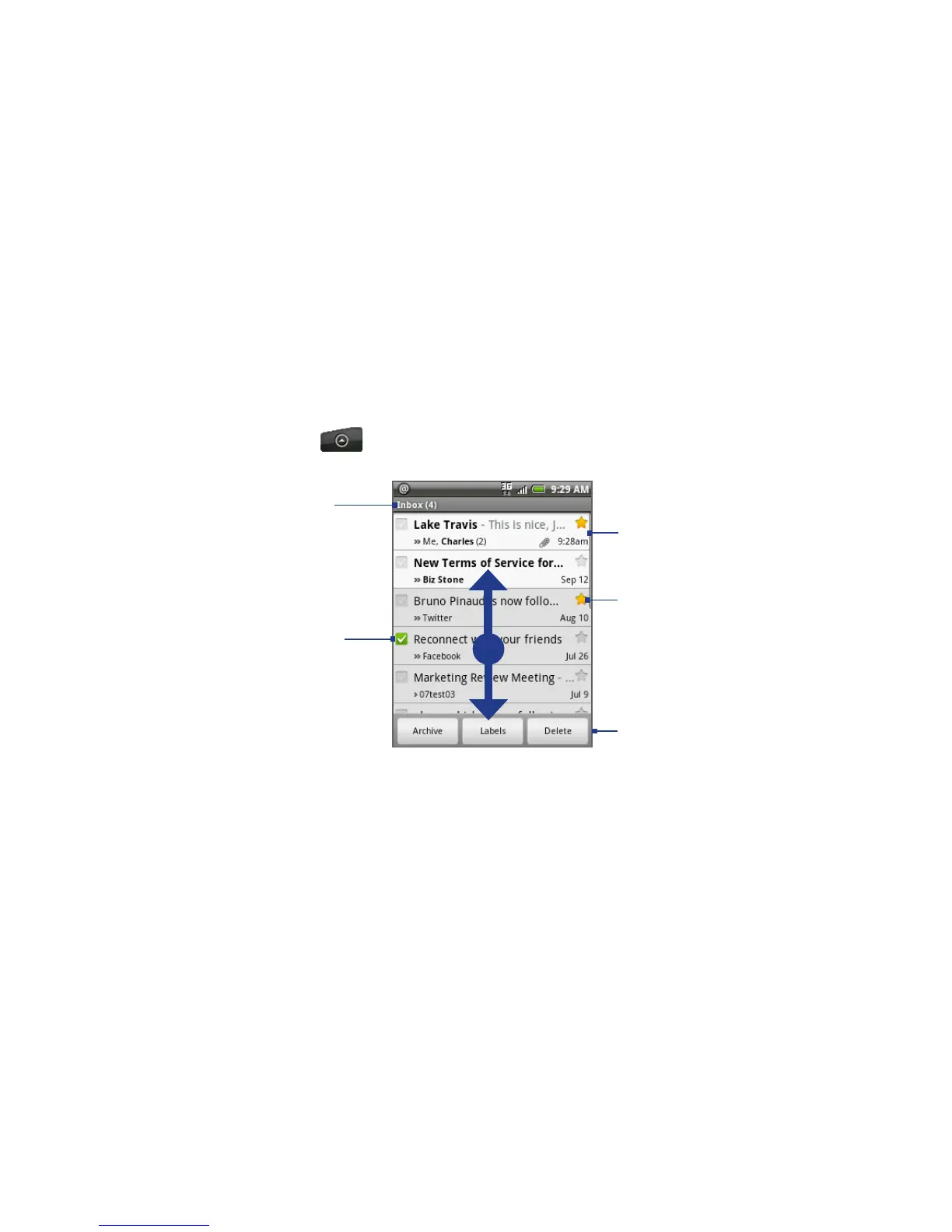
To scroll through the
message list:
Slide your finger up/
down on the screen.
Press the Navigation
Control up/down
buttons.
•
•
Checked email.
Select one or more
emails to apply an action.
Note: Batch operations
needs to be enabled.
Starred message.
Tap to add or
remove the star.
Folder (or Label) and
number of unread
email messages.
Actions for checked
email(s). This will not show
if there is no item selected
in the inbox.
Unread messages are
displayed in bold.
The Inbox conversations list (hereinafter referred to as Inbox) is your default Gmail/
Google Mail view. All your received emails are delivered to your Inbox.
To refresh Gmail/Google Mail
Press MENU and then tap Refresh to send or receive new emails and to synchronize
your emails with your Gmail/Google Mail account on the web.



 To Next Page