194 Managing Your Phone
10.5 Changing the Look of Your Phone
Personalize your phone by replacing its faceplate, bottom cover, and back cover
with new ones that can be purchased in different designs and colors.
Important Always turn off your phone before removing the covers.
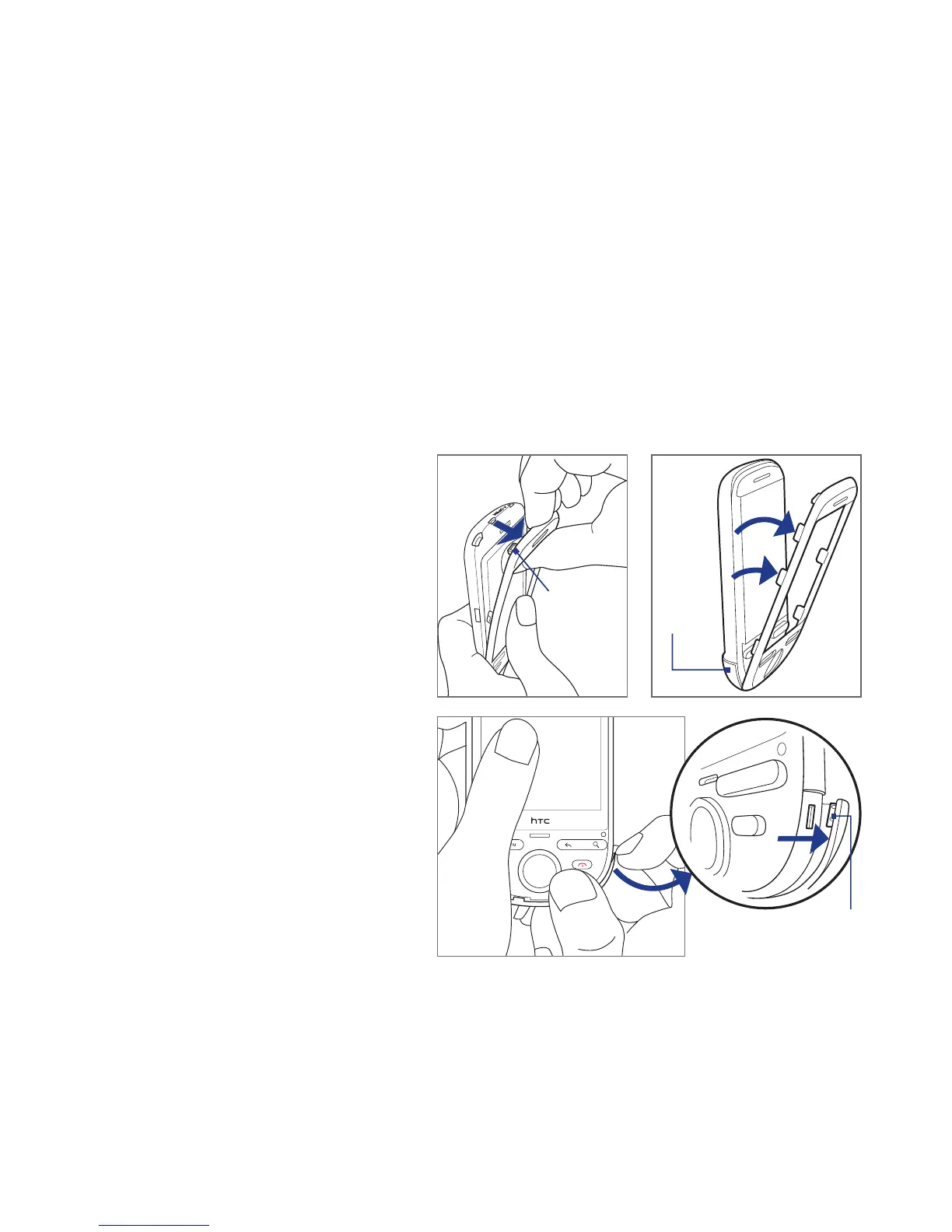
Removing the covers
1. Remove the back cover and battery. For more information, see “Installing the
Battery, SIM Card, and Storage Card” in Chapter 1.
2. With the phone facing you,
lift the faceplate starting
from the top edge until the
top tabs disengage from
the phone.
3. Pull the faceplate until all
its tabs detach from the
phone’s notches.
4. Starting from one side, lift
the edge of the bottom
cover until the tab
disengages from the phone.
5. Pull the bottom cover until
all its tabs detach from the
phone’s notches.
6. Set the old covers aside.
Faceplate
tab
2 3
Bottom
cover
4
Bottom cover tab



 To Next Page