Phone Basics 29
SIM card
The SIM card contains your phone number, service details, and phonebook/
message memory. Your phone supports both 1.8V and 3V SIM cards.
Note Some legacy SIM cards may not function with your phone. You should consult your
wireless service provider for a replacement SIM card. There may be fees for this
service.
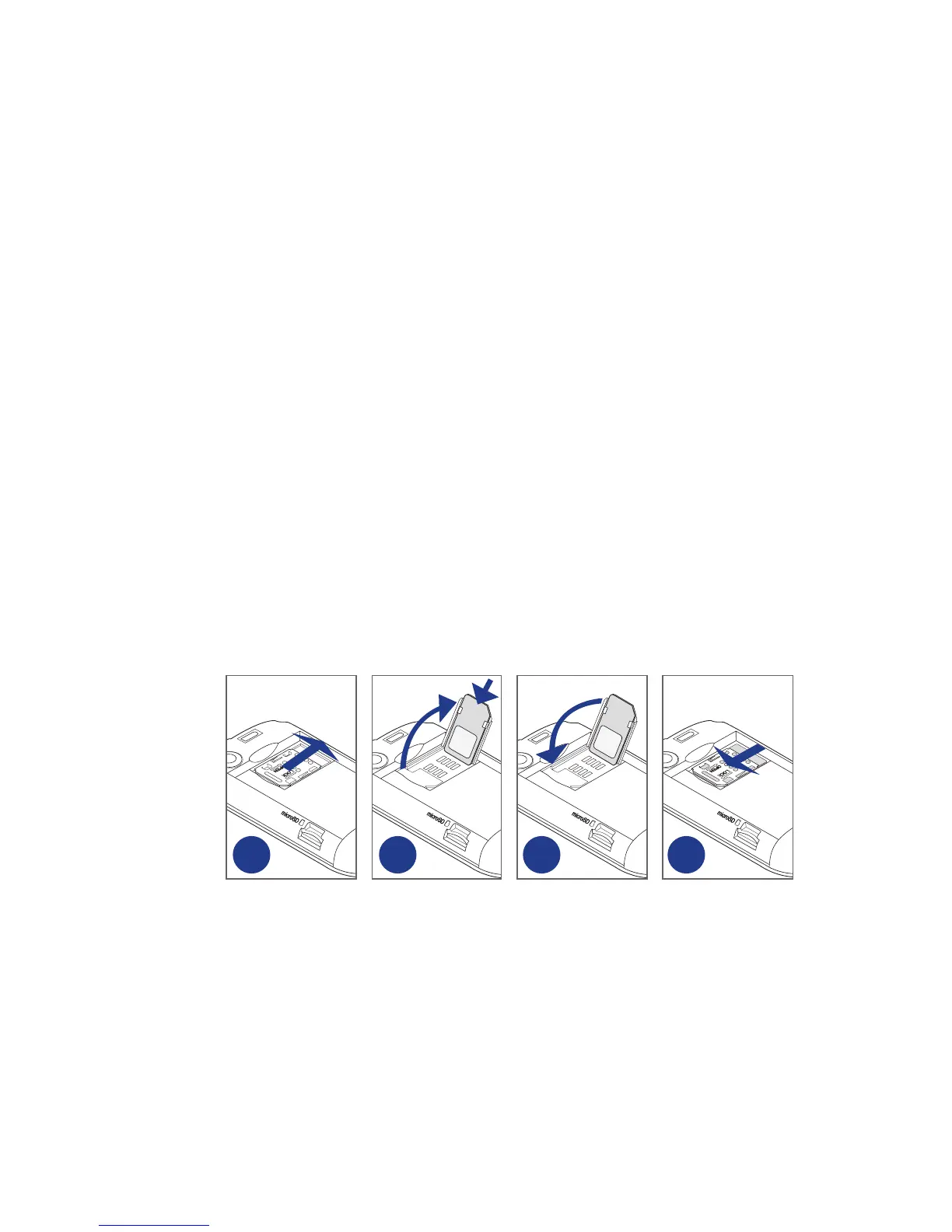
To install the SIM card
Remove the back cover and battery.
Slide the SIM card holder to the right to unlock it.
Flip the SIM card holder, and then insert the SIM card with its gold contacts
facing down and cut-off corner facing out the SIM card holder. Slide the SIM
card completely into the holder.
Replace the SIM card holder
Slide the SIM card holder to the left to lock it.
Replace the battery and back cover.
2 3 4 5
To remove the SIM card
Remove the back cover and the battery, if these are installed.
Slide the SIM card holder to the right to unlock it, and then flip it open.
Pull out the SIM card and replace the SIM card holder.
1.
2.
3.
4.
5.
6.
1.
2.
3.



 To Next Page