Phone Basics 25
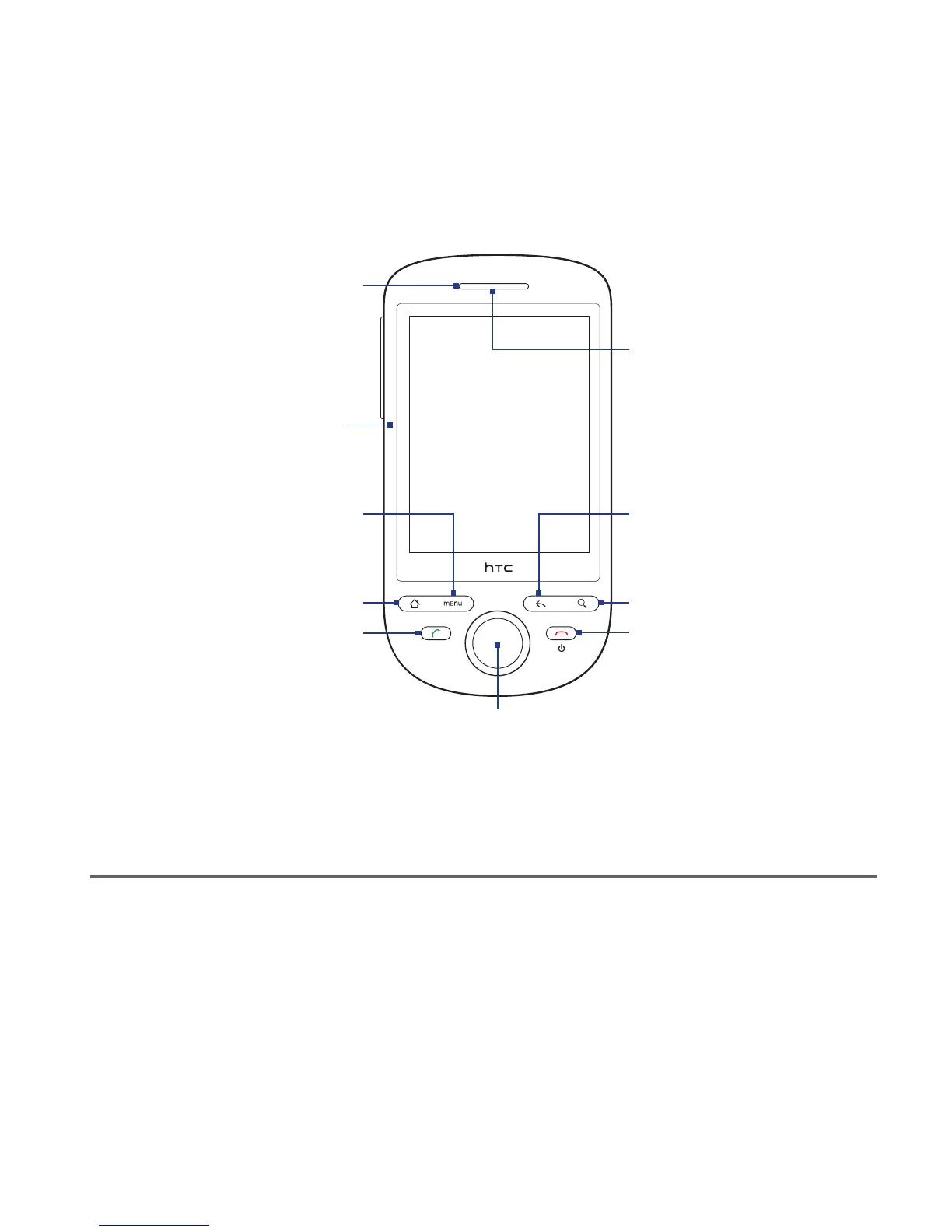
Front panel
Notification LED*
See description below.
Touch Screen
MENU
CALL
END CALL/POWER
Navigation Control and ENTER
HOME
BACK
Earpiece
Listen to a phone
call from here.
SEARCH
Faceplate
See “Changing the
Look of Your Phone”
in Chapter 10.
For more information about the functions of the CALL, HOME, MENU, BACK,
SEARCH and END CALL/POWER buttons, see “Phone Controls” in this chapter. For
more information about the Navigation Control, see “Using the Navigation Control”
in this chapter.
* Notification LED indicators:
Solid green - Battery is fully charged (when the phone is connected to the AC adapter/computer).
Solid amber - Battery is charging.
Flashing amber - Battery is low.
Flashing green - You have a pending notification.
•
•
•
•



 To Next Page