EasyManua.ls Logo

HTC Tattoo - Agenda View; Month View

HTC Tattoo
210 pages
Print Icon
To Next Page IconTo Next Page
To Previous Page IconTo Previous Page
Loading...
166  Other Applications
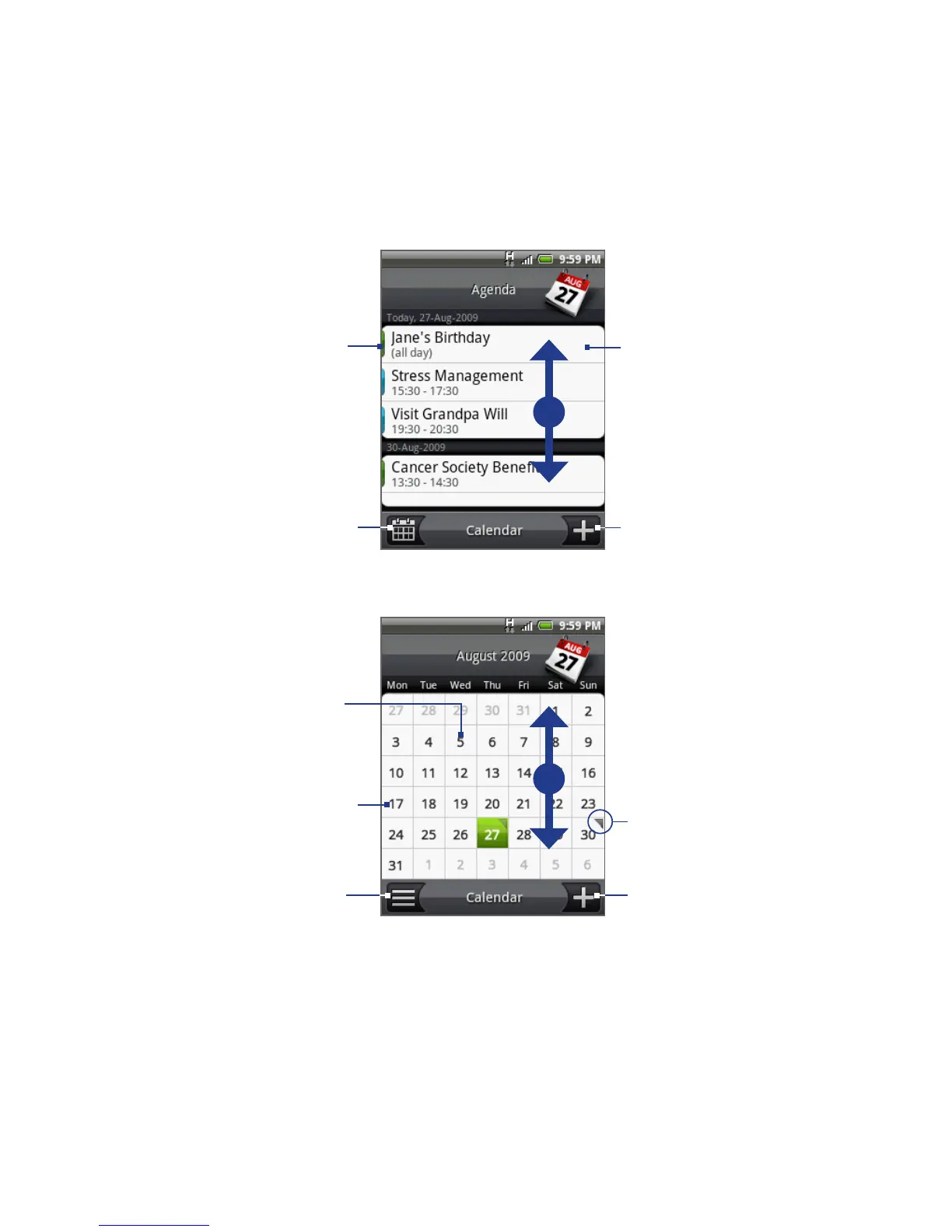
Agenda view
Swipe your finger 
up or down to view 
more events in 
Agenda view
Tap to open 
event details.
Tap to add a 
new event. 
Tap to switch 
to Month view. 
Colored bars 
indicate which 
calendar the event 
was created in. 
Month view
Swipe your finger up 
or down to to go to 
the previous or next 
month.
Tap to add a 
new event. 
Tap to switch to 
Agenda view. 
Indicates there are 
events for that day. 
Tap to view events 
for that day. 
Press and hold a day 
to open a menu and 
quickly create an 
event, show the days 
events, or switch to 
Agenda view.

Table of Contents

Other manuals for HTC Tattoo

Related product manuals