Exchanging Messages 83
Multimedia messages, also known as MMS, can contain text and a picture, a
recorded voice, an audio or video file, a picture slideshow, contact card (vCard), or
appointment (vCalendar).
Note The Messages application automatically converts a text message into a multimedia
message when you entered an email address in the To field, added a message subject,
or attached an item.
To create and send a text message
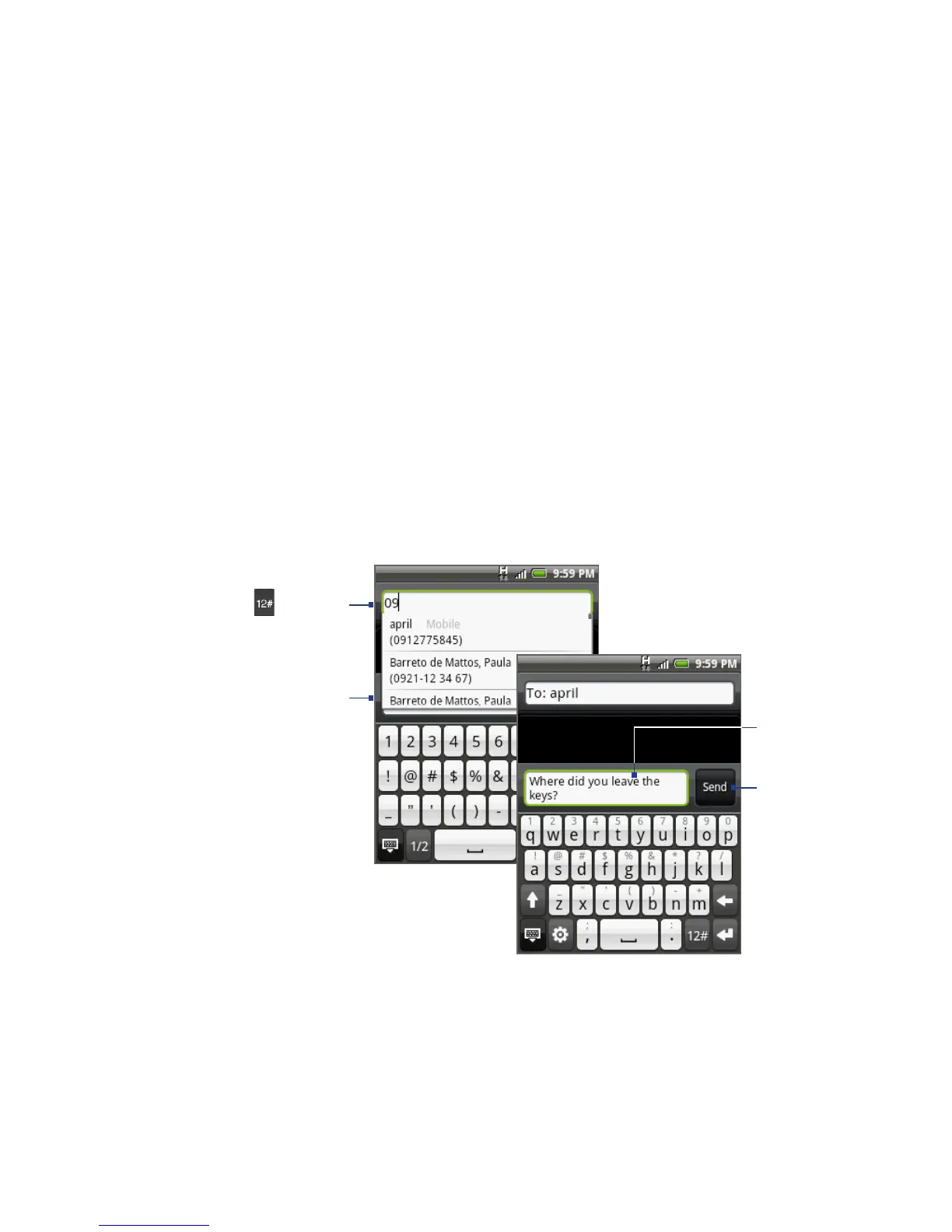
1. On the All messages screen, tap Compose message. The Compose screen opens.
2. In the To field, enter the recipient’s mobile phone number. You can also enter
the first few letters of the recipient’s name to display a matching list of names
from your stored contacts, and then tap a recipient to automatically fill in the
person’s phone number.
Enter a name to look up a
contact or tap
to enter
a phone number.
Tap to automatically enter
the mobile phone number
of the matched contact.
Note The phone number
only appears if the
number was filed
under Mobile in
Contacts.
Enter your text
message here.
Tap to send
the message.
3. Tap the text box with the “Tap to compose” label, and then start composing
your message.



 To Next Page