7
OTHER FUNCTIONS
7-23
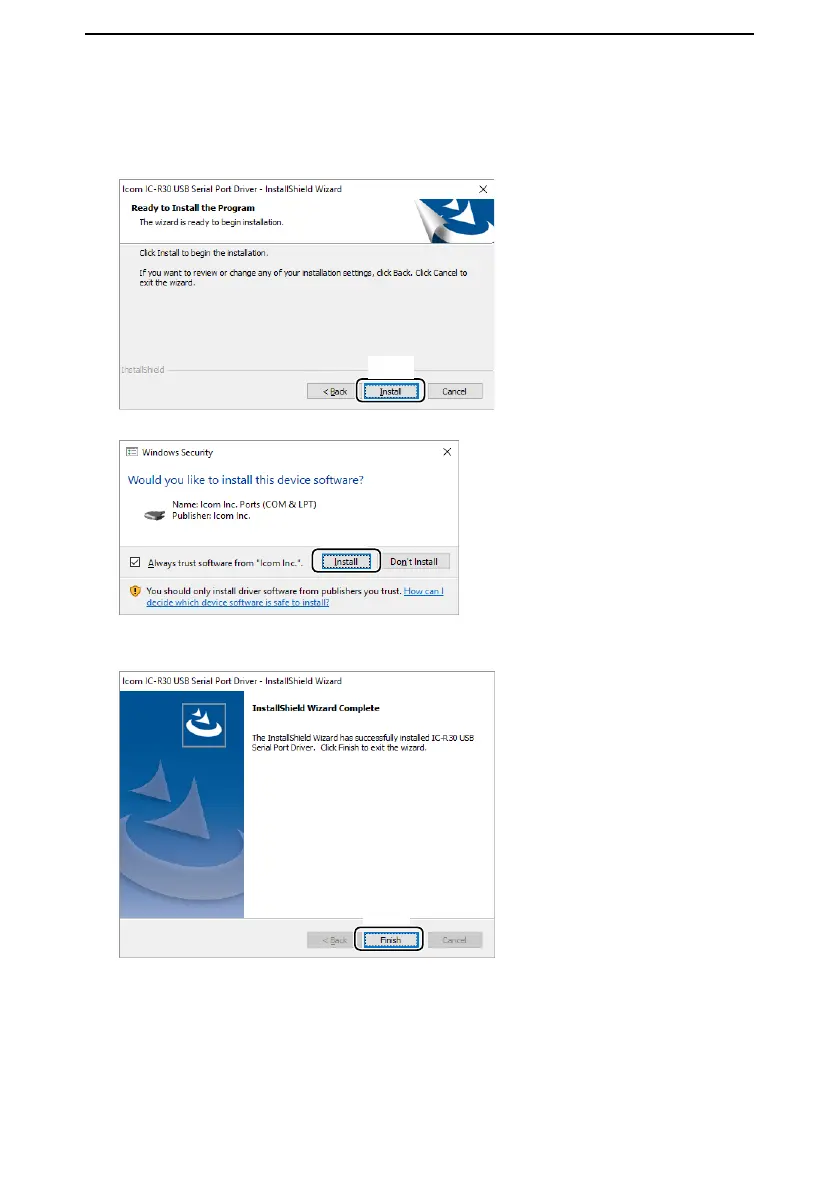
5. When the “Ready to Install the Program” dialog is displayed, click <Install>.
Click
6. If the “Windows Security” dialog is displayed, click <Install>.
Click
• Windows starts installing the driver.
7. After the installation has completed, click <Finish>.
Click
8. Connect the USB cable between the IC-R30* and the PC. Then, turn ON the radio’s
power.
* Confirm that the IC-R30’s “USB Connect” is set to “Serialport” on the Menu screen.
([MENU] > Function > USB Connect)
L Depending on your system version and settings, you may be prompted to restart the PC. In
this case, follow the instructions on the screen.
■ USB driver installation
D Installation (Continued)



 To Next Page