2
microSD Card
2-2
■ About data saved on a microSD card
• Receiver data
Memory channel contents, receiver settings, and so on.
• Recorded audio
Recorded received audio data.
• Receive history
Receive history log (Digital signal).
• Position data from the GPS receiver
Position data from the internal GPS receiver.
■ Saving data onto the microSD card
Memory channels and item settings on the menu screen can be saved on a microSD card.
Saving data on the microSD card enables you to easily restore the receiver to its
previous conguration, even if an All reset is performed.
L Data can be saved as a new le or overwritten to an older le.
Saving as a new le
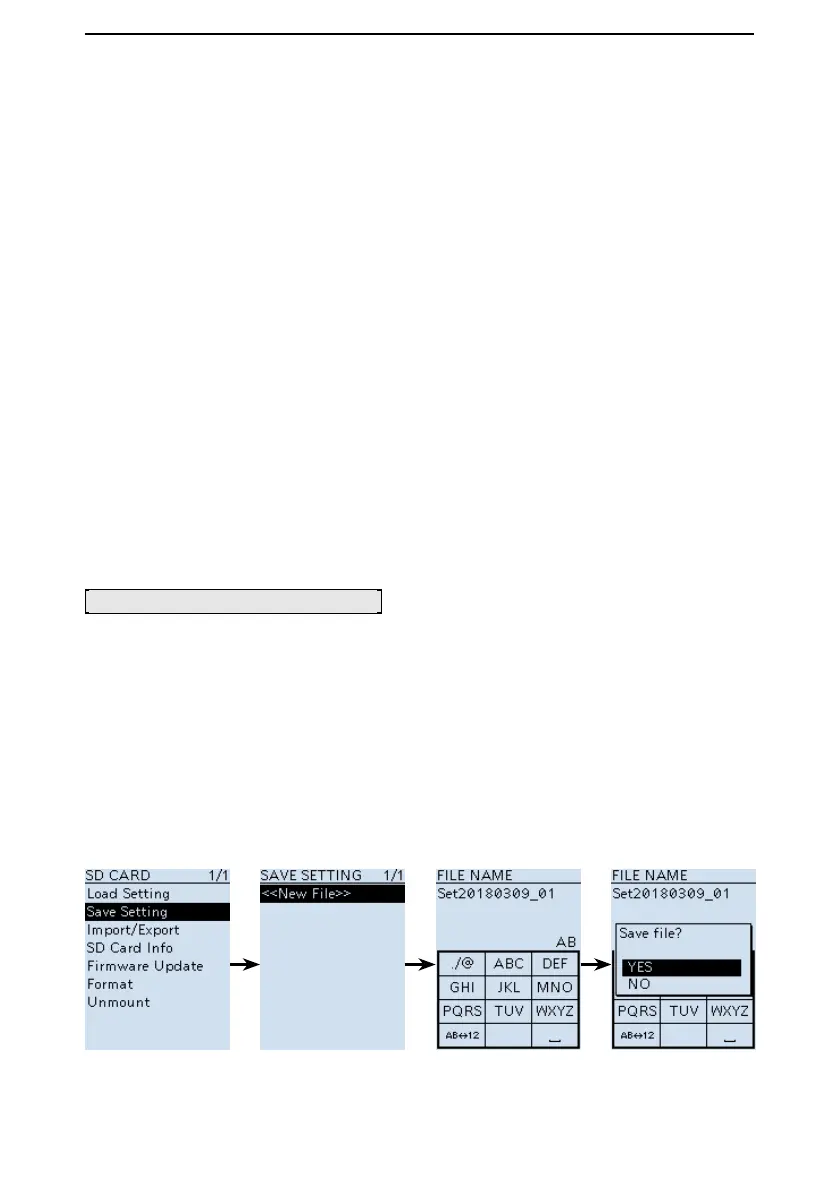
[MENU] > SD Card > Save Setting
1. Push [MENU].
2. Select “Save Setting” in the “SD Card” menu.
(Rotate [DIAL] to select it, then push [ENTER].)
3. Select “<<New File>>.”
L The le name is automatically named in the following manner: Setyyyymmdd_xx
(yyyy: Year, mm: month, dd: day, xx: serial number).
L If you want to change the file name, see page 2-3 for entry details.
4. Push [ENTER].
• A conrmation dialog is displayed.
5. Select “YES,” and then push [ENTER].
L Push [CLEAR] to return to the Main screen.


 To Next Page