Manual Page 61
B.6.6.1 Transaction modes
Two transaction modes are available for the mail transfer. See chapter C.3.7.1, section
Transaction mode, for detailed information.
The mode, selected in the Scan2Net user interface, influences the process when a
scanned image should be mailed.
Automatic When pressing the button Mail image via SMTP at the touchscreen, the
image will be sent to the address defined in the screen Mail Options
(Picture 59). While sending the image via mail the rotating circle is
displayed.
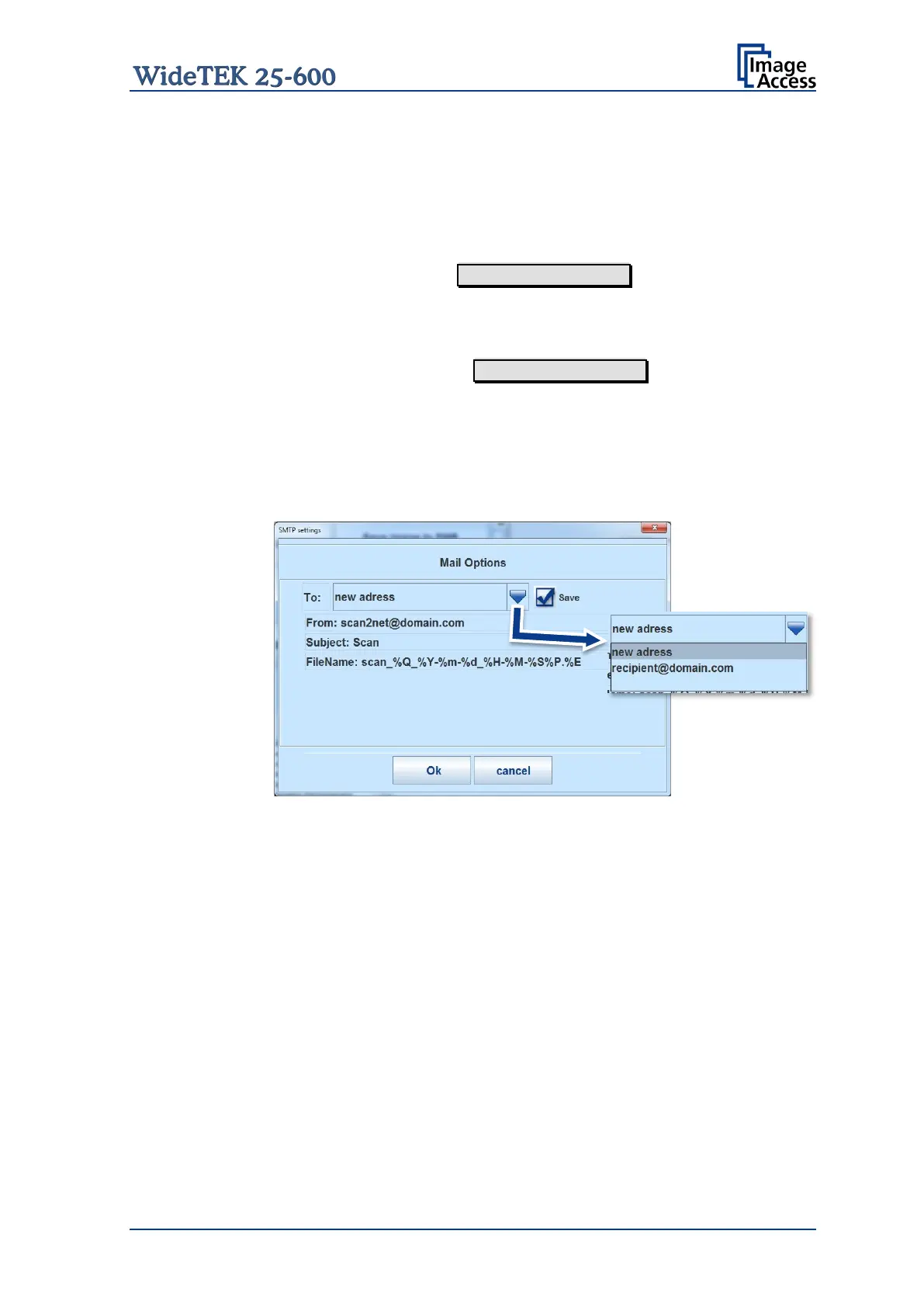
Interactive When pressing the button Mail image via SMTP at the touchscreen,
another window opens in the touchscreen.
It is titled Mail Options and allows entering another address for the
recipient or selecting an address from the list.
To enter another address, click in the topmost line.
Press the selection arrow to open the list of stored addresses.
Picture 60: Interactive mode, mail options
All entered addresses will be saved in a list when Save is selected with
the checkbox. Click at the selection arrow to see the list.
Using the transaction mode Interactive is recommended when transferring image to often
changing addresses.
B.6.6.1.1 Deleting the address list
The stored addresses can only be deleted from the Scan2Net interface.
Chapter C.3.7.2 describes how the address list can be deleted.








 To Next Page