- 5
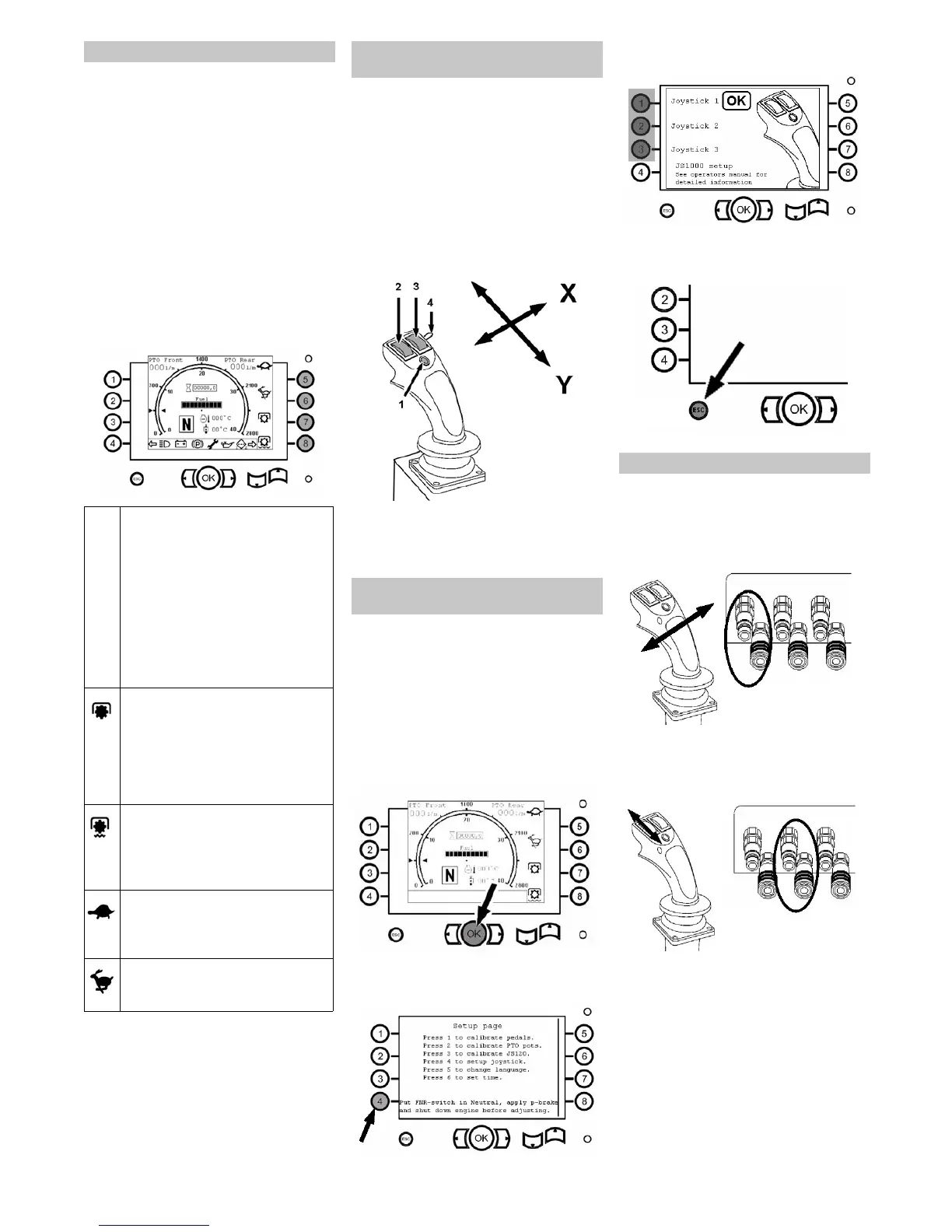
The machine has 5 different operating
ranges:
STARTING RANGE AUX:
WORK RANGE 1:
WORK RANGE 2:
TRANSPORT MODE SLOW:
TRANSPORT MODE FAST:
The machine is always in the AUX range
when it is started until a different range is
selected. It is not possible to return to the
starting range after a work range or a trans-
port range has been selected.
You can return to the start position by
switching off the ignition and restarting the
machine.
The work range is selected via the but-
tons 5 to 8.
There are 3 programmes for the functions
of the multi-function lever; this allows the
machine to be fitted for different attach-
ments.
All attachments, front and rear, are con-
trolled via the multi-function lever.
The joystick can be moved into the X and
the Y direction.
There are two rolling switches and one
function button. You can switch between
the functions by holding down this button
1 Function button
2 Left rolling switch
3 Right rolling switch
4 Blinker switch
Note: If the machine is shut off and restart-
ed, the most recently set programme will
remain stored.
1 Ensure that the attachment is connect-
ed properly.
2 Start the machine, see "Starting the
motor".
3 Wait until the display is populated with
information and then press the OK but-
ton.
4 Now, the display shows <Setup page>.
Press button no. 4.
5 Select the desired programme via but-
tons 1 to 3.
6 Press the ESC key during navigation to
return to the previous menu.
Operation of a snow shield, for example.
Move the joystick into X direction.
For float position: Press and hold the
button, move the joystick to the right
and then back into the 0 position.
Control of front hydraulic connection 3
Use the left rolling switch.
Note: Float position not possible in this
function.
Control of front hydraulic connection 2
Press and hold the button, move the
joystick into Y direction.
For float position: Press and hold the
button, move the joystick to the front
and then back into the 0 position.
Work ranges
STARTING RANGE AUX:
When the machine is started up, it is
in the STARTING RANGE AUX.
The drive pedal is without function
until a work or transport range is se-
lected.
AUX is selected to work with attach-
ments that are used while the ma-
chine is standing still to prevent the
machine from suddenly moving in-
advertently.
WORK RANGE 1:
For hydraulic attachment. The max.
speed represents the set motor
speed.
Important! The speed is then regu-
lated electronically via the drive
pedal.
WORK RANGE 2:
Working position with load sensing.
When the load on the attachment
fluctuates, the working speed is reg-
ulated electronically.
TRANSPORT MODE SLOW:
The drive speed is regulated via the
drive pedal. Max. speed approx. 20
km/h.
TRANSPORT MODE FAST:
The drive speed is regulated via the
drive pedal; max. 40 km/h.
Function of the multi-function lever
(joystick)
Selecting programmes on the
display
Description - programme 1
23EN


 To Next Page
 Loading...