12
Unite
®
Panel System - Panel Frame Assembly
Assembly Instructions
Assemble units as described herein only. To do otherwise
may result in instability. All screws, nuts and bolts must be
tightened securely and must be checked periodically after
assembly. Failure to assemble properly, or to secure parts
may result in assembly failure and personal injury.
31
/ -16 x 1 /
bolt
84
”
washer
connector
block
frame
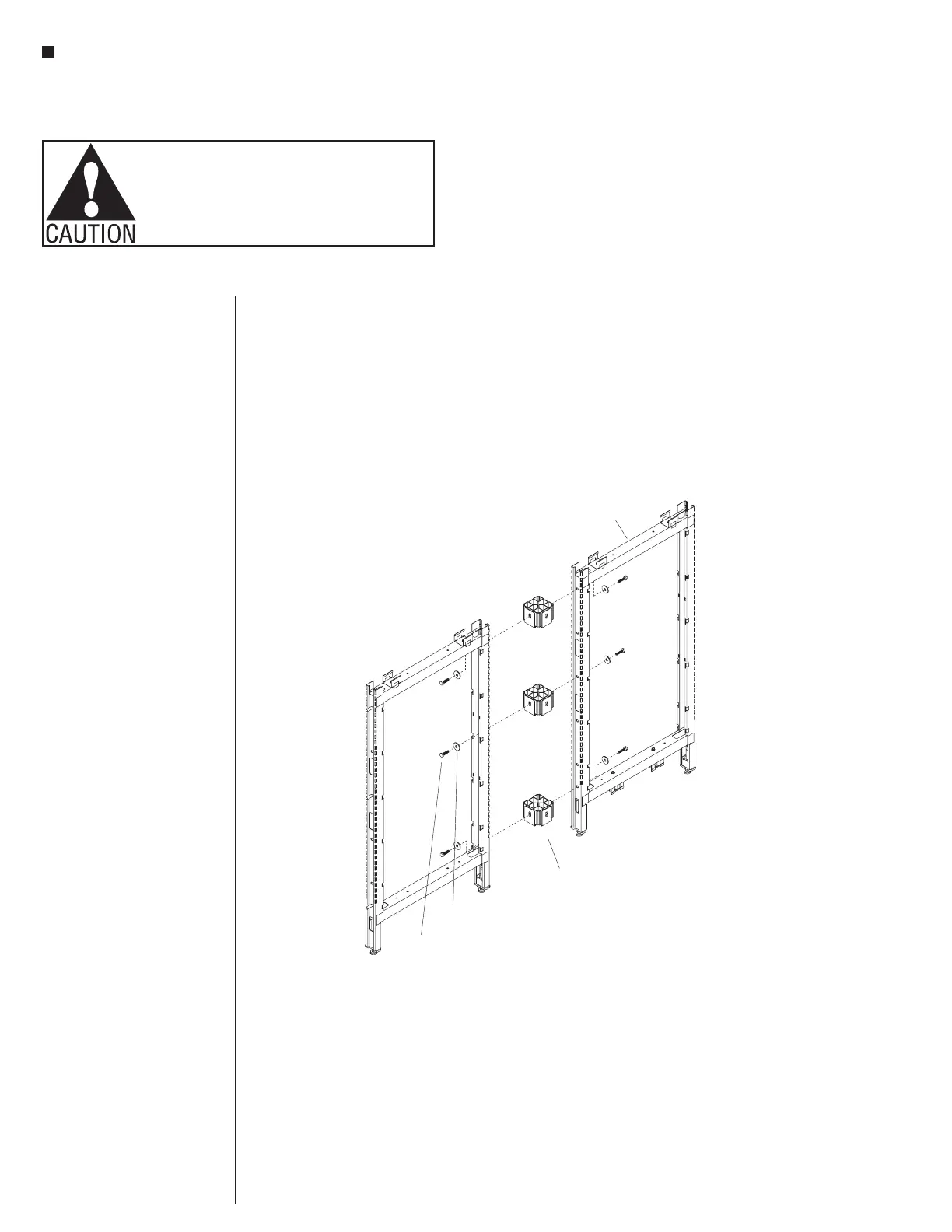
Figure 13 -2-Way 180 Panel Frames - In-Line Connection
°,
180° Panel Frames - In-Line
Connection Assembly
Note: The space-planning
layout may specify an in-line
panel frame connection. In this
intersection condition, light
shields are not required.
1. Loosely attach connector blocks
to one vertical panel frame (to
the shortest panel frame first, if
frames are of different height)
using one
3
/
8
-16 x 1
1
/
4
” hex
head bolt and large flat washer
per connector block. Attach one
connector block to the lowest
mounting hole in the frame, one
block at the highest, and the third
connector block approximately
30” from the floor, near beltway
height. If the panel frame is only
32” high, use only two connector
blocks, one at the top and one at
the bottom (See Panel Connector
Block Charts, page 5).
Note: Each frame at an
intersection must have a
connector block in the top-most
bolt hole unless there is no
adjacent connection due to a
height-change condition.
3. Align the second panel frame to
the panel frame with installed
connector blocks, and attach
using
3
/
8
-16 x 1
1
/
4
” hex head bolt
and large flat washer through the
panel frame and into the panel
connector blocks of the first
frame. Hand-tighten hardware at
this time (Figure 13).
4. Tighten all hex bolts attaching
the frames, then level the frames,
twisting the height-adjustable
glides in or out (Figure 13).



 To Next Page