Unite
®
Panel System - Electrical Installation
Assembly Instructions
Assemble units as described herein only. To do otherwise
may result in instability. All screws, nuts and bolts must be
tightened securely and must be checked periodically after
assembly. Failure to assemble properly, or to secure parts
may result in assembly failure and personal injury.
33
11
/ -20 x 2 /
thread-forming
screw
44
”
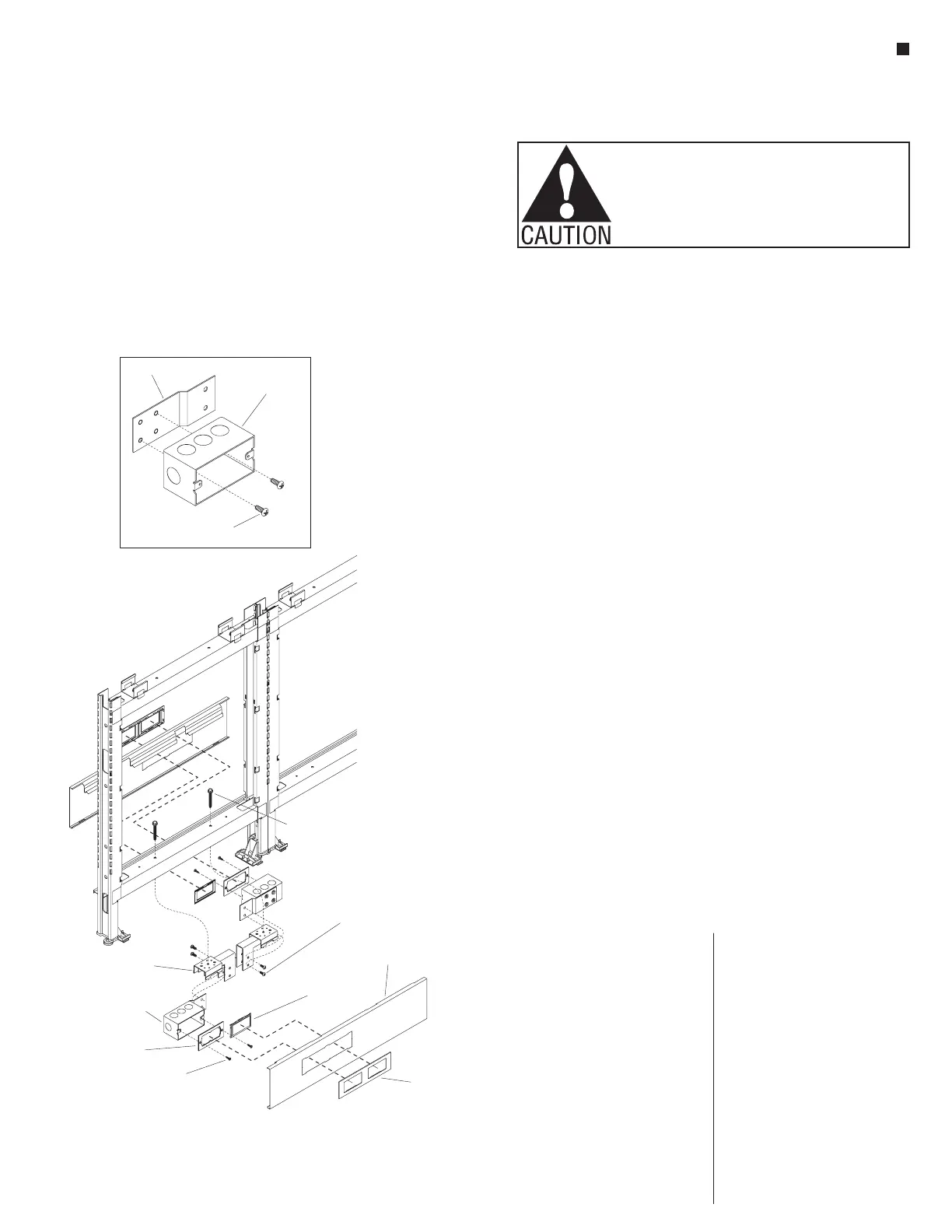
Figure 19-Chicago Hardwired Base Power Infeed - 24”&30” Panel
Detail L
receptacle box &
Chicago mounting
bracket
Chicago base
raceway cover
data filler
plate
Z-bracket
receptacle
box
Chicago
bezel plate
Chicago
filler plate
filter
plate screw
15
/ -20 x 2 /
Phillips thread-forming
screw (46.0195)
4
16
”
15
/ -20 x 2 /
Phillips thread-forming
screw (46.0195)
416
”
Chicago Hardwired Base Power
Infeed Installation - 24” & 30”
Panel Width
Important: All panel frames
must be mechanically connected
together, with all rigid wireways
and panel-to-panel power
connections appropriately
installed before adding power
infeed, or connecting infeed to
power source.
Note: The Chicago Hardwired
steel receptacle boxes may mount
to open at both sides of the frame
base, but the boxes are staggered
to not be back-to-back. Frames of
24” or 30” wide can accommodate
only one receptacle box per side,
while 36” through 72” wide frames
can accommodate two receptacle
boxes per side.
Chicago Hardwired - 24” & 30”
Panel Width
1. Position a Z-bracket to the back of
a steel receptacle box, and attach
bracket to box using two
1
/
4
-20 x
5
/
16
” Phillips
thread-forming screws (46.0195)
as illustrated (Detail L). Assemble
all remaining panel boxes and
Z-brackets together at this time.
The receptacle box & Z-bracket
assemblies are non-handed, so
can be used on either side of the
frame.
2. Using two
1
/
4
-20 x
5
/
16
” Phillips
thread-forming screws, attach
a Chicago mounting bracket to
each receptacle box & Z-bracket
assembly as illustrated. Orient the
parts for assembly such that the
screw goes through the Chicago
bracket and threads into the
Z-bracket (Figure 19).
3. If the lower panel frame rail has
two brackets mounted under
it, remove the
1
/
4
-20 x 2
1
/
4
”
thread-forming screws (46.0195)
securing them. Discard the
brackets but retain the
thread-forming screws. Orient the
Chicago mounting brackets (with
receptacle & Z-bracket attached)
under the holes in the lower panel
frame rail and secure the Chicago
mounting brackets to the frame
rail using a
1
/
4
-20 x 2
1
/
4
”
thread-forming screw (Figure 19).
Note: The power infeeds are to be
connected to the power source by
a qualified electrician who must
follow all state and local codes
at the building site and check the
electrical integrity of the finished
system.
4. Install conduit, wiring and
receptacles per Chicago Electrical
Codes.
5. Place a Chicago filler plate over
the receptacle box as illustrated
and secure with two filler plate
screws (Figure 19).
6. Install Chicago base raceway
covers in the same manner as
standard Unite. Chicago base
raceway covers are different
than standard as the cut-outs
are in unique locations for this
application (Figure 19).
7. Snap the Chicago bezel plate into
the Chicago base raceway cover.
Chicago bezel plates are different
than standard as they have the
1
/
2
”
deep snap tabs removed. Snap the
data filler plates into the Chicago
bezel plates if no data cables are
used at that location. The data port
accepts modular furniture data
port covers or data jacks
(Figure 19).



 To Next Page