Unite
®
Panel System - Trim Installation
Assembly Instructions
Assemble units as described herein only. To do otherwise
may result in instability. All screws, nuts and bolts must be
tightened securely and must be checked periodically after
assembly. Failure to assemble properly, or to secure parts
may result in assembly failure and personal injury.
61
Note: Vertical height change
“snap-on” trim (120° end-of-run
change-of-height trim) is
installed different than “hang-on”
intersection/end-of-run trim.
Change-of-height trim snaps
onto “end-of-run trim clips” and
has a specific top and bottom,
so requires correct orientation to
attach properly.
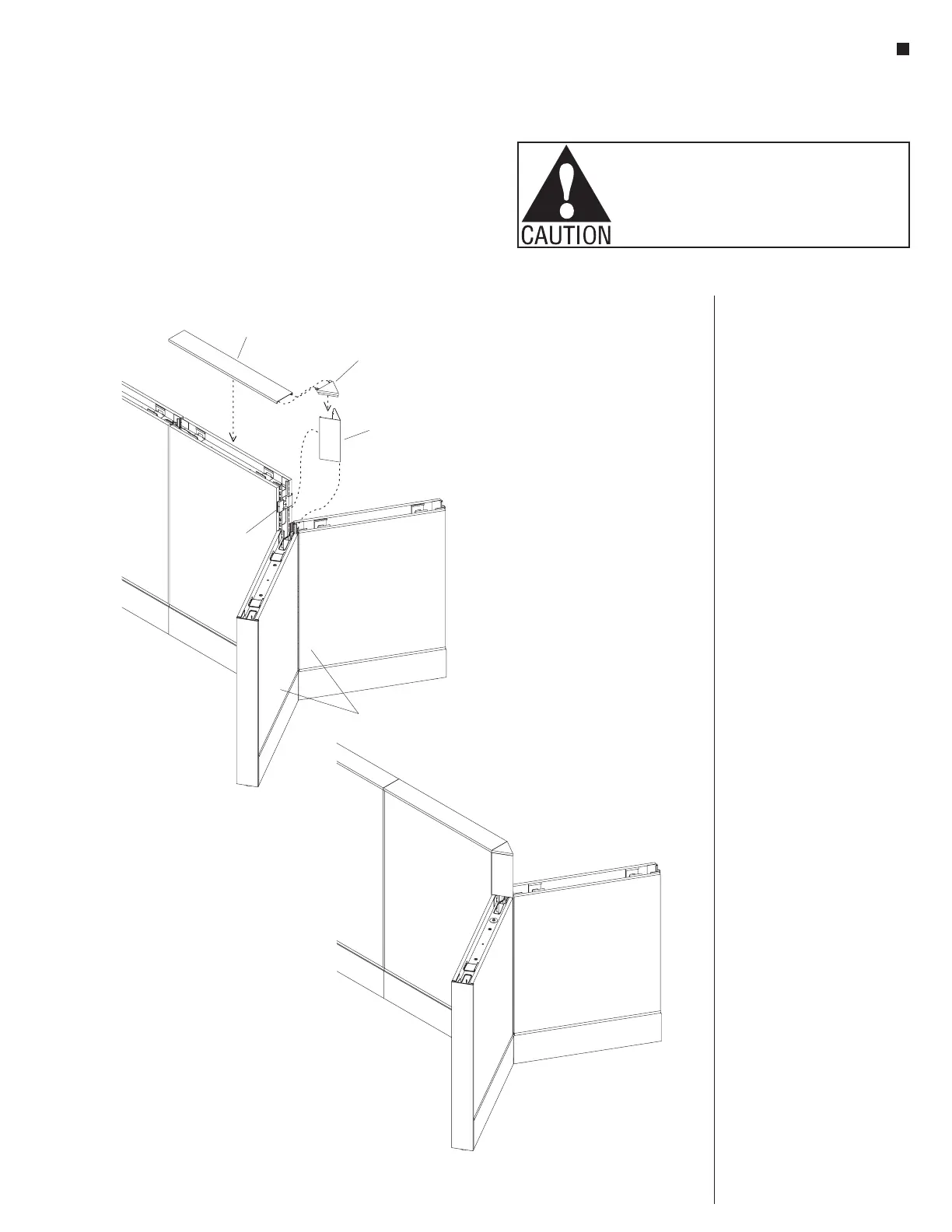
1. Orient the “120° end-of-run
change-of-height trim” with the
top up, so it aligns properly with
the installed end-of-run trim
clip. Correctly positioned, the
longer tabs of the trim will be to
the top, and the smaller tabs with
paint-hanging hole will be at the
bottom. The bottom of the upper
tabs will rest on the top edge of
the end-of-run trim clip
(Figure 9).
3. Hook one side of the 120°
end-of-run change-of-height trim
onto the end-of-run trim clip.
Rotate the hooked trim towards
the un-clipped side, up against
the trim clip and snap the trim
into place by striking at the side
opposite the lose side, toward the
loose side with a rubber mallet
or the palm of your hand. Ensure
that the clip(s) are fully engaged
to prevent trim from falling off
(Figure 9).
4. Finally, orient the “dead end
intersection cap” as illustrated
and insert the tabs of the cap into
the narrow slots in the top cap.
Mate the dead-end intersection
cap into the top of the end-of-run
change-of-height trim and snap
the top cap into place at the top of
the panel frame (Figure 9).
top cap
end-of-run
trim clip
120° dead end
intersection cap
end-of-run
change-of-height
trim
120°
120°
change-of-height
panels
9-End-of-Run 120 Change-of-Height Vertical Trim



 To Next Page