7.56 Replacing injector
NOTE
• When you
register the injector ID to engine
ECU, you have to stop the engine, then place
the key switch in the ON position.
Tools required
• Laptop computer (Diagmaster (software) installed)
• Interface (DST-i)
Removing injector
1. Remove the injector
.
Installing injector
1. Install the injector.
Injector compensation
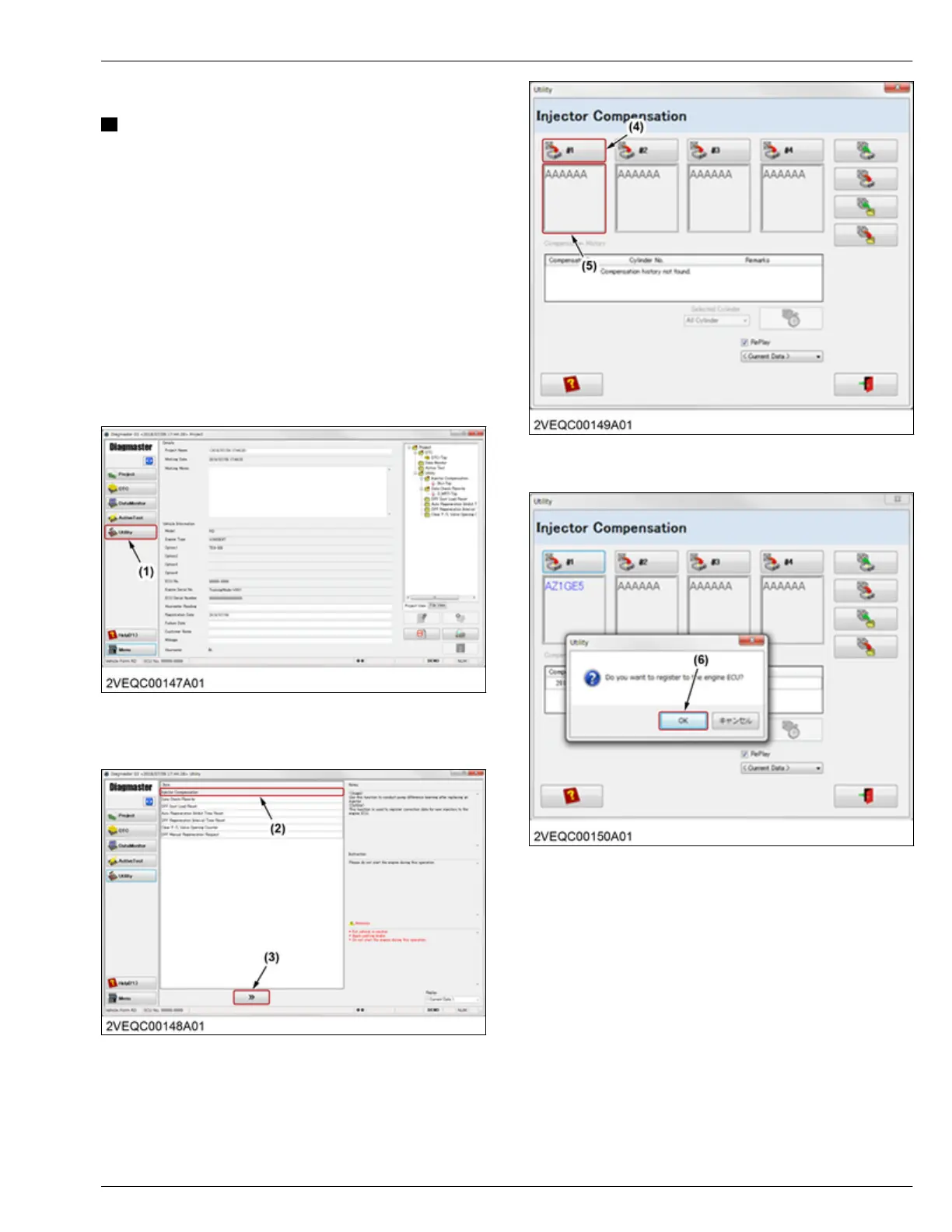
1. Start "Diagmaster", then click the [Utility] button (1)
from the project window.
(1) Utility button
2. Select
the "Injector Compensation" item (2), then
click the
[proceed] button (3).
(2) Injector Compensation item (3) Proceed button
3. Enter
the injector compensation value to the initial
display (5), then click the
[Register] button (4).
(4) Register button (5) Initial display
4. Click the [OK] button (6) if rewriting is OK.
(6) OK button
5. Click the [OK]
button (7) when rewriting is correctly
completed.
SERVICING
7. Servicing 4. ENGINE
D1803-CR-E4,D1803-CR-TE4,D1803-CR-TIE4,V2403-CR-E4,V2403-CR-TE4,V2403-CR-TE4BG,V2403-CR-TIE4




 To Next Page