RELATED PAGE
5.15 Removing injector on page 4-122
6.30 Installing injector
on page
4-151
7.57 Replacing engine ECU
Tools required
• Laptop computer (Diagmaster (software) installed)
•
Interface (DST-i)
Download DPK file (from K-iSS)
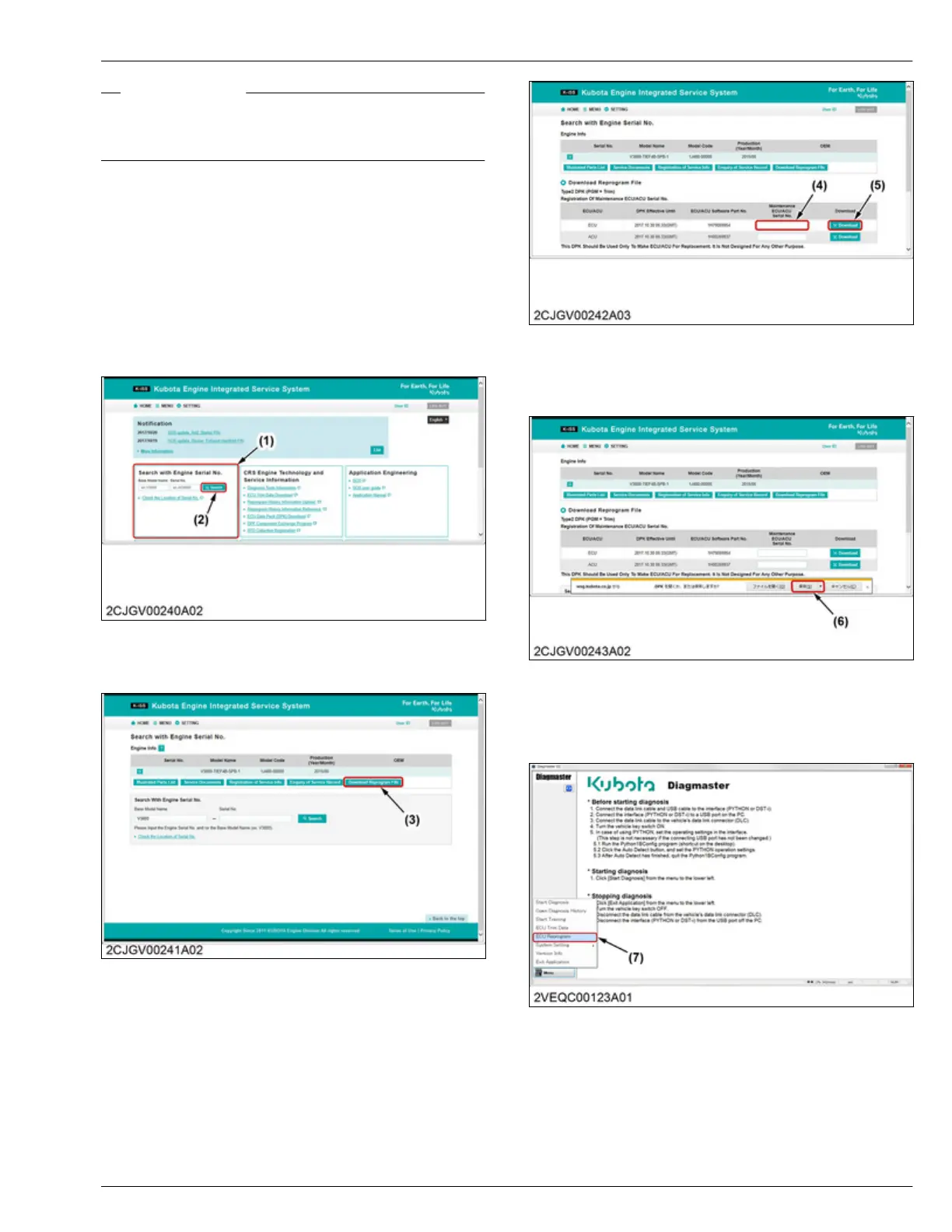
1. Enter the base model name and serial number to
the "Search with Engine Serial No." window (1),
then click the [Search] button (2).
(1) Search with Engine Serial
No. window
(2) Search button
2. Click the [Download Reprogram File]
button (3).
(3) Download Reprogram File
button
3. Enter
the service engine ECU serial number (4),
then click the
[Download] button (5).
(4) Service engine ECU serial
number
(5) Download button
4. Click the [Save] button (6), then download the DPK
file.
(6) Save button
ECU reprogram
1. Start
"Diagmaster"
and click the [ECU Reprogram]
button (7) from the default window.
(7) ECU Reprogram button
2. Select
the download file (DPK file), then click the
[browse]
button (8).
SERVICING
7. Servicing 4. ENGINE
D1803-CR-E4,D1803-CR-TE4,D1803-CR-TIE4,V2403-CR-E4,V2403-CR-TE4,V2403-CR-TE4BG,V2403-CR-TIE4




 To Next Page