User Guide
Leviton D4200 LCD Ver 2.0 Architectural Lighting Controller Page 58 of 80
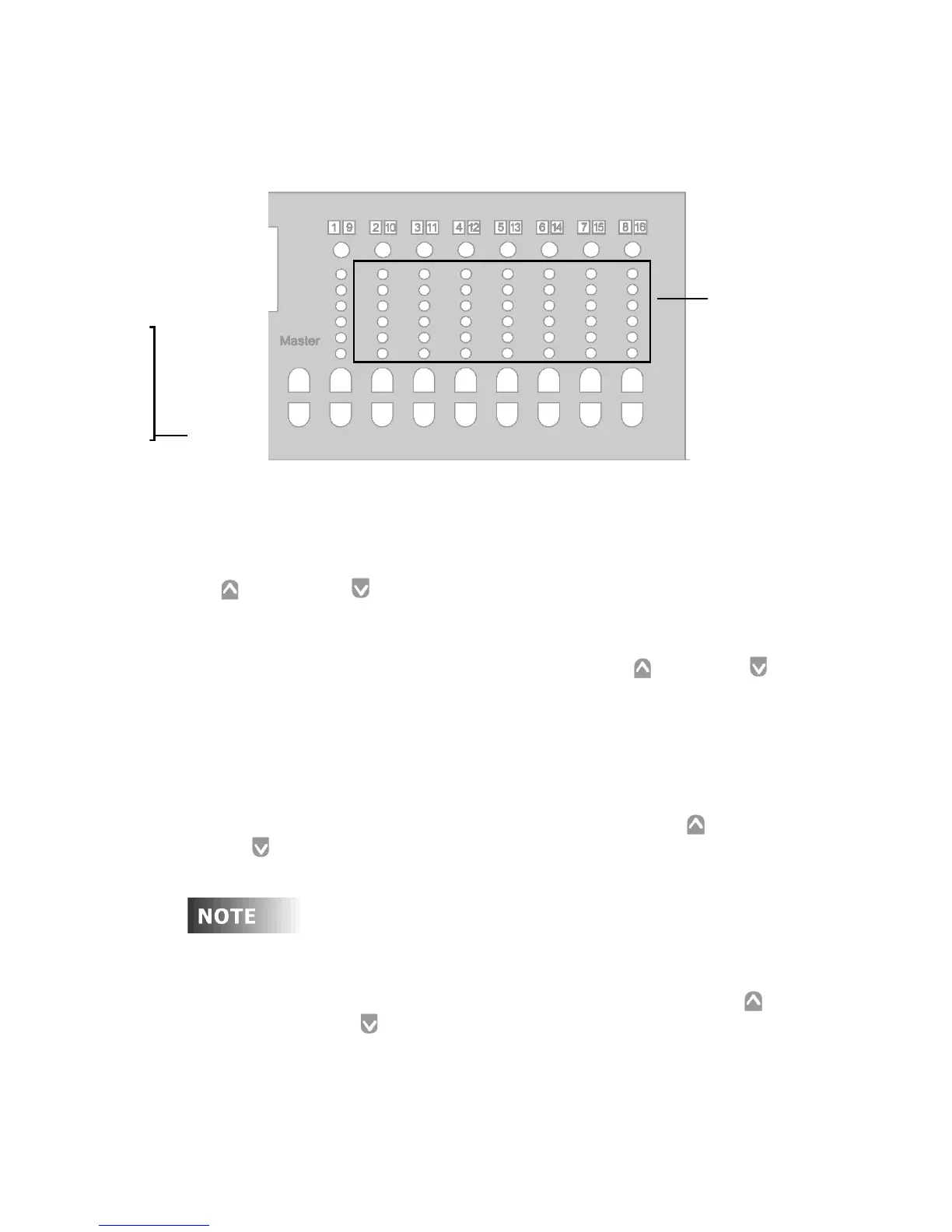
The approximate lighting level for each Zone is represented by the
Zone level LED indicators.
Figure 17 - Zone Level Indicators
Overall Lighting Levels
To adjust overall lighting levels, open the cover and use the Master
Up and Down buttons. Once you have recorded Scenes, use
these buttons to modify all the Zones concurrently.
• To increase or decrease all assigned lighting Zones by one
percent, momentarily press the Master Up or Down
button.
• To rapidly increase or decrease the lighting levels, press and
hold the button.
The approximate lighting levels for each Zone are represented by the
Zone level indicators. The lighted Scene button goes dark and the
LCD display shows MANUAL MODE after the Master Up or
Down button is pressed. You can record these new values for the
Scene if you prefer the new lighting levels.
Since levels in all assigned Zones increase or decrease by
the same amount, lighting levels eventually become the
same in all Zones when you press the Master Up or
Down buttons. As each Zone reaches its maximum or
minimum level, it stays at that level while the other
Zones catch up.
Master Up and Down buttons
Zone Level
LED Indicat



 To Next Page