Diagnostic information 2-21
4036-307, -308
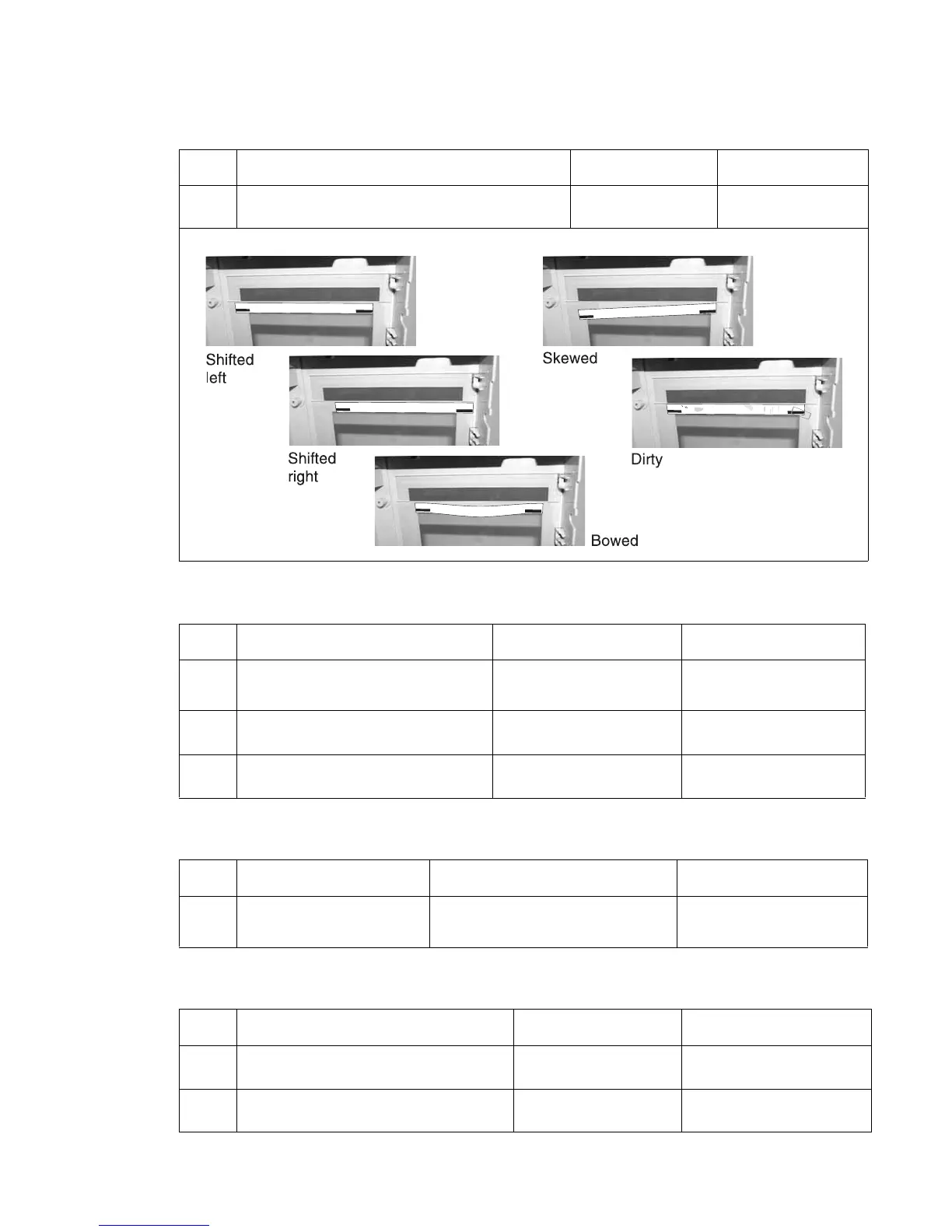
846.xx Front calibration strip
848.00 Modem/config ID mismatch
848.01 Modem/config ID mismatch
849.00 HD/config ID mismatch
Step Action and questions Yes No
1 Is flatbed calibration strip properly attached to the
flatbed with glass cover?
Replace flatbed
optical unit
Replace flatbed w/
glass cover
Remove flatbed with glass cover. See “Flatbed cover with glass removal” on page 4-28.
Step Action and questions Yes No
1 Is the model a 4036-307?
(check the back panel)
Replace the A1 board with
40X2179
Go to Step 2
2
Is modem cable securely connected
to the back of the scanner?
Go to step 3 Reseat modem cable
3
Is the modem cable damaged? Replace the modem cable Replace or install the
modem board
Step Action and questions Yes No
1 Is the model a 4036-307?
(check the back panel)
Remove modem board and modem
cable
Replace the A1 board with
40X2179
Step Action and questions Yes No
1 Is the power cable connected to the hard
drive and the scanner control board?
Go to step 2 Securely connect the
cable
2
Is the data cable connected to the hard
drive and the scanner control board?
Replace the hard drive Securely connect the
cable



 To Next Page