8-36
Windows Software Reference (Single Chamber Mode)
8100 Menu
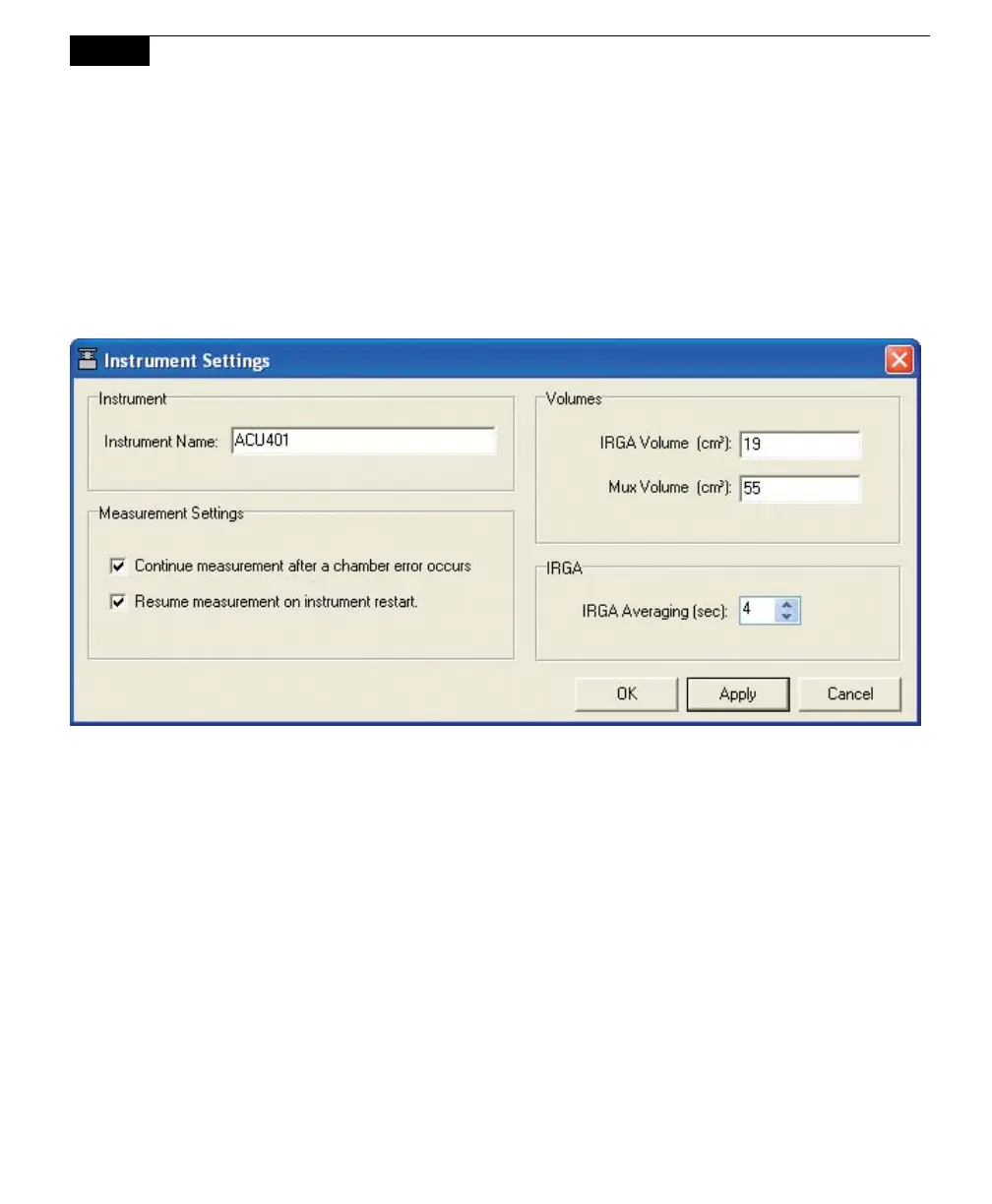
Instrument Settings
You can enter a name for the instrument, decide how to proceed after a chamber
error or instrument restart occurs, choose default values for IRGA and Multiplexer
volumes, and choose the time interval (in seconds) over which to average the IRGA
readings in this window.
The instrument name is a user-entered name; enter a maximum of 30 characters.
The instrument name is used to identify data from multiple instruments; when
logging data to a compact flash card, a directory is created with the instrument
name under which to store the data.
The Measurement Settings determine whether or not the measurement will
continue after a chamber error (e.g. the chamber fails to close because of an
obstruction) occurs, and whether to resume a measurement after an instrument
restart, as can occur from a power failure or a low battery condition.
The Volume is used as default value for the IRGA in the LI-8100A. In most cases
this value should not be changed. The default value is 19 cm
3
for the IRGA
volume.
The IRGA Averaging setting controls the amount of averaging that is done to CO
2
and H
2
O signals from the IRGA. The IRGA is sampled at 2Hz. With 4 second
IRGA Averaging (the default recommended setting) 8 data points will go into any



 To Next Page