214325 203 Revision A
Replacing Auto Header Height Control (AHHC) Sensor
The auto header height control (AHHC) sensor/potentiometer sends a signal to combine allowing it to maintain a
cutting height and optimize float as header follows ground contours. To replace AHHC sensor, follow these steps:
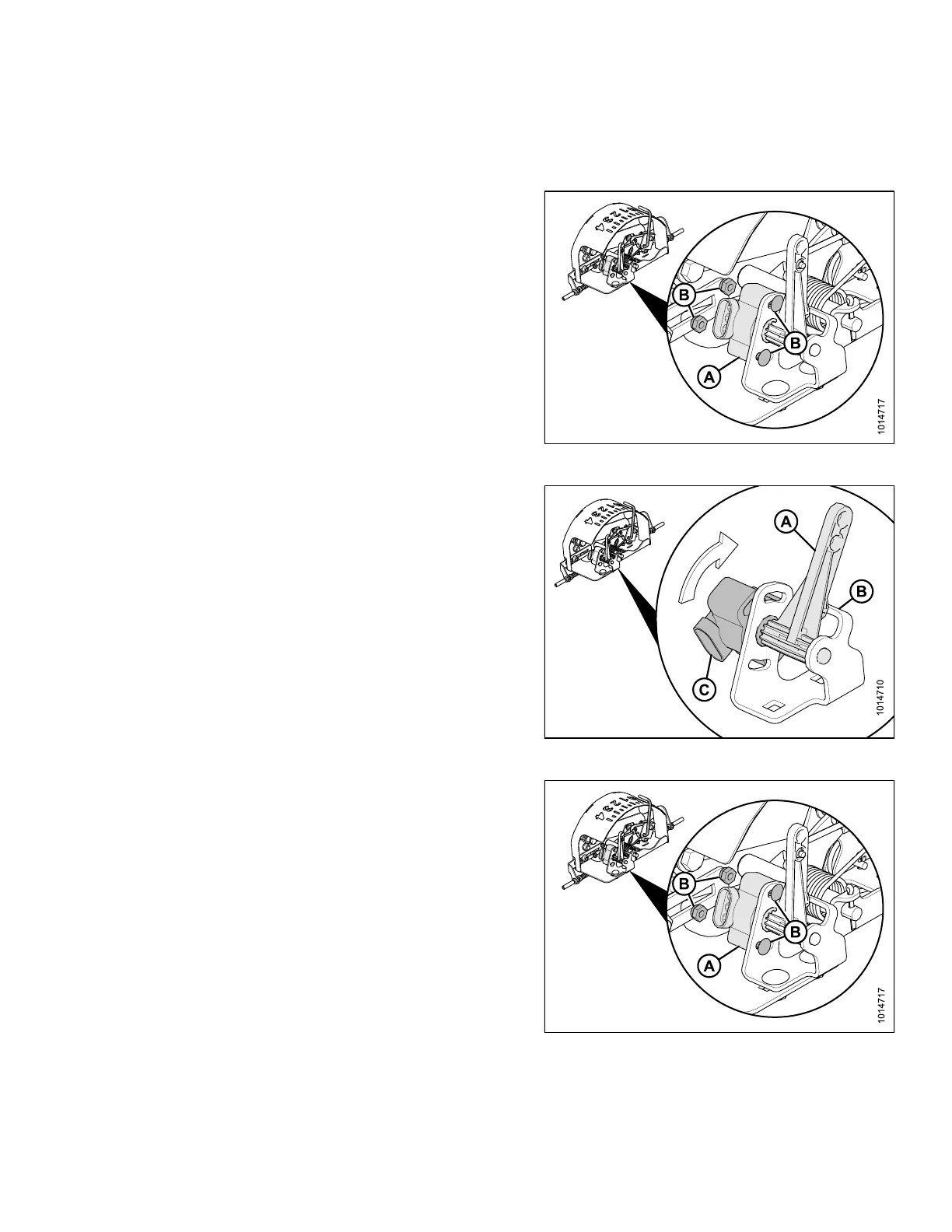
Figure 5.135: AHHC Sensor
1. Disconnect wiring harness from existing sensor (A).
2. Remove two nuts and bolts (B) that secure sensor to
bracket and remove sensor (A).
IMPORTANT:
To avoid damaging new sensor, install sensor as
follows:
Figure 5.136: AHHC Sensor
3. Position sensor control arm (A) against stop (B).
4. Install new sensor (C) onto linkage arm with wiring plug
facing away from stop.
5. Pretension sensor’s internal spring by rotating
sensor (C) until bolt holes align with holes on bracket.
Figure 5.137: AHHC Sensor
6. Secure new sensor (A) to bracket with two nuts and
bolts (B).
SETTING UP AUTO HEADER HEIGHT CONTROL








 To Next Page