214325 230 Revision A
Combine
Lower Voltage Limit
(+/- 0.2)
Upper Voltage Limit
(+/- 0.2)
Minimum Range
Difference
CLAAS 500/600/700
Series
0.7 V 4.3 V 2.5 V
Check sensor’s output voltage range at float indicator according to the instructions that follow.
Checking Sensor’s Output Voltage Range
The auto header height sensor output must be within a specific range for feature to work properly. To check
sensor’s output voltage range, follow these steps:
1. Position header 150 mm (6 in.) above ground, and rest it on safety props. Unlock adapter float.
NOTE:
If header is not on down stops during next two steps, voltage may go out of range during operation causing a
malfunction of auto header height control (AHHC) system.
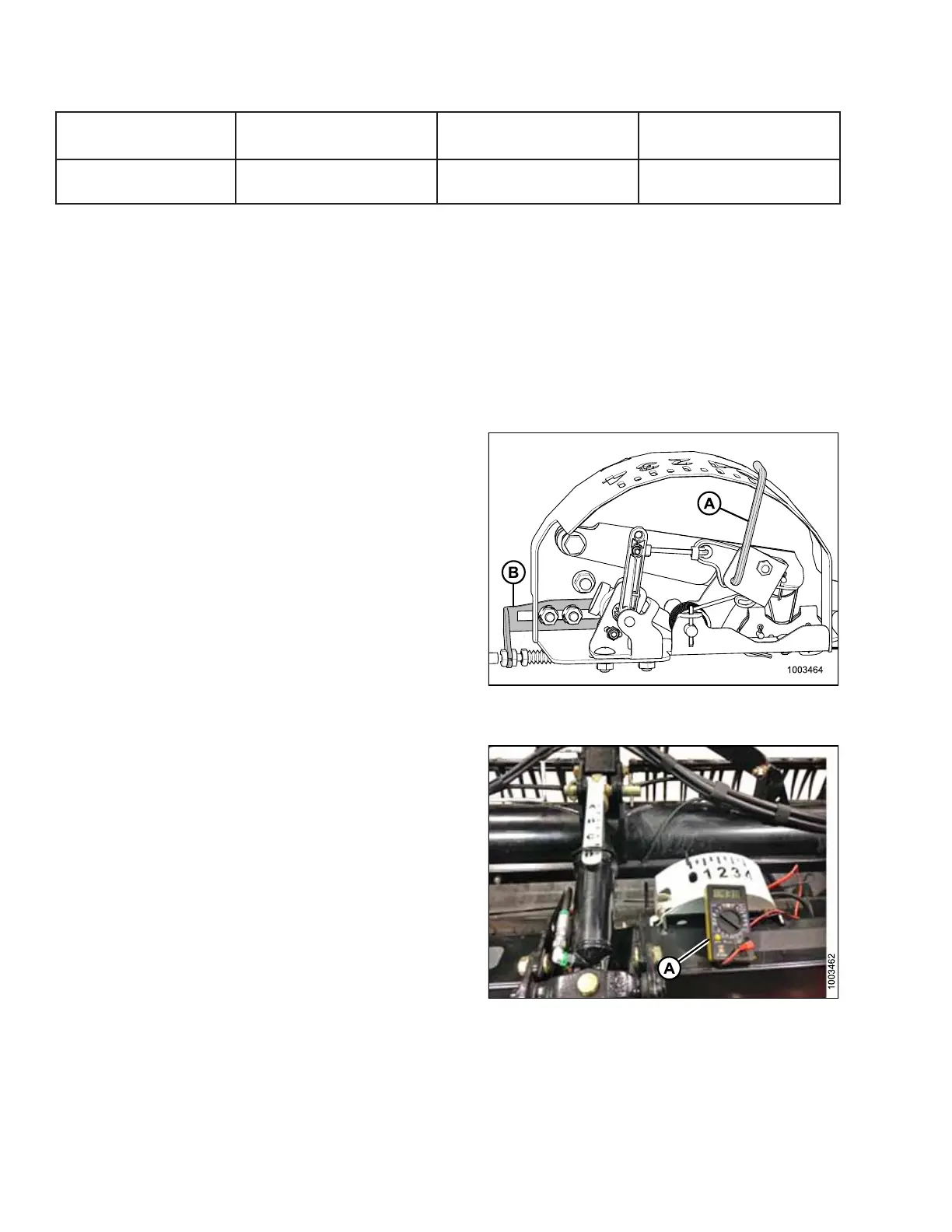
Figure 5.196: Float Indicator with Auto Header
Height Sensor
2. The pointer (A) on float indicator should point at 0 .Ifit
does not, adjust cable bracket (B) until pointer (A) on
float indicator points to 0.
Figure 5.197: Float Indicator Reading 1 V
3. Measure voltage between ground and signal wires at
AHHC sensor in float indicator with a voltmeter (A).
NOTE:
The voltage reading should be below 4.3 V.
SETTING UP AUTO HEADER HEIGHT CONTROL








 To Next Page