214325 245 Revision A
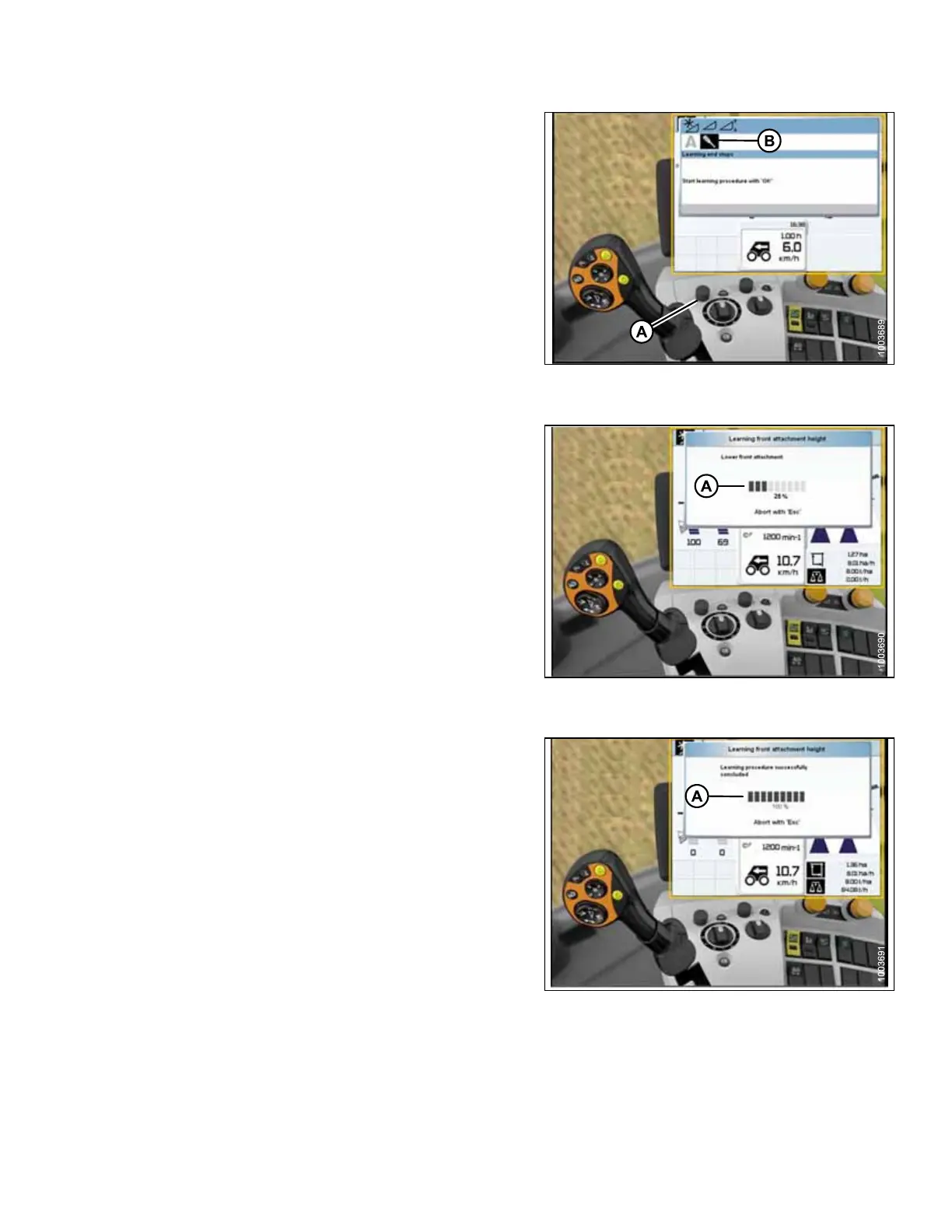
Figure 5.227: CLAAS Combine Display,
Console, and Joystick
6. After pressing control knob, letter A and screwdriver
icon (B) appear on screen (as shown).
7. Use control knob (A) to highlight the screwdriver
icon (B).
8. Exit cab to engage combine separator and
feeder house.
9. Press control knob (A) and a progress bar chart will
appear.
Figure 5.228: CLAAS Combine Display,
Console, and Joystick
10. Fully raise feeder house and progress bar chart will
advance to 25% (A).
11. Fully lower feeder house until header stops moving.
Header float should be unlocked. The progress bar
chart will advance to 50%.
12. Fully raise feeder house a second time and progress
bar chart will advance to 75%.
13. Fully lower feeder house until header stops moving, and
progress bar chart will advance to 100%.
Figure 5.229: CLAAS Combine Display,
Console, and Joystick
14. Once calibrations are complete, progress bar chart
displays 100% (A).
NOTE:
At any time during calibration, if voltage is not within
range of 0.5–4.5 volts, monitor will indicate that learning
procedure has not concluded.
NOTE:
If header float is set too light, an error message will
appear. If error message appears, back float off three
full-turns of adjuster bolts to adjust float to
approximately 45–55 kg (100–125 lb.).
SETTING UP AUTO HEADER HEIGHT CONTROL








 To Next Page