214683 142 Revision A
3.8.4 Case IH 5130/6130/7130 and 5140/6140/7140 Mid-Range Combines
Setting up the Header on the Combine Display (Case IH 5130/6130/7130; 5140/6140/7140)
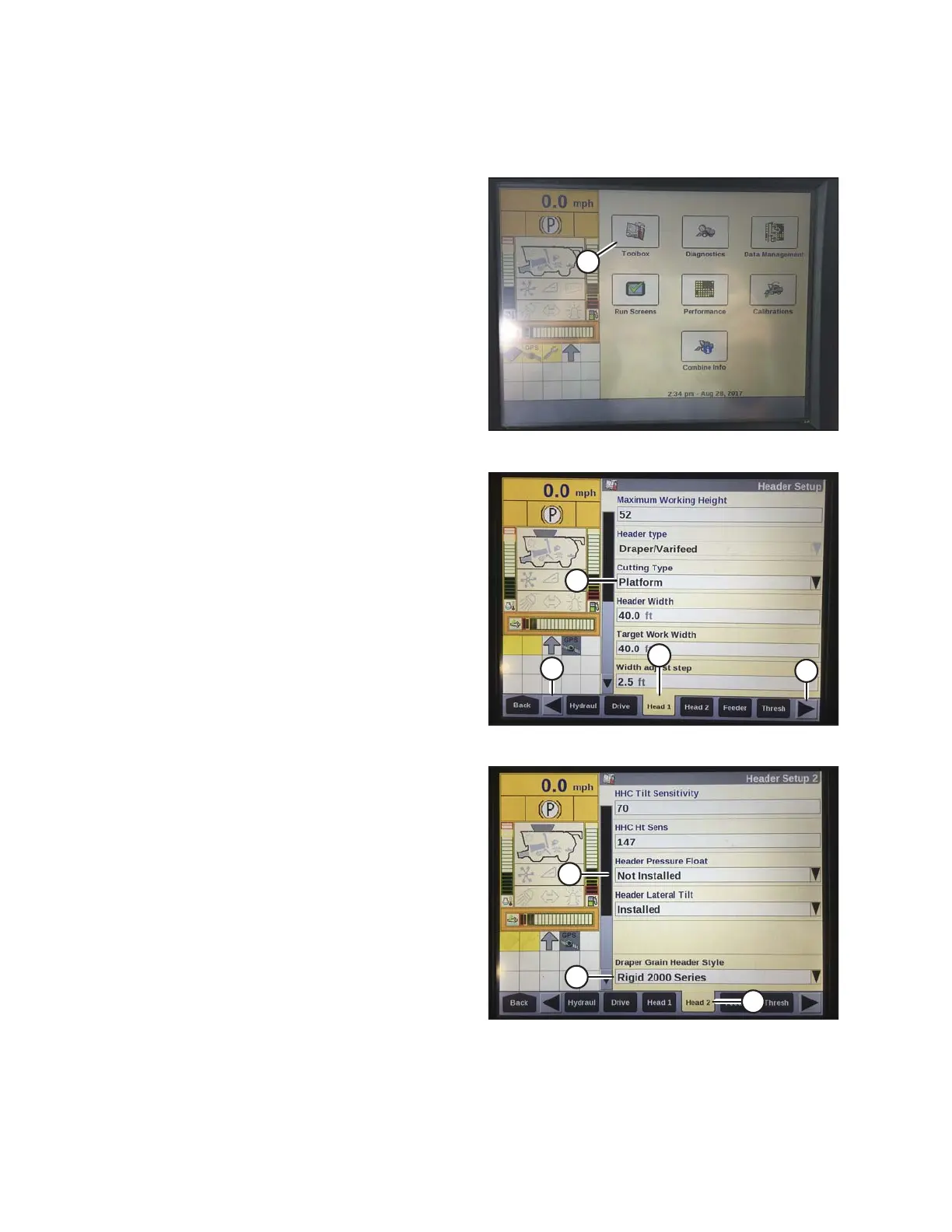
Figure 3.188: Case IH Combine Display
1. On the main page of the combine display, select
TOOLBOX (A).
Figure 3.189: Case IH Combine Display
2. Select the HEAD 1 tab (A). The HEADER SETUP page
displays.
NOTE:
To locate the HEAD 1 tab, you may need to scroll to the
right using side arrows (C).
3. From the CUTTING TYPE menu (B), select
PLATFORM.
Figure 3.190: Case IH Combine Display
4. Select the HEAD 2 tab (A). The HEADER SETUP 2
page displays.
5. From the HEADER PRESSURE FLOAT menu (B),
select NOT INSTALLED.
6. If you are operating a D1 Draper Header, from the
DRAPER GRAIN HEADER STYLE menu (C), select
RIGID 2000 SERIES.
If you are operating an FD1 FlexDraper
®
Header, from
the DRAPER GRAIN HEADER STYLE menu (C),
select FLEX 2000 SERIES.
OPERATION









 To Next Page