214683 173 Revision A
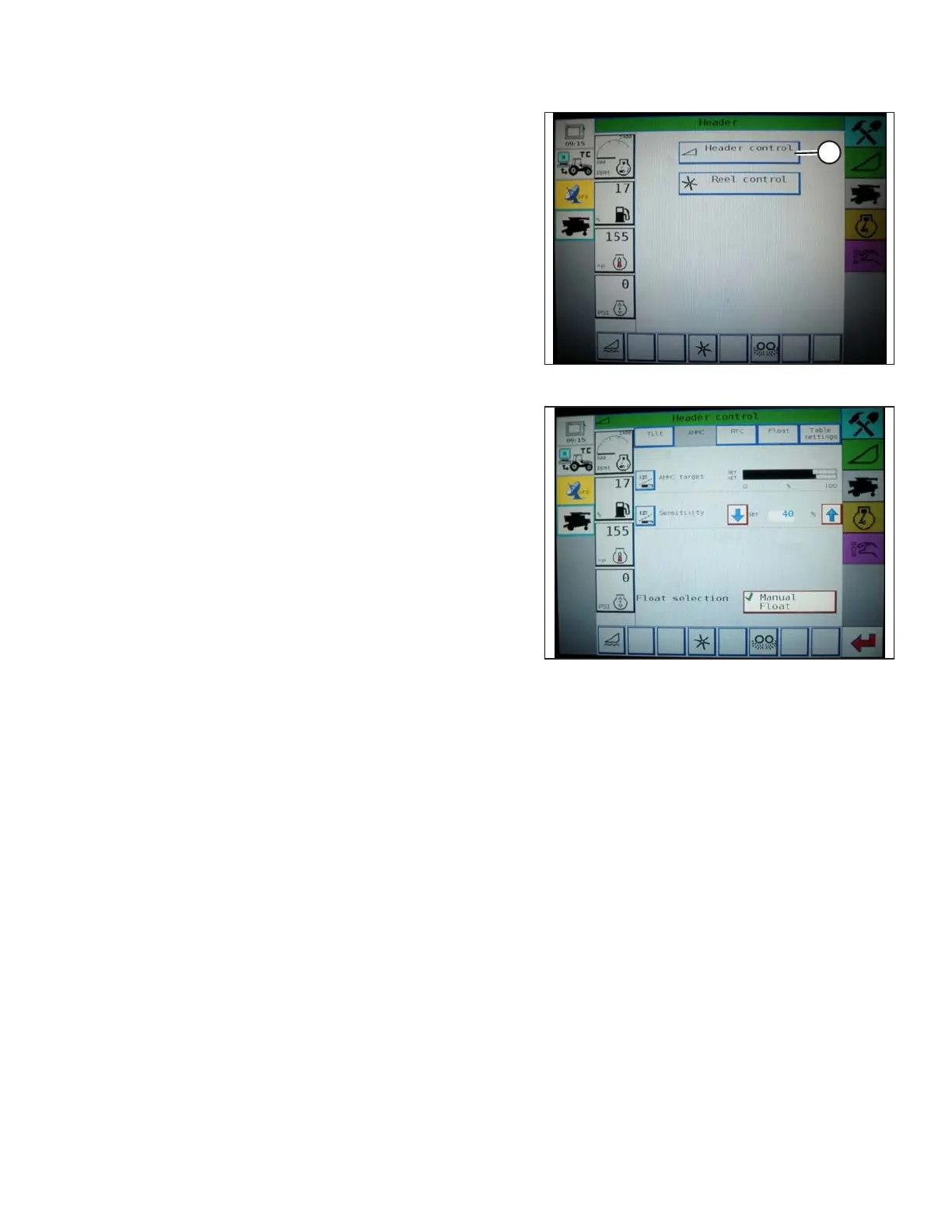
Figure 3.264: Challenger Combine Display
2. Press the HEADER CONTROL button (A). The
HEADER CONTROL screen appears. You can adjust
sensitivity on this screen using the up and down arrows.
Figure 3.265: Challenger Combine Display
3. Adjust the sensitivity to the maximum setting.
4. Activate the AHHC, and press the HEADER LOWER
button on the control handle.
5. Decrease the sensitivity until the feeder house remains
steady and does not bounce up and down.
NOTE:
This is the maximum sensitivity and is only an initial
setting. The final setting must be made in the field, as
the system reaction will vary with changing surfaces
and operating conditions.
NOTE:
If maximum sensitivity is not needed, a less sensitive
setting will reduce the frequency of header height
corrections and component wear. Partially opening the
accumulator valve will cushion the action of the header
lift cylinders and reduce header hunting.
3.8.7 Gleaner R65/R66/R75/R76 and S Series Combines
Checking Voltage Range from the Combine Cab (Gleaner R65/R66/R75/R76 and Pre-2016
S Series)
NOTE:
Changes may have been made to the combine controls or display since this document was published. Refer to the
combine operator’s manual for updates.
1. Position the header 150 mm (6 in.) above the ground, and unlock the float.
OPERATION









 To Next Page