DRIVING ENVIRONMENT
DRIVER INFORMATION DISPLAY
4 Use the Toggle/Enter button to scroll
through the available Vehicle Info sub-
menus.
Trip 1/2
The Trip 1 or 2 menus are accessible
through the Applications/Vehicle Info
menus.
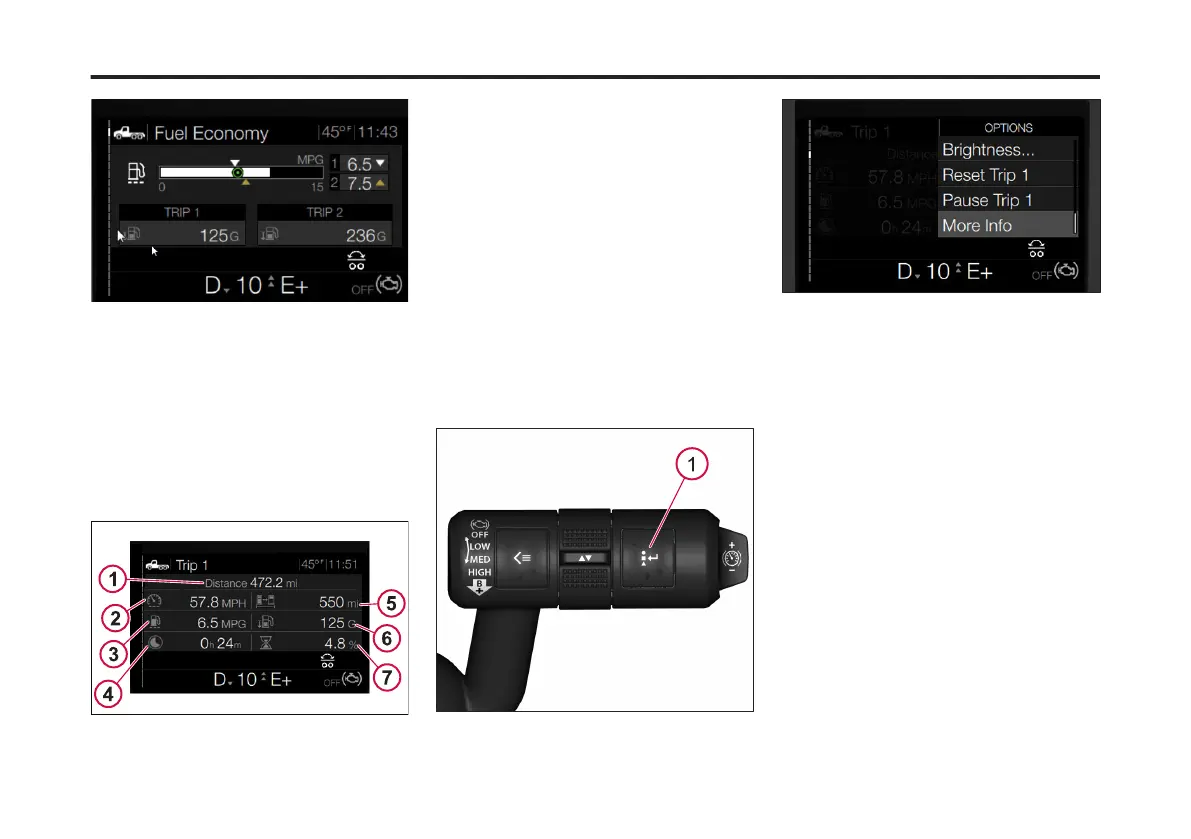
The following is an example of the Trip 1
screen.
1 Distance (driven): Provided in either miles or
kilometers depending on the driver's settings.
2 Average Speed: Displayed as MPH (miles per
hour) or kilometers per hour (km/h).
3 Average Fuel Economy: Displayed as MPG
(miles per gallon) or liters used per 100
kilometers (L/100 KM).
4 Time Driving: Display in hours and minutes.
5 Distance Until Fuel Tank Empty: Displayed in
miles (mi) or kilometers (km).
6 Fuel Used: Displayed in gallons (G) or liters
(L).
7 Idle Time: lists percentage of driving time
spent in idle.
To adjust the Trip data complete the
following:
1 From the Trip (1 or 2) menu, press
the Options button.
1 Options Button
The Trip menu screen displays.
The available options are:
• Screen Off: turns off the DID screen.
Only a black screen displays.
• Brightness: allows adjustment of the
DID screen brightness.
• Reset Trip X: resets all trip
information to zero.
• Pause Trip X: pauses the trip
information updates.
• Resume X: resumes the trip updates
after being paused.
• More Info: provides additional trip
information such as cruise control
time, engine brake time, max RPM,
etc.
2. Use the Toggle button to scroll to the
desired action (Reset Trip X, Resume
Trip X, etc.).
93
X Publication_PC28



 To Next Page