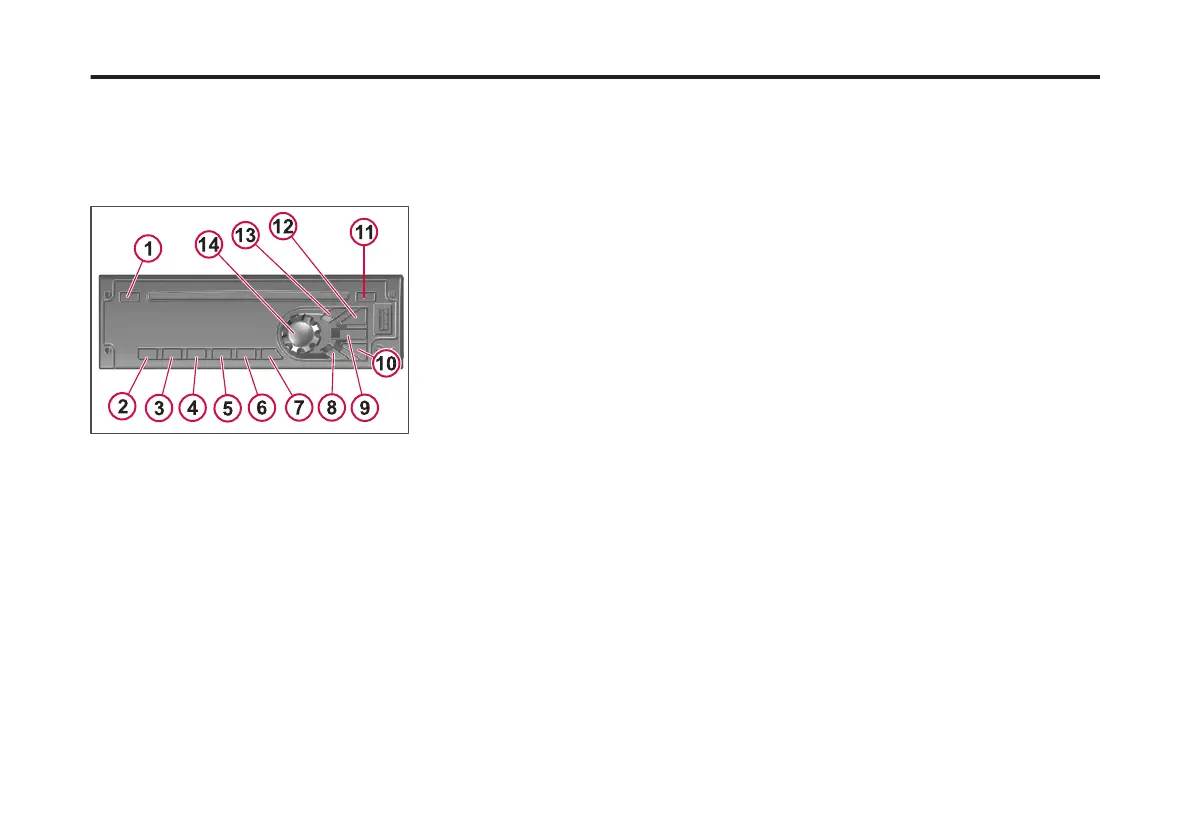
INFOTAINMENT
RADIO
Introduction
The information provided are general
features found for the operation of the
DEA5XX Radio.
1 Phone
2 Play/Pause
3 Browse
4 Check/Alarm
5 RPT (Repeat)
6 RDM (Random)
7 ESC (Escape)
8 DSP (Display)
9 Scan/ASCN (Scan/Autoscan)
10 PREV (Previous)
11 Eject
12 Next (Next)
13 SRC/PWR (Source/Power)
14 Knob
Radio Button Operation
• SRC/PWR: Press to switch to FM ->
AM -> WX -> SXM -> CD -> USB/
iPod -> AUX -> Bluetooth Audio (if
equipped) and to turn Radio ON.
Press and hold to turn radio OFF.
• One-Hour Timer: With the ignition
off, pressing the SRC/PWR button
will turn on the receiver and activate
the receiver’s one-hour timer.
• VOLUME KNOB/OK: Press for less
than 3 seconds to display Audio
Control Menu. Press for more than 3
seconds to Show the User Menu.
Rotate to Increase/decrease Volume
or during a Menu for Navigation.
Press while in a Menu to conrm the
selection.
• PREV (Previous/Reverse): Press to
select previous track or station.
Press and hold for FR or Tune Down
• NEXT (Next/Forward): Press to select
next track or station. Press and hold
for FF or Tune Up.
• EJECT: Press to eject the CD
• PHONE (If equipped): Press the
Phone button for more than 3
seconds to Show the Bluetooth
Menu. When Bluetooth is enabled,
press the button to display the Dial
Menu or to accept and Incoming Call
(if a Phone is paired).During a call
Press the button for more than 3
seconds to transfer the call from the
radio to the Phone.
• CLOCK ALARM: Press during Alarm
activation to cancel the Alarm.
• SCAN/ASCAN: Scans stations/CD
tracks/MP3/ WMA les and folders
and stores strongest stations to
presets.
• PLAY/PAUSE: Press to pause/
unpause current Media.
• RPT (Repeat): Press to repeat
current track. Press again to stop
repeat. Look for the RPT icon to turn
on in the radio display.
• BROWSE: Press to Navigate on the
device and select a specic song or
play context (Applicable to USB
sticks, CD MP3 discs and iPods)
• RDM (Random): Press to play the
tracks randomly. Press again to stop
random mode. Look for the RDM
icon to turn on in the radio display.
• ESC (ESCAPE): Press to exit one
Menu Level.
• DISP (DISPLAY): If vehicle Ignition is
ON: Press to Change Source Display
Views. Press for more than 3
seconds to show the Clock for a
short time. If vehicle Ignition is OFF:
188
X Publication_PC28



 To Next Page