DRIVING ENVIRONMENT
CAB CLIMATE CONTROL
Cab Climate Control
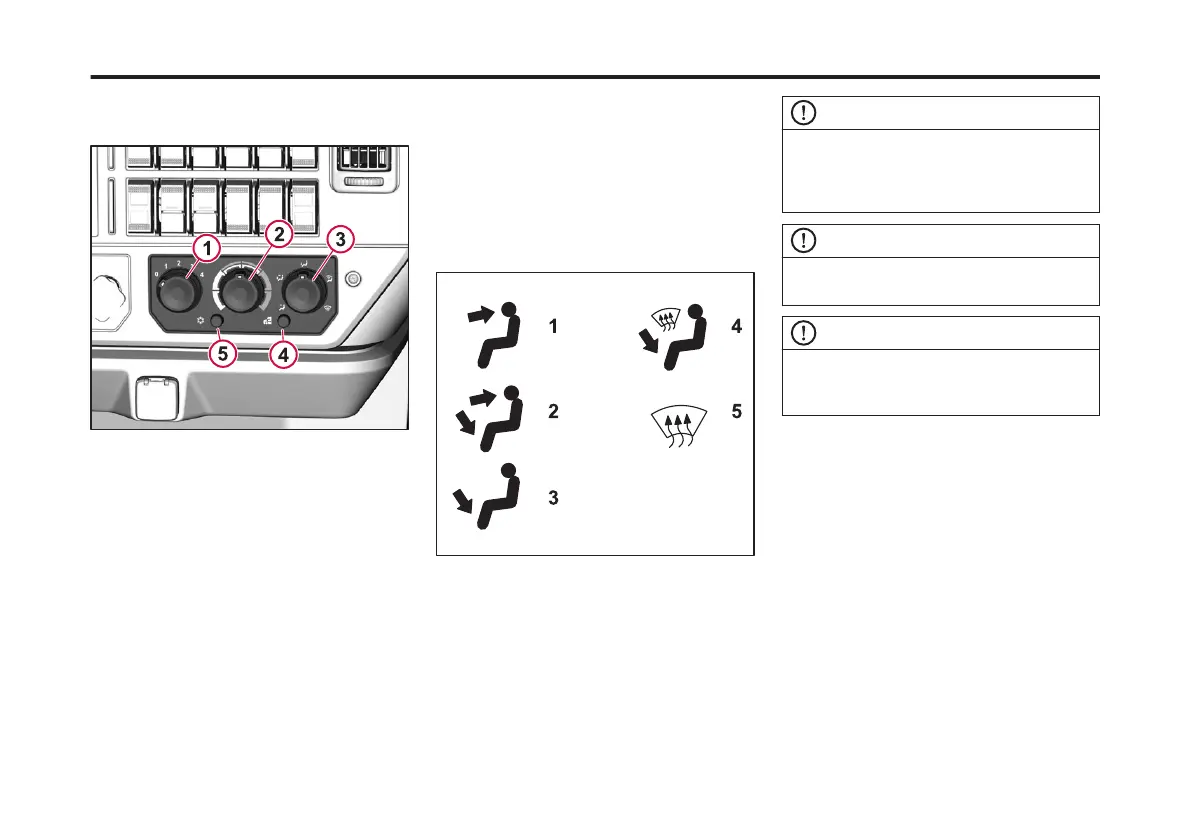
1 Blower Control Knob
2 Temperature Control Knob
3 Mode Knob
4 Fresh/Recirculation Button
5 A/C ON/OFF Button
1 Blower Control Knob
This knob controls fan speed from
OFF to 4 (highest speed).
2 Temperature Control Knob
Controls the temperature of the air in
the cab from COOL (far left) to HOT
(far right).
3 Mode Selection Knob Controls the
direction of air ow around the cab
seen below.
4 Fresh/Recirculation Switch or Button
Selects the cab intake air between
fresh air (from outside the cab) and
recirculated air (inside the cab).
5 Air Conditioner ON/OFF Switch or
Button
Activates the air conditioning
system.
1 Directs airow through the dash panel air
vents only.
2 Directs airow through both the dash panel
and oor air vents (bi-level).
3 Directs airow through the oor vents only.
4 Directs airow through the oor vents and the
windshield for defrosting and/or defogging.
5 Directs airow only to the windshield for
defrosting and/or defogging.
NOTE
The Mode Selection knob can be rotated
to any position. This allows the operator to
select the desired amount of blend
between the positions.
NOTE
For maximum air conditioner
performance, select recirculated air.
NOTE
Turn the bunk and dash blower fan to 0 or
OFF before initiating remote software
update operations.
110
X Publication_PC28



 To Next Page