DRIVING ENVIRONMENT
DRIVER INFORMATION DISPLAY
3 Press Enter to return to the main Trip
menu.
Tire Monitor
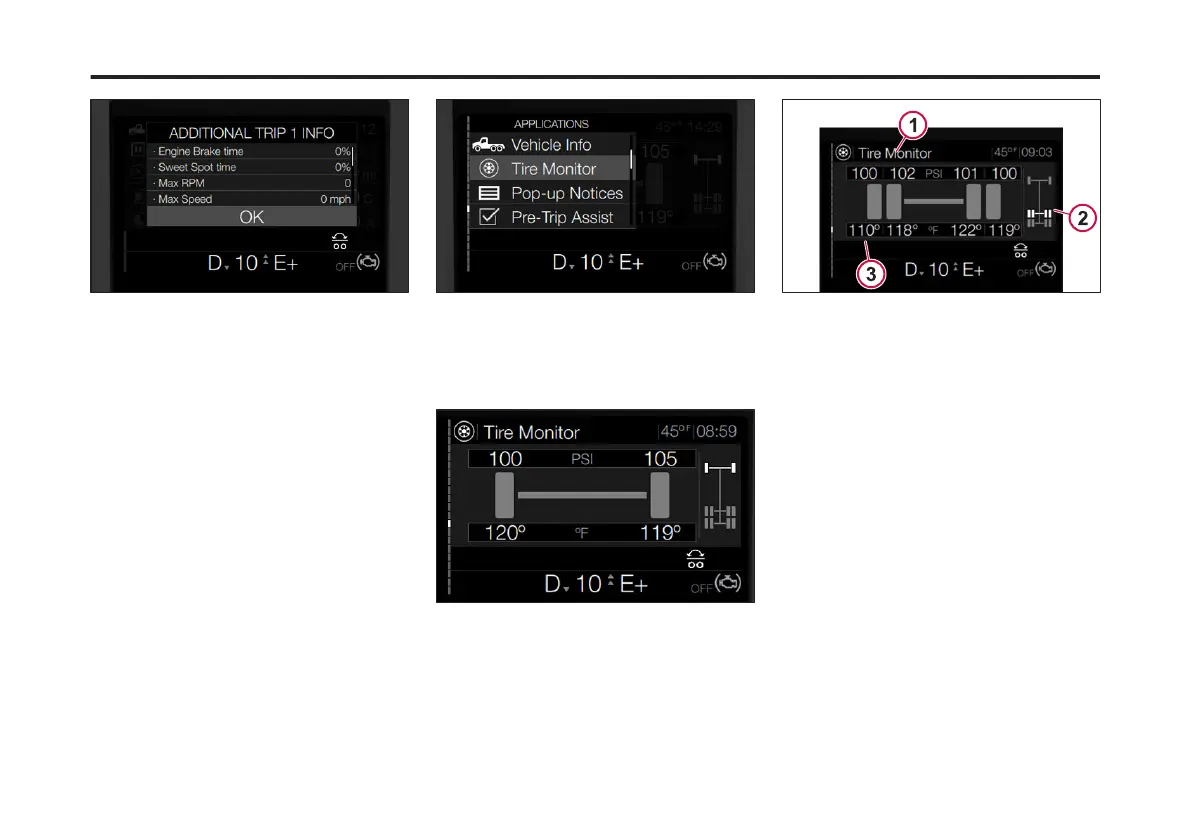
The Tire Monitor DID screen provides
the following information:
• Tire Pressure: Pounds per Square
Inch (PSI) or Kilopascal (KPA)
depending on the setting.
• Tire Temperature: Fahrenheit (Fº) or
Celsius (Cº).
• Axle: The tire information for each
axle is displayed based on the axle
selected.
To access the Tire Monitor sub-menu
from the Driver Information Display,
complete the following steps:
1 Press the Applications button on the
right-hand stalk.
The Applications menu screen displays.
2 Use the Toggle button to scroll to Tire
Monitor.
3 Press Enter.
The Tire Monitor main screen displays.
4 Use the Toggle button to scroll through
the available tire information for each
axle.
The selected axle highlights on the right-
hand side of the screen.
1 Axle Pressure
2 Specic Axle Displayed
3 Axle Temperature
Pop-up Notices
This screen provides a list of the active
vehicle communication notices.
To access the Pop-up Notices sub-
menu from the Driver Information
Display, complete the following steps:
1 Press the Applications button on the
right-hand stalk.
2 From the Applications menu, use the
Toggle button to scroll to Pop-up
Notices.
95
X Publication_PC28



 To Next Page