EMISSION SOLUTION AND CONTROL
AFTERTREATMENT, MACK
Aftertreatment DPF
Regeneration
EATS Status
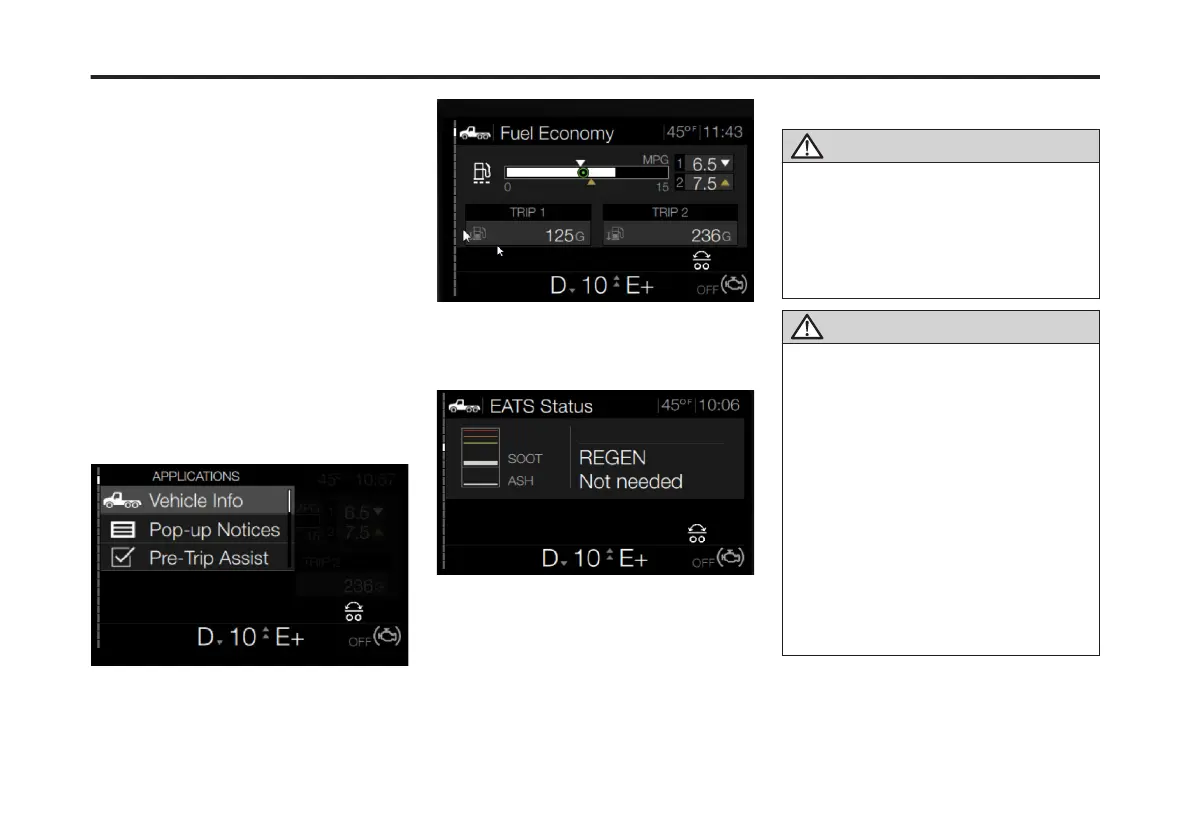
The EATS Status sub-menu is located in
the Vehicle Info DID menu. From this
sub-menu the driver can check the ash
and soot level in the EATS system. Also,
regeneration can be performed if
required.
To access the EATS Status menu from
the Driver Information Display, complete
the following steps:
1. Press the Applications button on the
right-hand side of the steering wheel.
The Applications menu screen displays.
2. If necessary, use the Toggle/Enter
button to scroll to Vehicle Info.
3. Press Enter.
Then initial Vehicle Info screen displays.
4. Use the Toggle/Enter button to scroll
to the EATS Status sub-menu.
The EATS Status sub-menu displays.
The EATS Status menu displays the soot
and ash level. If either of these measure
above acceptable levels, a regeneration
is required.
Regeneration
CAUTION
During the aftertreatment DPF
regeneration, the exhaust gas temperature
will be elevated. DO NOT park the vehicle
with the exhaust outlet near ammable
objects such as trees, awnings, etc. that
could be damaged by elevated exhaust
gas temperatures.
CAUTION
If the vehicle is PARKED in a location that
may be hazardous when a parked
regeneration begins (i.e., in close
proximity to ammable materials or gases,
inside tunnels, parked under ammable
objects, etc.), the aftertreatment DPF
regeneration should be stopped. If
regeneration is stopped by the vehicle
operator, it must be initiated at a later time
when the vehicle is in a safer location.
Regenerations that are stopped and never
restarted at a later time, however, will
require that the vehicle be taken to an
authorized dealer to have the
aftertreatment parked regeneration
manually started with special service
tools.
212
X Publication_PC28



 To Next Page