DRIVING ENVIRONMENT
STEERING COLUMN
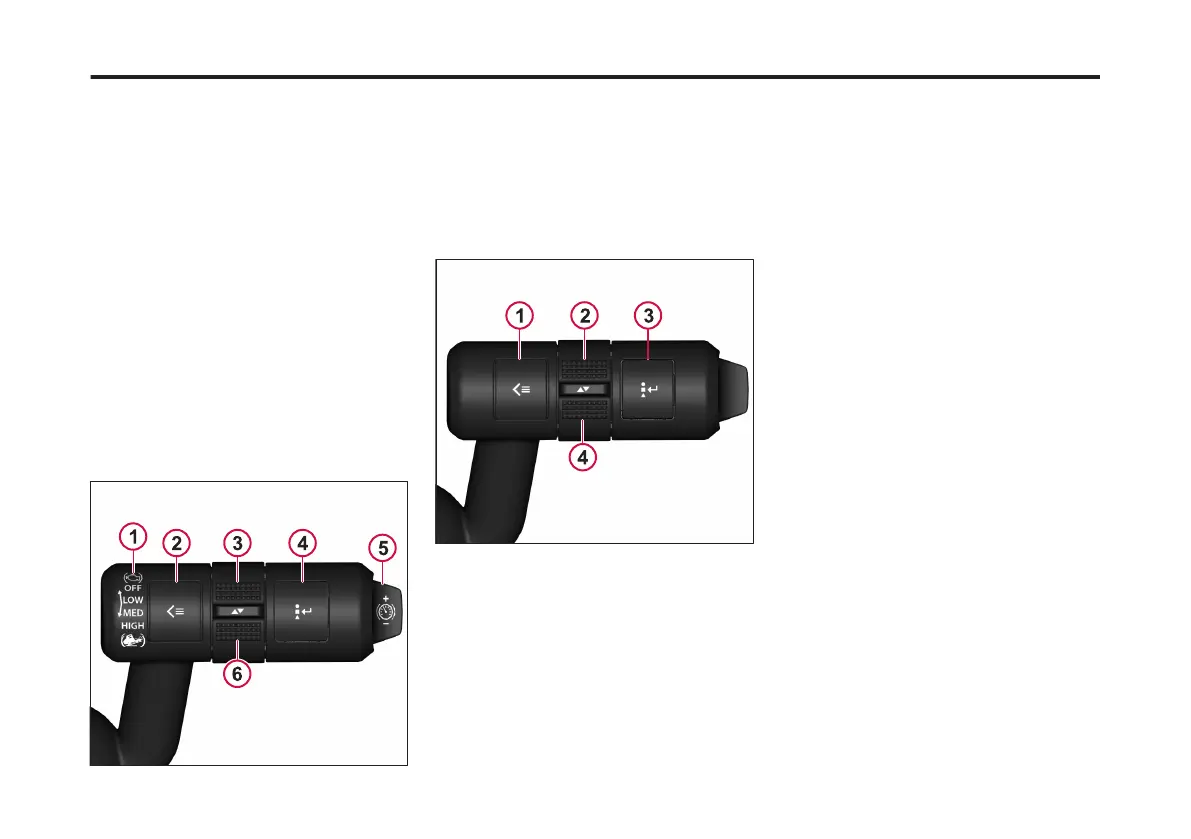
Right Stalk
The stalk on the right hand side of the
steering column is used to use the
Driver Information Display (DID). Two
buttons and a toggle section assist in
browsing throughout for the DID menus.
The buttons allow the user to perform
the following DID functions:
• Toggle
• Enter
• Open the Applications menus
• Open the Options menus
• Return to the Home screen
Also, included on the stalk are the
engine brake toggle and cruise control
brake button.
1 Engine Brake Lever
2 Applications Menu (Short Press)/Home (Long
Press) Button
3 Menu UP Scroll Ring
4 Options/Enter Button
5 Brake Cruise Increase (+)/ Decrease (-) Button
6 Menu DOWN Scroll Ring
1 Applications Menu (Short Press)/Home (Long
Press) Button
2 Menu UP Scroll Ring
3 Options/Enter Button
4 Menu DOWN Scroll Ring
129
X Publication_PC28



 To Next Page