DRIVING ENVIRONMENT
DRIVER INFORMATION DISPLAY
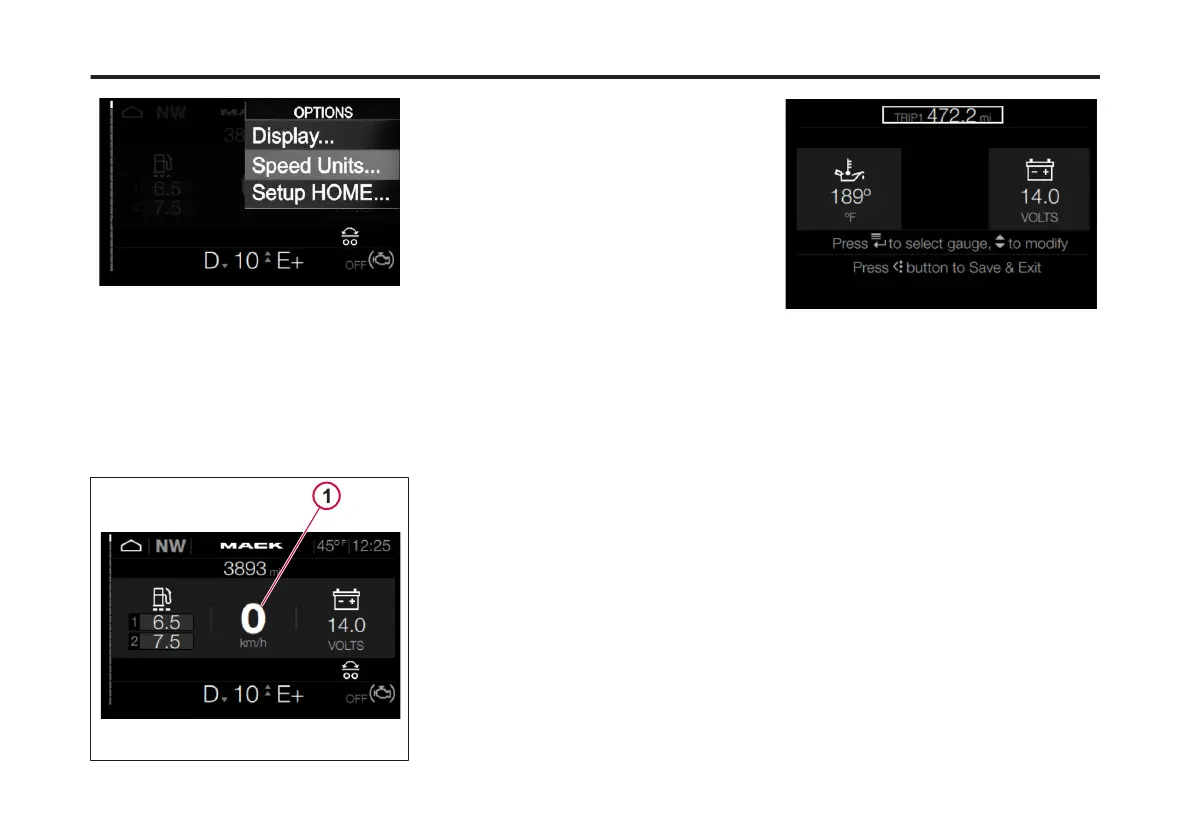
2 Press Enter.
The Driver Information Display (DID)
Speedometer setting changes to the
opposite measurement.
An example would be if the original
Speedometer setting was miles per hour
(MPH). The new setting would be
kilometers per hour (km/h).
1 Speedometer Setting
Setup HOME
The 'favorites' menus available for the
HOME screen include:
• Engine Oil Temperature
• Transmission Oil Temperature
• Distance to Empty
• Battery Voltage
• Fuel Economy
• Air Suspension Gauge Rear
• Air Suspension Gauge Front
• Front Rear Axle Temperature
• Rear Rear Axle Temperature
• Center Axle
• Throttle Percentage
• Engine Load Percentage
• Pyrometer
• Sweet Spot Status Icon
• Electronic Control Suspension
To change the Setup HOME settings in
the Driver Information Display (DID),
complete the following:
1 From the Options main screen, use the
Toggle button to scroll to Setup HOME.
2 Press Enter.
The Setup HOME screen displays.
The Home screen is divided into three
sections. Each section represents a
'favorite' menu.
Upon opening the Setup HOME menu
the rst 'favorite' menu is highlighted. To
adjust each section's 'favorite' selection
complete the following:
3 Use the Toggle button to scroll through
the available favorites.
4 Press Enter to select the visible
favorite in the section.
The next 'favorite' section is
automatically highlighted.
108
X Publication_PC28



 To Next Page