DRIVING ENVIRONMENT
DRIVER INFORMATION DISPLAY
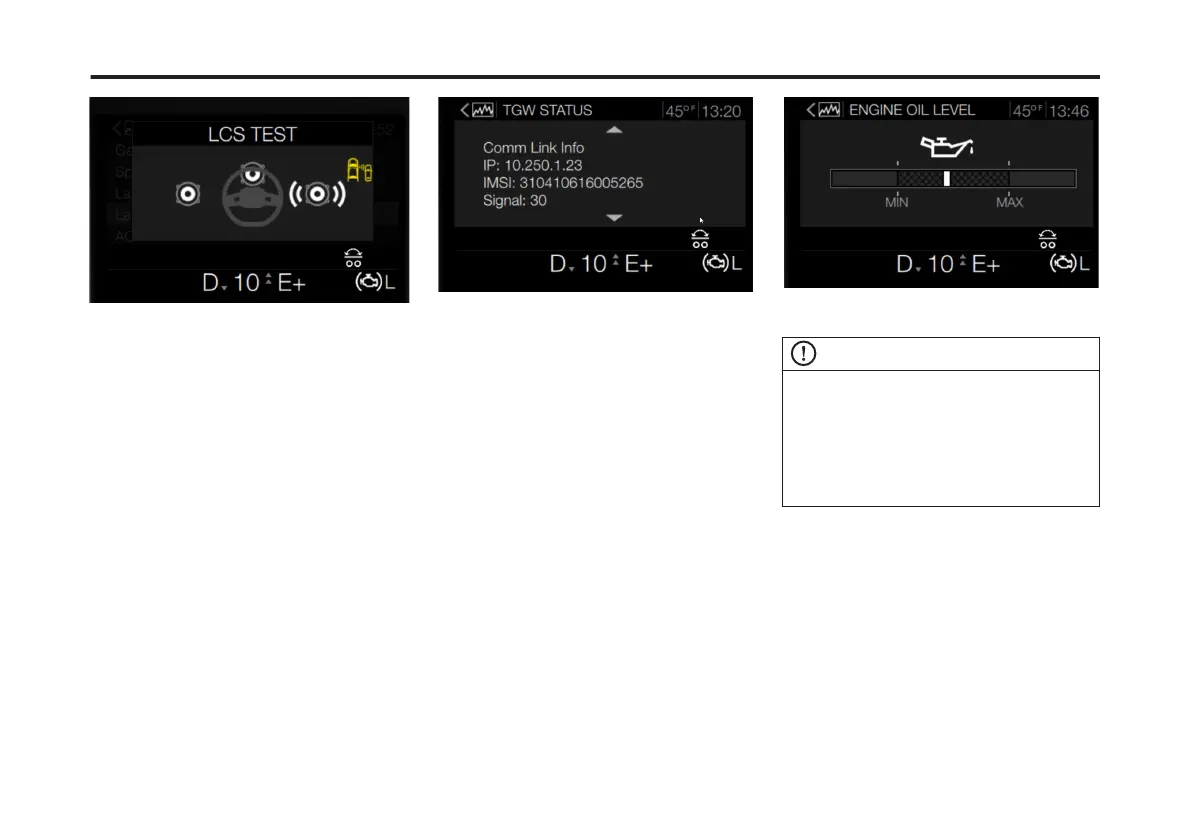
Speaker Test Screen
5 To exit any Cluster Self Test, press
Enter.
Telematics Gateway Status
(TGW)
The Telematics Gateway Status (TGW)
diagnostics menu, provides status
information for the system.
To access this menu, complete the
following:
1 From the Vehicle Diagnostics main
screen, use the Toggle button to scroll to
Telematics Gateway Status (TGW).
2 Press Enter.
The TGW Status screen displays.
3 Use the Toggle button, to scroll
through the available TGW messages.
Engine Oil Level
The Engine Oil Level menu provides a
visual status of the engine oil level. The
minimum (MIN) and maximum (MAX)
levels are shown. The Engine Oil Level
screen indicates whether the current
engine oil level falls above or below
those levels.
To access the Engine Oil Level menu,
complete the following:
1 From the Truck Data main screen, use
the right-hand steering stalk Toggle
button to scroll to Engine Oil Level.
2 Press Enter.
The Engine Oil Level screen displays.
Adaptive Cruise Control (ACC)
NOTE
The vehicle operator cannot adjust the
FDA (Following Distance Alert) intervals.
These can only be adjusted by a certied
technician.
For additional information on ACC refer to
Adaptive Cruise/Stability Advantage
chapter.
The Adaptive Cruise Control (ACC)
Conguration menu provides visual
markers for the system's Following
Distance Alerts (FDA).
The Following Distance Alert (FDA) is
active whenever the vehicle is moving.
The alert provides both audible and
visual warnings. These warnings occur
whenever the following distance
between your vehicle and the vehicle
ahead is less than the set time gap.
99
X Publication_PC28



 To Next Page