DRIVING ENVIRONMENT
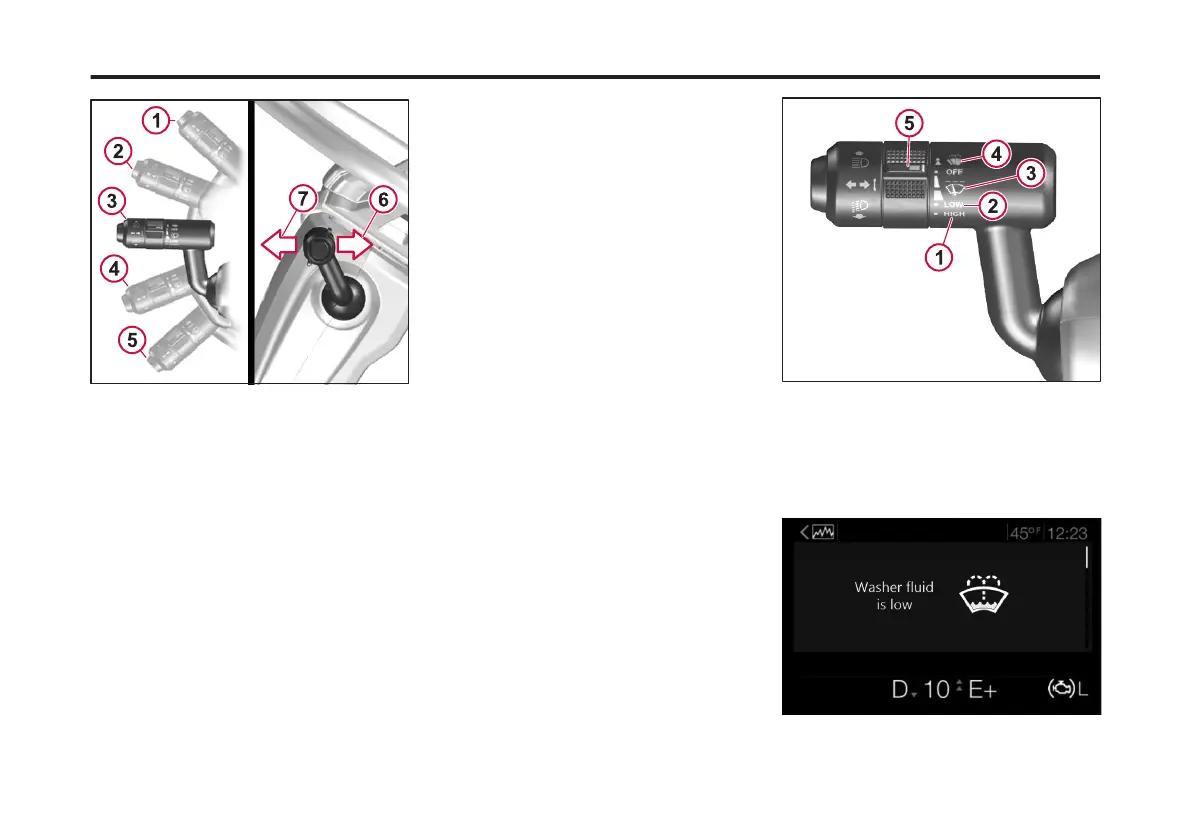
STEERING COLUMN
1 Handle in Right Turn Position for Right Turn
Signal
2 Highway Turn Right (ve blinks) to change
lanes
3 Handle in rest position
4 Highway Turn Left (ve blinks) to change
lanes
5 Handle in Left Turn Position for Left Turn
Signal
6 Pull Lever for Courtesy Flashing of High
Beams (Daylight or Dark)
7 Push Lever Toward IP to Turn High Beams ON
Wiper Controls
The wiper/washer functions are
operated by a scroll ring. The wipers
have normal and fast speeds which are
activated by moving the scroll ring down
one or two positions. To let the wipers
engage for a few passes, lightly turn the
scroll ring until the wipers start. The
wipers return to the parking position
when the scroll ring is released.
The interval wiper function is engaged
by moving the lever down to the dash
position on the stalk. The normal
programmed speed is one pass every 10
seconds. To shorten the interval time,
move the wheel on the stalk, there are 2
intermittent speeds provided.
To operate the windshield washer, push
the scroll ring upward. If washer uid
needs to be added, use a commercially
reputable washer uid that has good
cleaning capability and does not freeze
in cold weather. An indicator will appear
in the DID when the washer uid level is
low.
1 High Speed
2 Low Speed
3 Intermittent Speeds
4 Windshield Washer
5 Wiper/Washer Scroll Ring
128
X Publication_PC28



 To Next Page