STARTING AND DRIVING
CRUISE CONTROL
Engaging Cruise Control
DANGER
DO NOT use the cruise control in heavy
trafc, with ice/snow on the road or during
other unfavorable conditions. This can
lead to a loss of vehicle control, causing a
vehicle crash, personal injury or death.
CAUTION
Transmission gear changes must not be
made without the use of the clutch while
in the cruise control mode. Failure to use
the clutch will cause the engine speed
(RPM) to increase to the high idle limit,
which can cause severe powertrain
damage.
The cruise control maintains a set speed
and allows acceleration and deceleration
through the system switches.
To set the cruise control for normal
highway operation, the following
conditions must be met:
• The vehicle road speed must be
above the customer-programmable
speed value of 24 to 56 kph (15 to
35 mph).
• The service and parking brake must
not be applied.
• The clutch must be engaged (pedal
released).
Once the above conditions are satised,
activate the cruise control as follows
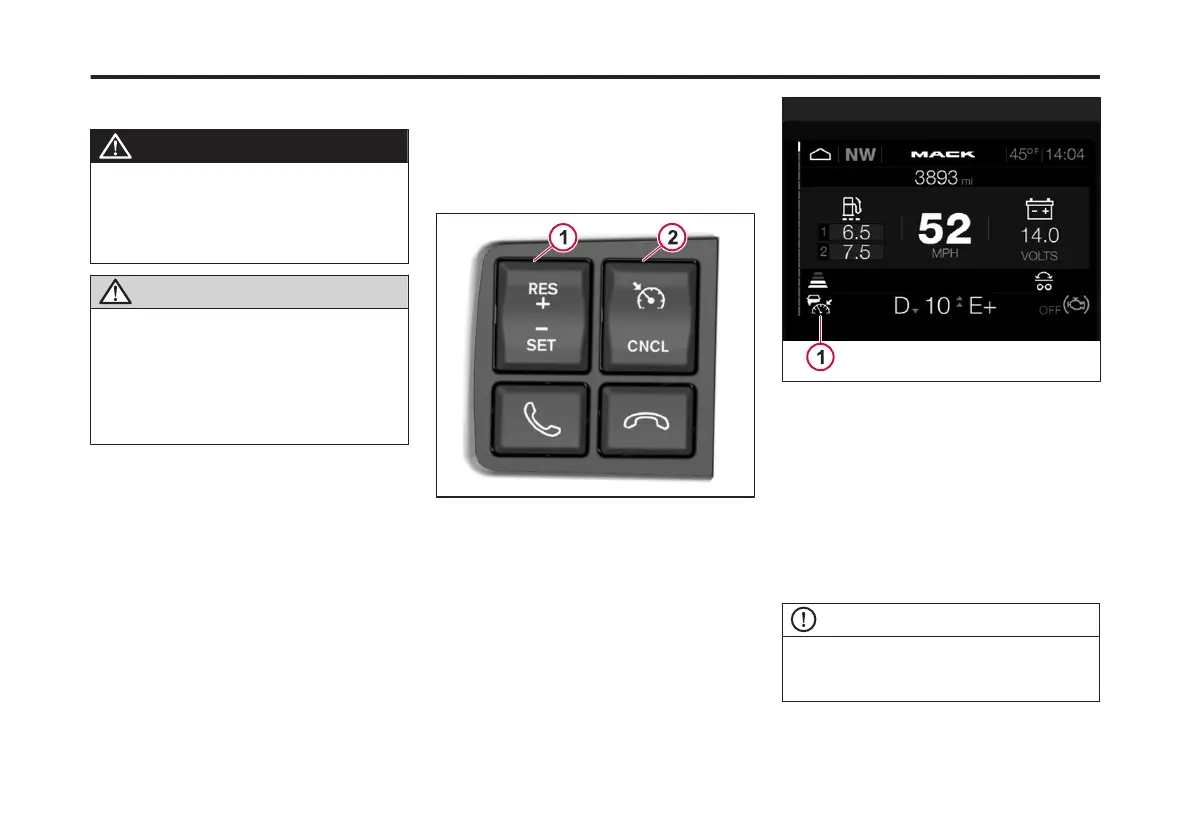
1 On the left-hand steering wheel
controls, press the Cruise Control
ON/OFF button.
1 Cruise Control Resume/Set
2 Cruise Control ON/OFF/Cancel
When the cruise control is activated the
Cruise Control icon displays in the Driver
Information Display (DID)
1 Cruise Control Icon
2 At the desired road speed, press and
release the Cruise Control Resume/Set
button. The Cruise Control icon turns
green. Also, the set cruise control speed
displays next to the icon.
The vehicle maintains the set speed.
Increasing the Cruise Control Set
Speed
NOTE
The cruise control speed will not increase
above the maximum programmed speed
limit.
1 To increase the Set speed, press the
Cruise Control Resume/Set button up
(+).
177
X Publication_PC28



 To Next Page