STARTING AND DRIVING
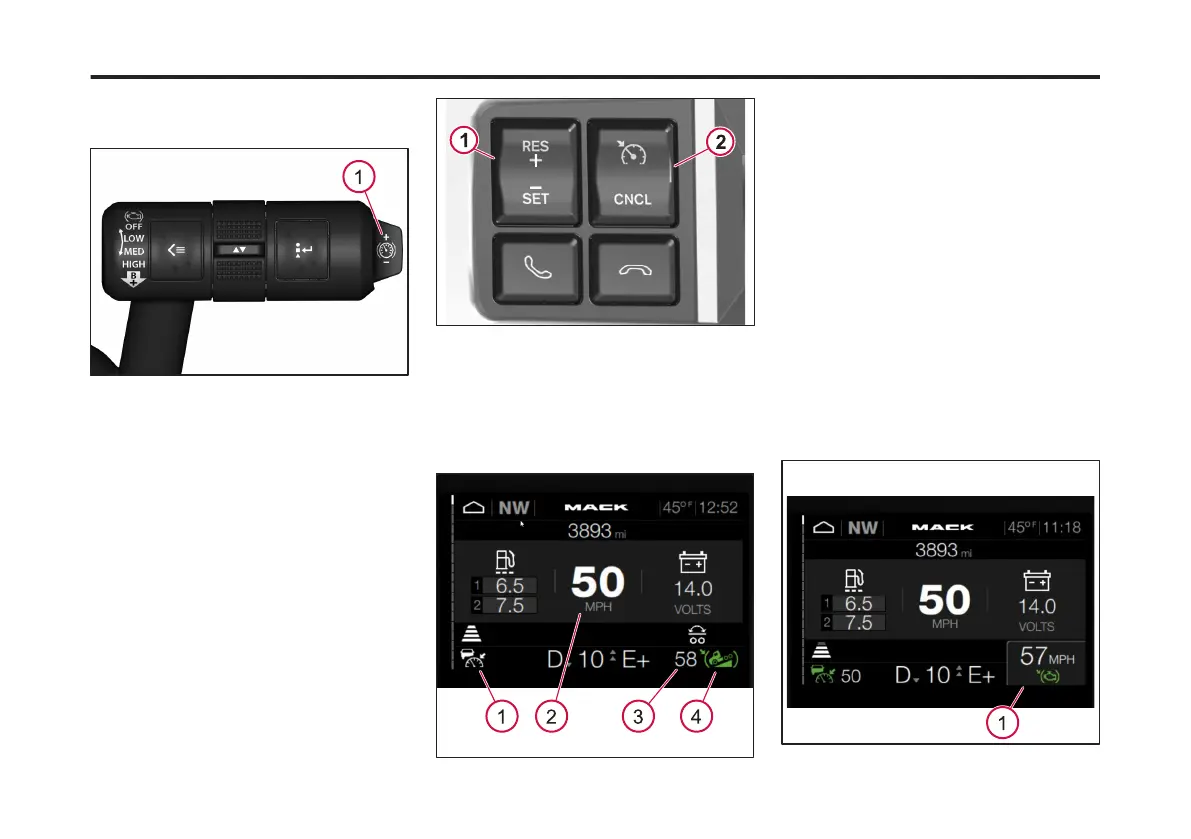
ENGINE BRAKE
located on the end of the right-hand
stalk.
1 Cruise Control Braking Speed Button
To set the cruise control braking speed
complete the following steps:
1 Activate the engine brake.
2 Press the Cruise Control ON/OFF/
Cancel button.
3 Set the cruise control speed.
1 Cruise Control Resume/Set
2 Cruise Control ON/Off/Cancel
When the cruise control and engine
brake are activated the following icons
display in the Driver Information Display
(DID).
1 Cruise Control Icon
2 Current Speed
3 Current Cruise Control Braking Speed
4 Cruise Control Braking Icon
4 To increase the cruise control braking
speed, press the Cruise Control Braking
Speed button away from you. To
decrease the cruise control braking
speed, pull the Cruise Control Braking
Speed button toward you. The Cruise
Control Braking Speed is adjustable to
maximum of 9 mph from the current set
speed.
The second pop-up displays in the DID
when adjusting the cruise control
braking speed. The pop-up displays the
new braking speed.
1 New Cruise Control Braking Speed
181
X Publication_PC28



 To Next Page