Segments
F6 SMART™ – Volumetric Handheld Camera – User Guide
Group
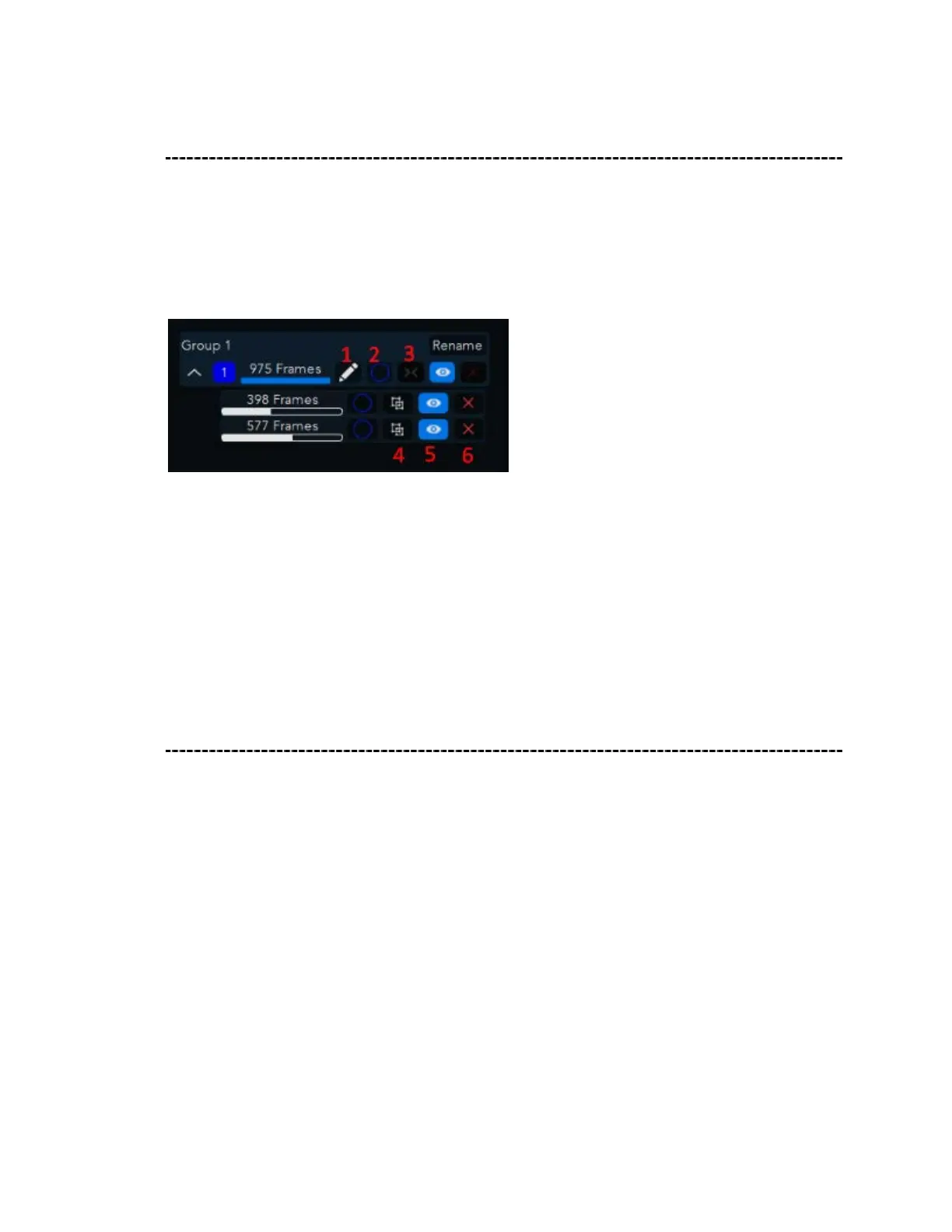
Each group will contain joined and merged registrated segments, that will help editing
the scanned point cloud.
group hierarchy – image (only)
1. Edit
2. Checking Box
3. Merge
4. Ungroup
5. Visible
6. Delete
Group tab management
Under each group the following options are available:
It is possible hide/show each group/segment individually by pressing on the eye icon
(toggle visible) next to the relevant segment group
It is possible to delete the entire group or either delete each of the segments by pressing
on the delete icon next to it- this action will delete the group/segment indefinitely
To view or edit only the chosen group press on the pencil icon, once pressed you will be
able to manipulate the chosen point cloud data in the 3D space and only the relevant
timeline will be displayed
It is possible to split grouped segments by pressing the ungroup button (2 squares icon),
this will divide the segments inside the group to multiple groups.



 To Next Page