Spawn
F6 SMART™ – Volumetric Handheld Camera – User Guide
Chapter 19 Spawn
Foreword
Spawning is the creation of a new child process. This is done by calling an operating
system function, and the OS does all the work of setting up the new process, and
managing it along with all the other processes currently running. In Echo when you can
choose to spawn a file in ether mesh or point cloud, this new file will no longer contains
MVX file content such as RGB / IR video and rig data but will remain point cloud
coordinate system.
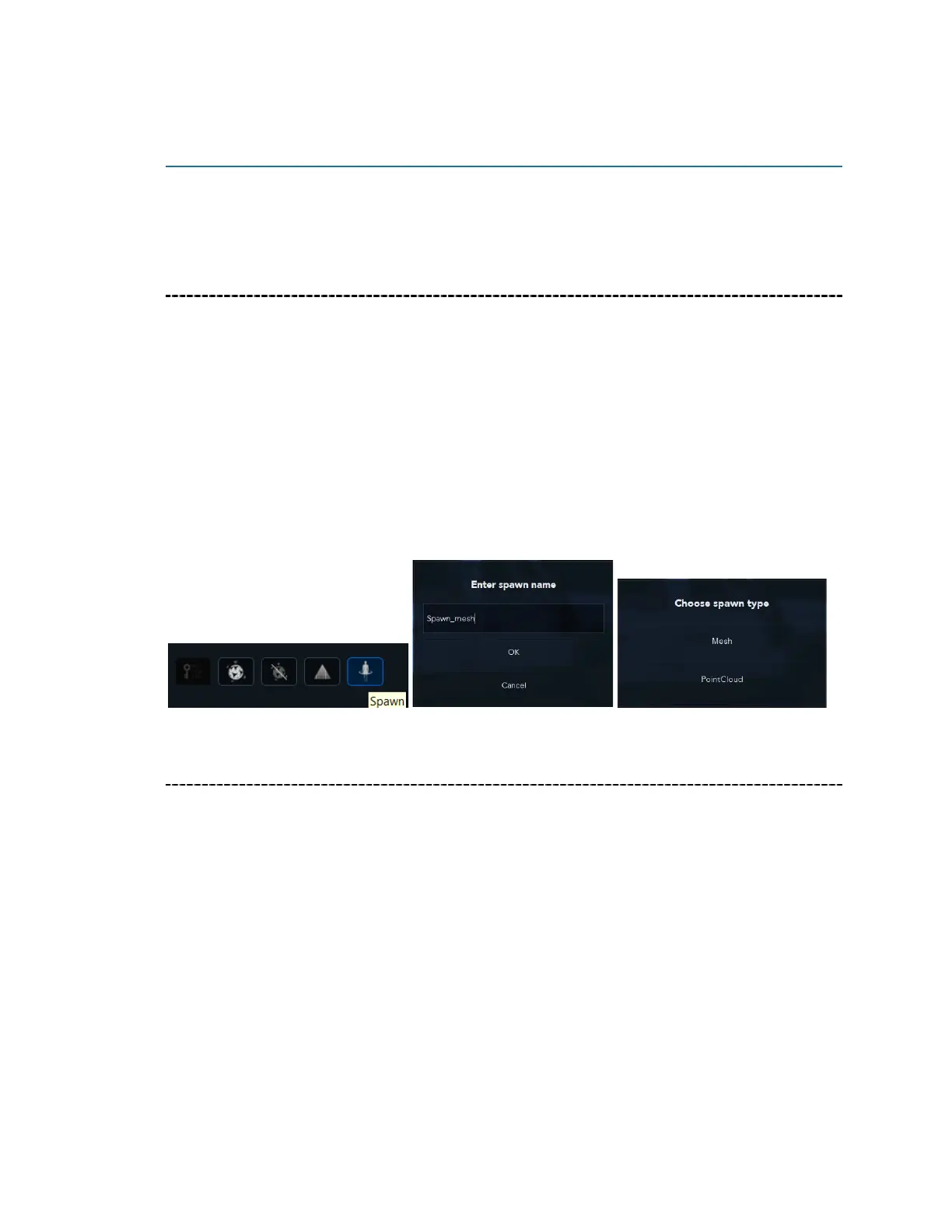
To create a spawn file, click on the spawning icon than name the new spawn file you
want to create.
Chose the type of spawn file you like create – Mesh or Point Cloud.
Mesh
While point clouds can be directly rendered and inspected, point clouds are often
converted to polygon mesh or triangle mesh models, NURBS surface models, or CAD
models through a process commonly referred to as surface reconstruction.
There are many techniques for converting a point cloud to a 3D surface. Mantis-Vision
approaches for mesh, is to convert the point cloud into a volumetric distance field and
reconstruct the implicit surface so defined through a marching cubes algorithm.
Point clouds can also be used to represent volumetric data, as is sometimes done in
AR/VR imaging. Using point clouds, multi-sampling and data compression can be
achieved.
In this chapter, we show you how to spawn scans inside the Echo app.



 To Next Page