OPERATOR INTERFACE MENUS 5 - 5
D-MAXE with OI-B/OI-Nwww.maxcessintl.com MI 2-296 1 D
Menus.fm
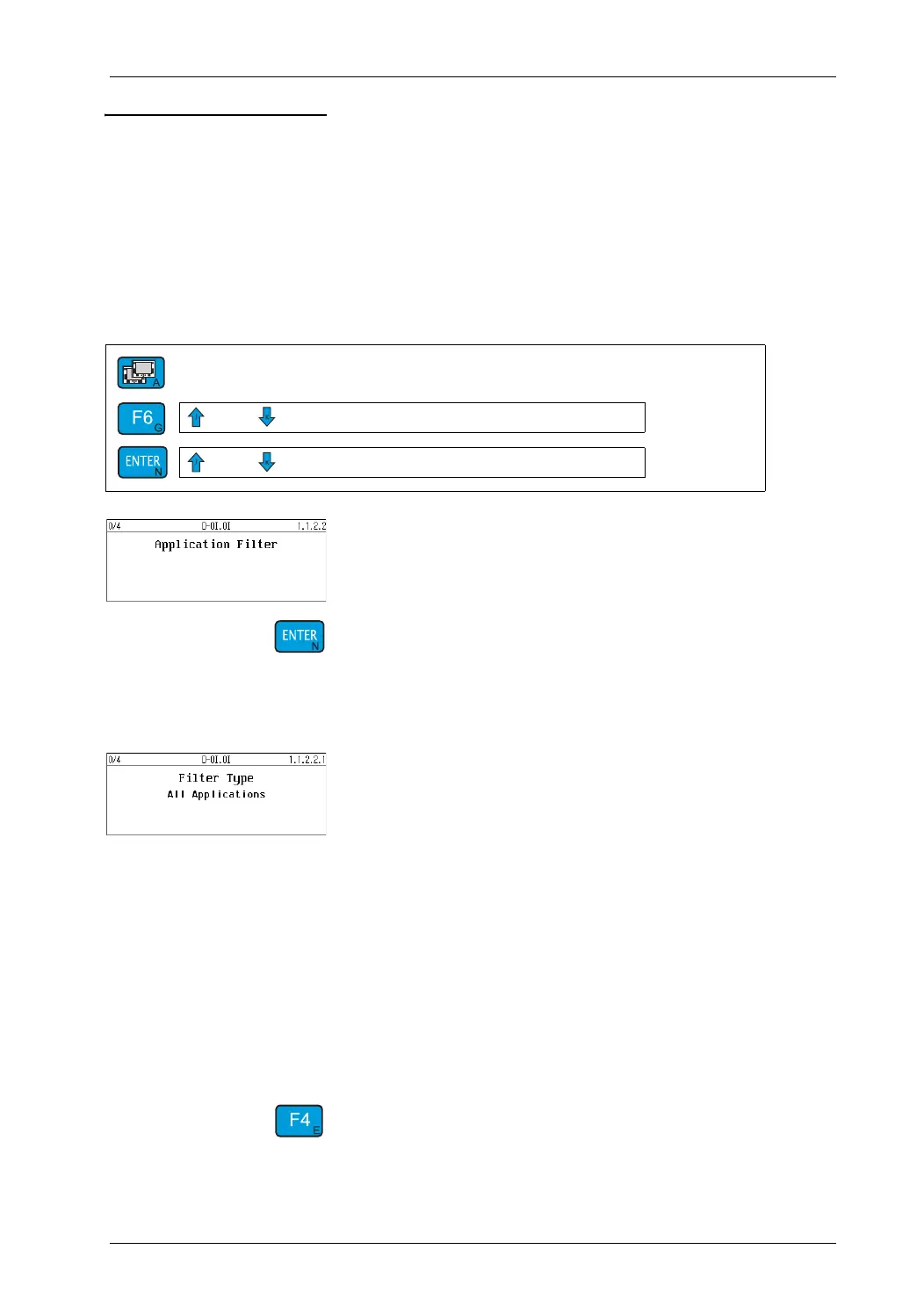
Menu 1.a.2.2
Application Filter
Description You can use the
Application Filter
menu to configure the view of
the operator interface to a "distributed system" (see
Menu 1y.7.5
Distributed System, page 7-47
).
Menu
Key sequence for menu 1.a.2.2:
Switch to the menus that describe the
Application Filter
parameter
Input
Menu
1.a.2.2.1 Application Filter
∙ Select the desired
Filter Type
The following views (filter types) are possible on a
"distributed system":
All Devices:
View of "All devices" on the network
All Applications:
View of all main conditions (CM) of the applications
Selected Application:
View of all "Devices" in an application
Filtering can be turned off temporarily with the F4 key in
menu "All Devices" (see
Selection of "devices", page 5-13
).
→ Press longer than 2seconds
1.a
1.a.2.2
→ Application Filter


 To Next Page