M
M
A
A
I
I
N
N
C
C
O
O
M
M
P
P
O
O
N
N
E
E
N
N
T
T
S
S
38
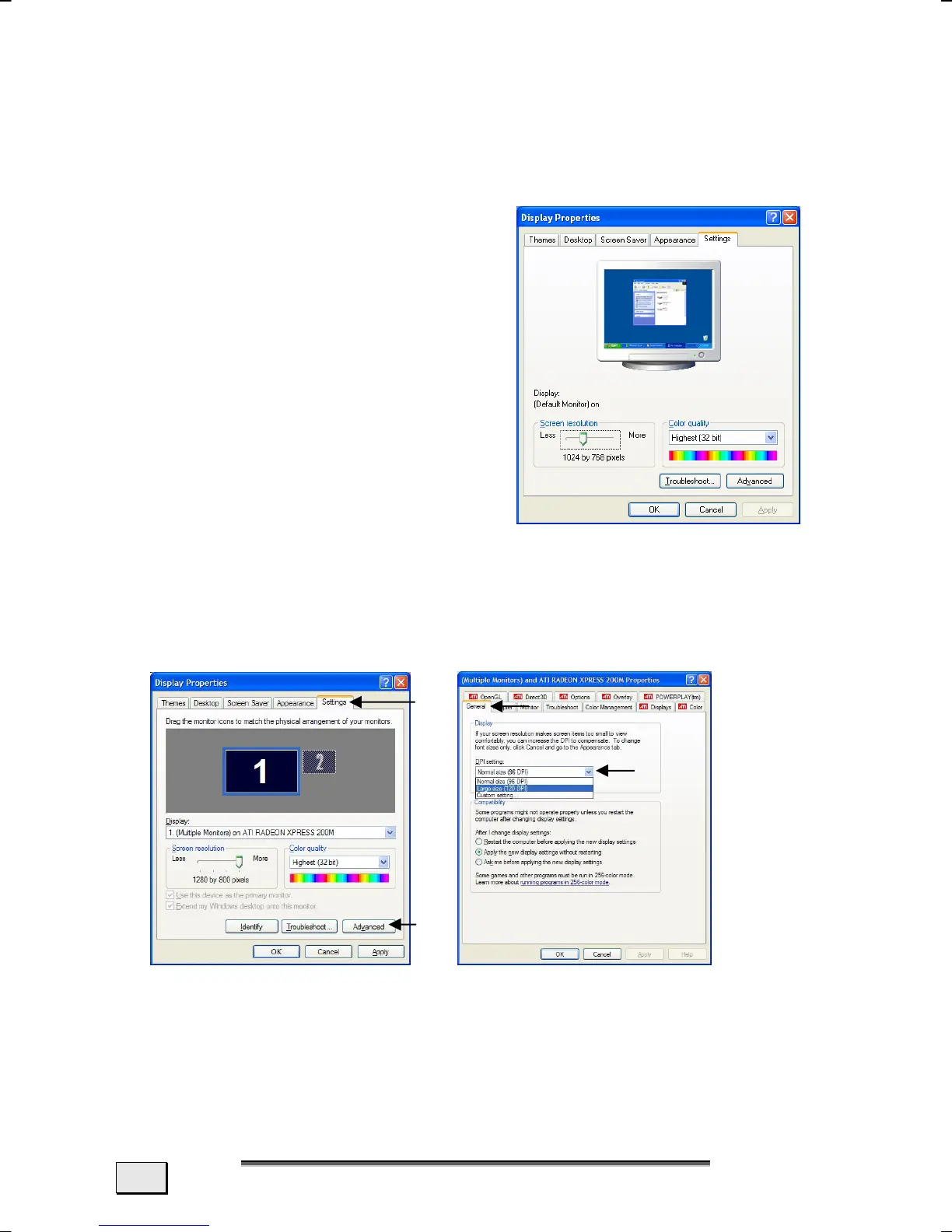
DISPLAY PROPERTIES
This program offers you the possibility of adjusting the presenta-
tion on your screen. It includes, for example, the background im-
age, the screen saver, the Active Desktop (Web) and additional
settings of your screen and your
display card. The program can be
started in the following way:
- Right click of the mouse on the
Windows Desktop and left click
of the mouse of Properties.
or
- Through Start Ö System
Control Ö Display by means
of a double-click with the left
mouse button.
You will have, for example, the possibility of changing the DPI
setting, in order to optimize your screen display.
To do this, go to the Settings (n) Tab in Display Properties
and click on Advanced (o) there.
Select the values corresponding to your requirements under Dis-
play (q) in the General (n)Tab.
n
o
p
q



 To Next Page