M
M
A
A
I
I
N
N
C
C
O
O
M
M
P
P
O
O
N
N
E
E
N
N
T
T
S
S
76
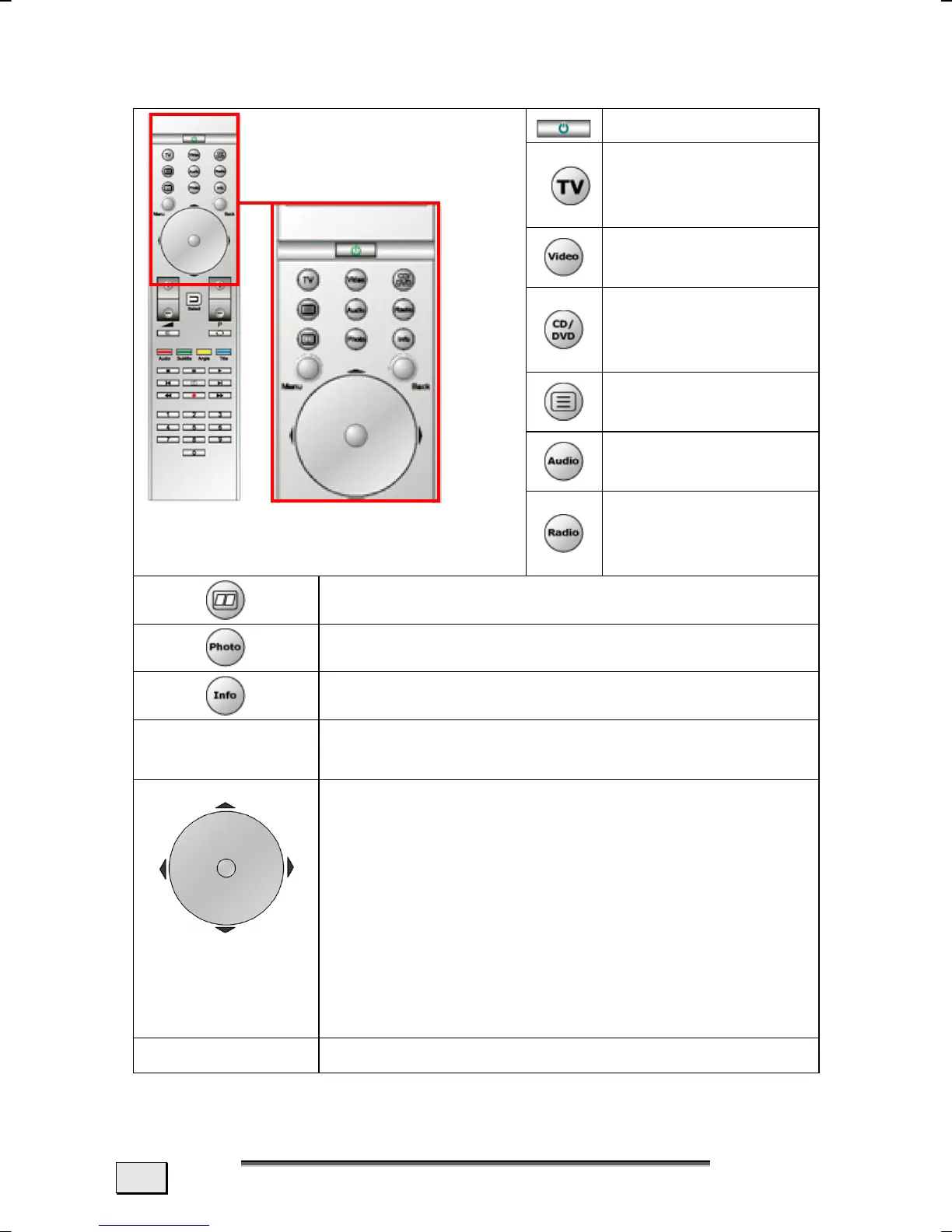
BUTTON LAYOUT
On / Off
View and record
television pro-
grams.
View video re-
cordings.
Playback music
CDs, video disks
and DVDs.
Start video text
application.
Open music ar-
chive.
Listen to and re-
cord radio pro-
grams.
EPG function (Electronic Program Guide)
Open photo archive.
Application-related information function.
Menu
Start Selection Menu of the application run-
ning.
Central selec-
tion button =
OK
You will select the function required with this
Navigation Field. The selection indicator will
move in the corresponding direction. The
pointer will move forward if you move your
finger clockwise; the pointer will move
backwards if you move your finger counter-
clockwise. You can also navigate in the cor-
responding direction with the arrow keys.
Press the Selection button in the centre of
the Field to confirm your selection.
Back
Reverts to the point selected previously.



 To Next Page