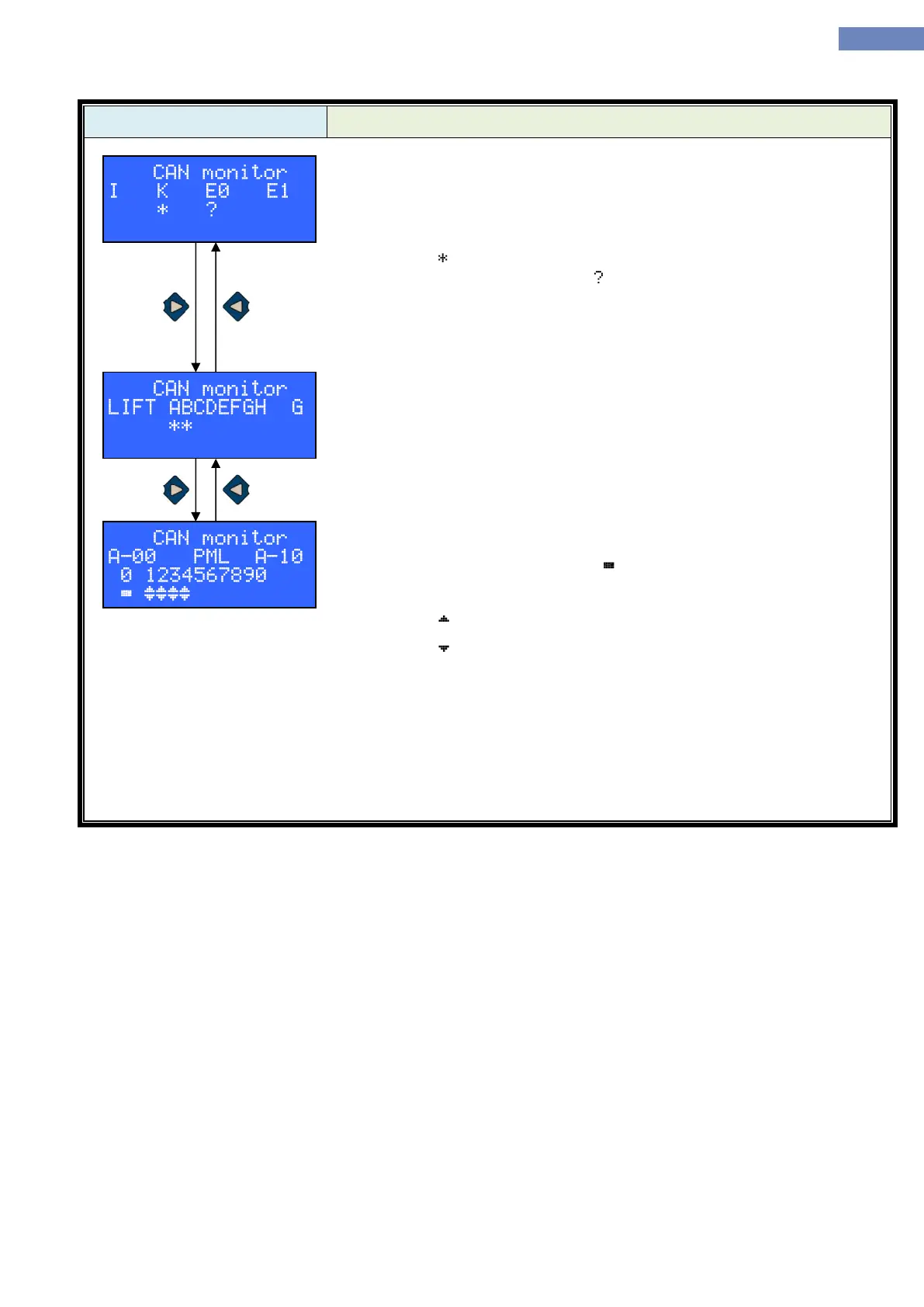
In CAN status menu it is posible to see status of communication
between main control board LC100-C with other LC100 units connected to
CAN bus.
After entering the menu communication with LC100-I, K, E0 and E1
board is displayed.
Sign „ “ means that the communication with the board is correct. If the
communication is not correct sign „ “ will apear. Units which don't have any
sign are not included in the system through parameter A-05 to A-08.
Pushing the „right“ button display shows next communication status:
This display shows communication status with other elevators in
multiplex and communication status with the LC100-G board.
Next display is CAN communication status for P or M boards adress
side „A“ on floors 1 to 10, and communication status for P or M board with
adress „0“.
For SIMPLEX elevators sign “ “ means that the communication is
correct.
For DUPLEX elevators sign for communication is:
Sign „ „ for „A“ elevator
Sign „ „ for „B“ elevator
Next display is A-20 which is status of communication for P or M board
adress „A“ on the floors 11 to 20, then A-30 for floors 21 to 30, A-40 for floors
31 to 40.
Next are communication statuses for P or M boards adressed „B“. B-
10 for floors 1 to 10, B-20 for floors 11 to 20, B-30 for floors 21 to 30 and B-
40 for floors 31 to 40.


 To Next Page