VJ-1624/1624W OPERATION MANUAL 7 Troubleshooting
7-5
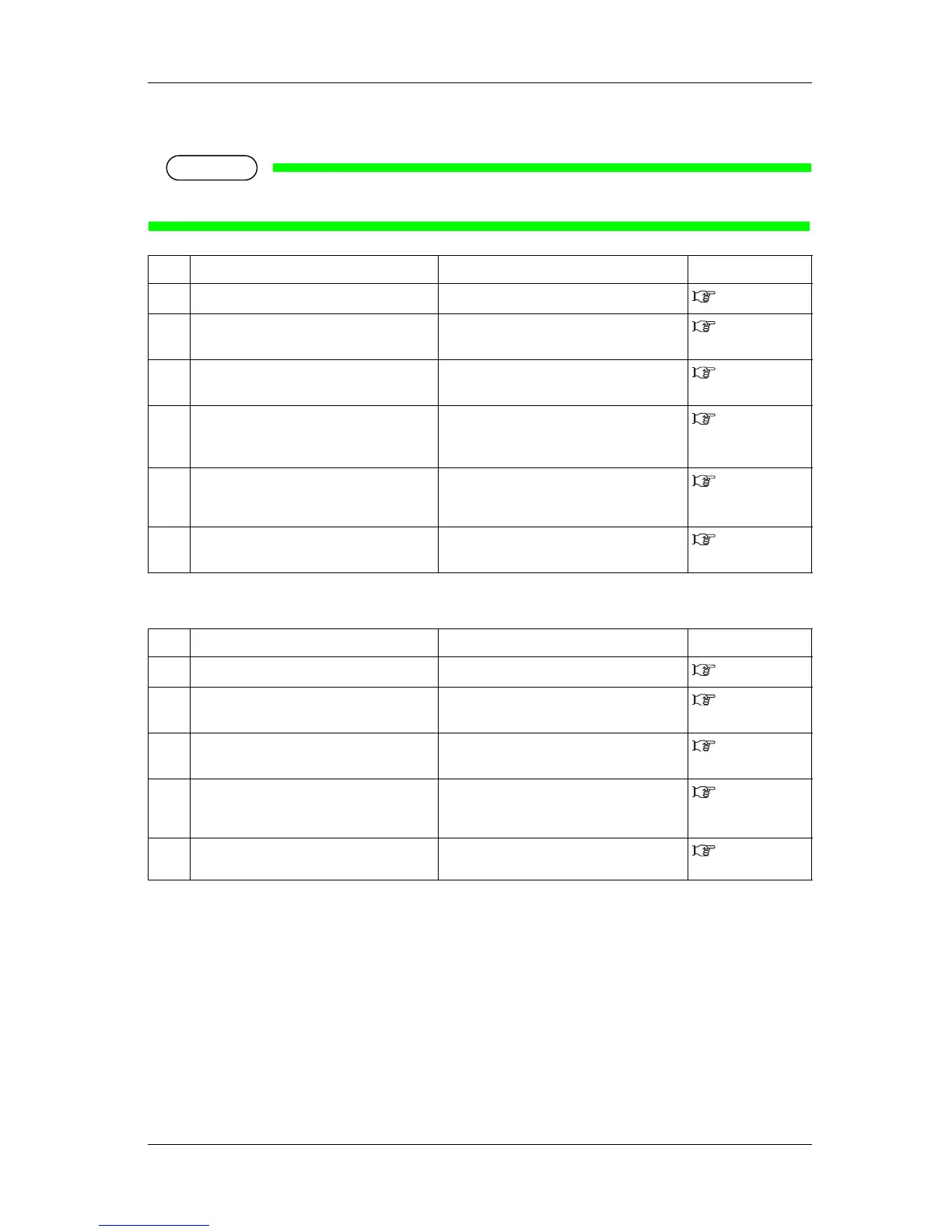
(2) The media is crumpled during initialization
NOTE
• If the media is jammed or torn, remove it according to "7.3 The media is jammed".
(3) The wrong media size is set during initialization
No. Possible cause Remedy Reference
1 Are you using the recommended media? Use the recommended media.
4.2.1 Media type
2 Is the loading position of the media correct? Load the media correctly.
3.4.2 Setting
Roll Media
3 Is the media loaded at an angle? Set the media straight.
3.4.2 Setting
Roll Media
4 Are there any foreign materials such as torn
paper attached to Pressurizing roller?
Clean Pressurizing roller.
6.2.2 Cleaning
the inside of the
printer
5 Is the printer used in an environment other
than the one specified, such as near an air
conditioner?
Only use the printer in an environment that is
specified for use.
Installation
manual
6 Are you using creased, damaged, torn or
curled media?
Replace the media.
4.2.2 Cautions
on handling media
No. Possible cause Remedy Reference
1 Are you using the recommended media? Use the recommended media.
4.2.1 Media type
2 Is the media loaded at an angle? Set the media straight.
3.4.2 Setting
Roll Media
3 When the media is set, does it curl upward? Straighten the media or set a new media.
3.4.2 Setting
Roll Media
4 Is the printer used in an environment other
than the one specified, such as near an air
conditioner?
Only use the printer in an environment that is
specified for use.
3.4.1 Loading
roll media
5 Are you using media that has been printed on
already?
Use a new media.
4.2.1 Media type















 To Next Page