4-2 WF1946B
4.1 Burst oscillation
Burst oscillation (Type: Burst) (
MODE
→
BURST
→ TYPE : BURST)
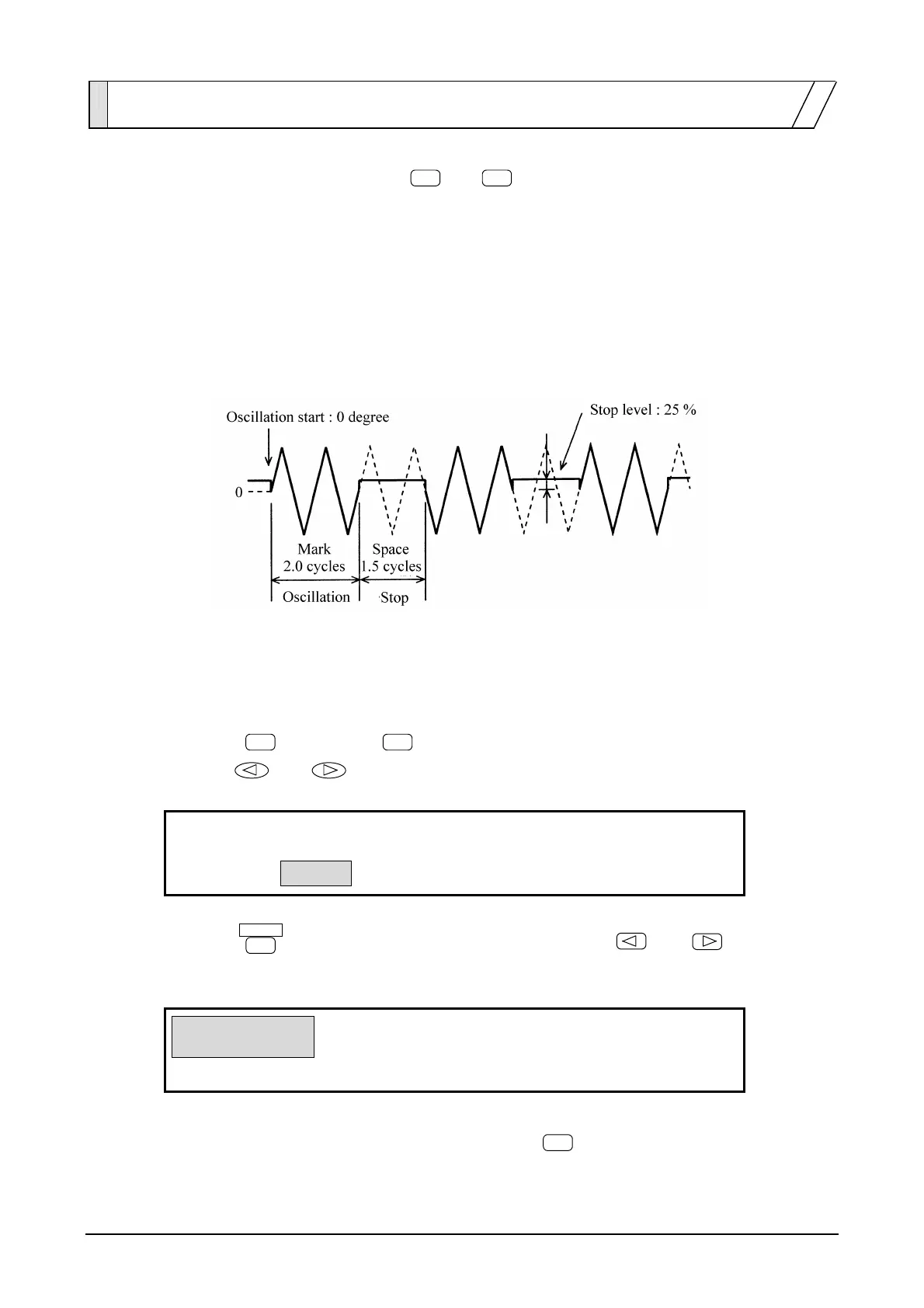
Burst oscillation (Type: Burst) produces an intermittent oscillation at the designated oscillation cycle and
stop cycle.
Operation is described with reference to an example of producing a waveform output such as indicated in
the figure.
In this example, the waveform is triangular, the DC offset is set to 0 V, the oscillation start phase is set to 0
degrees, and the frequency and amplitude are set to arbitrarily defined values.
Operation:
(1) Set the burst oscillation TYPE to BURST.
① Press the
MODE
key, then the
BURST
key.
② Use the
and keys to select the type (TYPE flashes).
BURST
TRIG GATE
4
BURST:TYPE MARK SPACE STOP―LEVEL
③ Press the
ENTER
key, then produce the following display with the
and
keys
(BURST flashes).
BURST
TRIG GATE
4
BURST:TYPE MARK SPACE STOP―LEVEL
④ This sets the burst oscillation type to burst. Press the
EXIT
key once to exit type setting.



 To Next Page