135
• A (hold) to scroll upward through Depth values at a rate
of 8 per second from 30 to 330 FT (10 to 100 M) in
increments of 10 FT (1 M)
• A (< 2 sec) to step upward through Set Points one at a time
• M (< 2 sec) to step back through Set Points one at a time
• S (< 2 sec) to save the setting and revert to the FREE Menu.
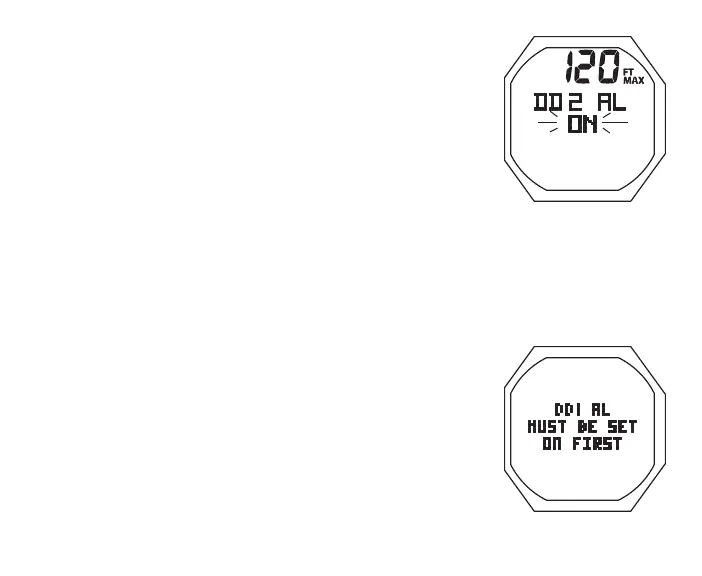
Set DD2 Alarm**, information includes (Fig. 132A):
> Depth value with MAX and FT (or M) icons
> Graphics DD2 AL
> Graphic OFF (or ON) flashing
• A < 2 sec to toggle OFF/ON
• S (< 2 sec) to save Set Point and flash Depth digits (if ON);
or revert to FREE Menu (if OFF), bypassing DD3
** If this screen is accessed when DD1 is set Off, a message
(Fig. 132B) will be displayed for 5 seconds, then operation
will revert to the FREE Menu.
• A (hold) to scroll up through Depth values at a rate of 8 per
second, beginning 1 increment > DD1 Set Point (40 FT/11
M min) to 330 FT (100 M) in increments of 10 FT (1 M)
• A (< 2 sec) to step upward through Set Points one at a time
• M (< 2 sec) to step back through Set Points one at a time
• S (< 2 sec) to save the setting and revert to the FREE Menu.
Fig.132A-SETDD2AL
Fig.132B-SETMESSAGE



 To Next Page