45487001TH Rev.1
2-33 /
Oki Data CONFIDENTIAL
2. Installation
Memo • If[Timeout]isdisplayed,itispossiblethattheaccesspointofthe
connectiondestinationcouldnotbefoundwithinthe timelimit.Redofrom
step 6.
• If[Overlap]isdisplayed,WPS-pushbuttonisbeingexecutedon2ormore
accesspoints.Pleasewaitforashorttimeandthenretry.
WPS-PIN
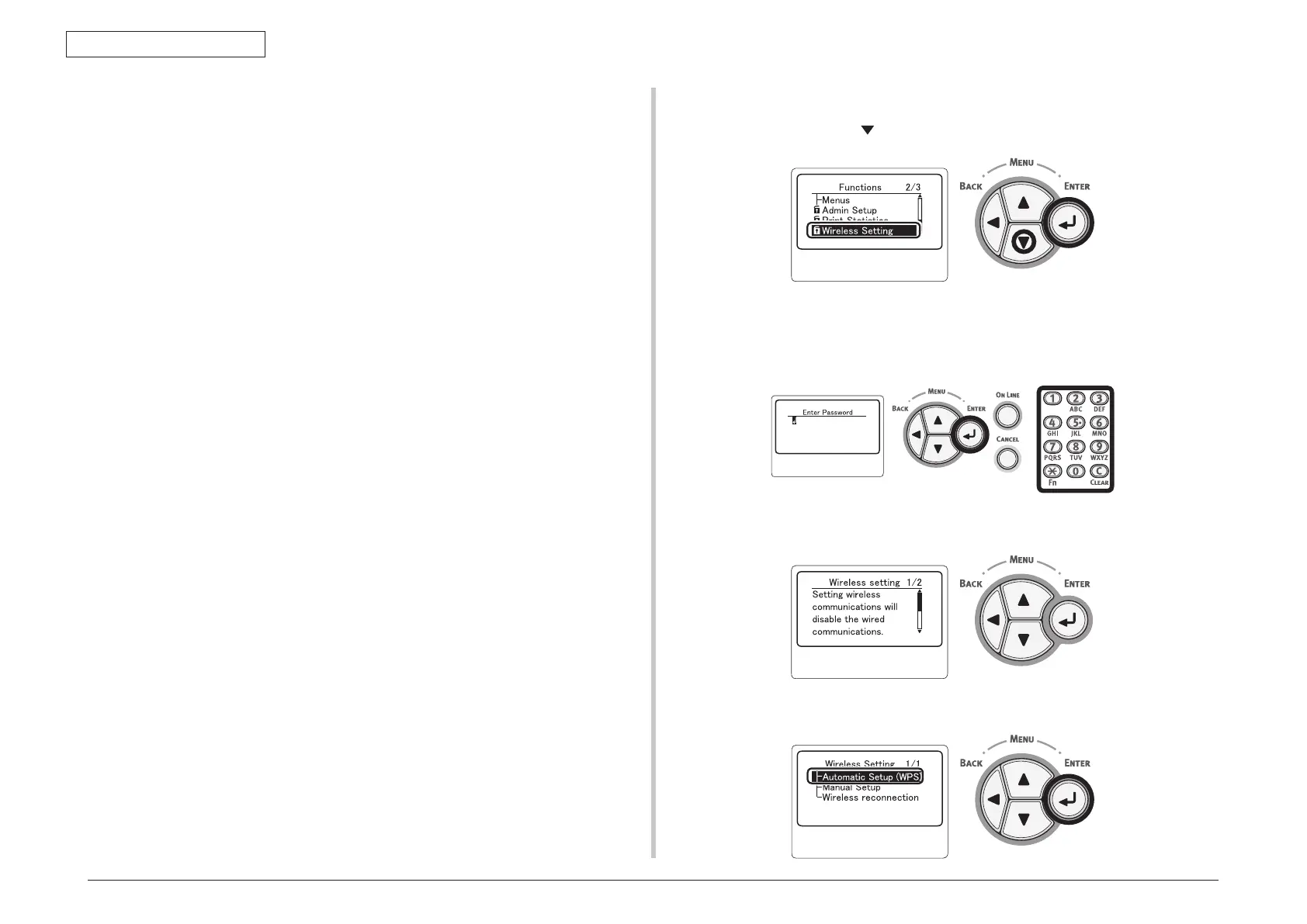
(1) Pressthescrollbutton toselect[WirelessSetting]andthenpressthe<ENTER>
button.
(2) Entertheadministratorpasswordusingtheten-keypad,thenpressthe<ENTER>
button.
The factory default password is “aaaaaa”. Press the <ENTER> button whenever
inputting one character.
(3) When the displayshownbelowappears,read itcarefully. Press the <ENTER>
buttonorwaituntilthedisplaychanges.
(4) Checkthat [Automatic Setup (WPS)] is selected and then press the <ENTER>
button.


 To Next Page