208
Setting Inspection Conditions
4.9 Adjusting Area Size (Area Size Adjustment)
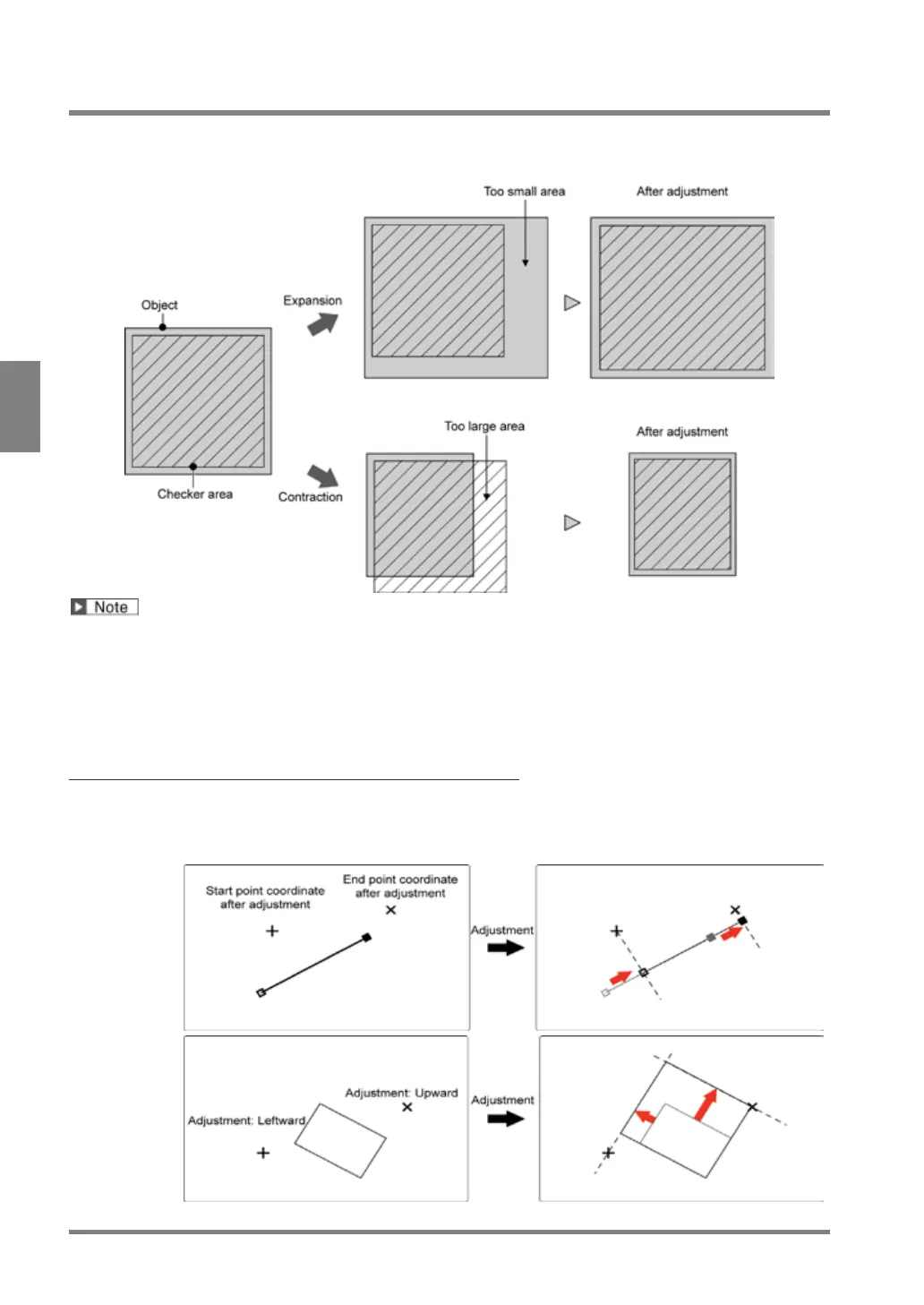
This function expands or contracts the inspection area or mask area to fit a variable-sized object. The function
detects the part which signifies an object size, such as edges of the object or register marks, and expands or
contracts a checker area based on the coordinates of the part.
Area Size Adjustment is not available for some checkers. In the checkers which can use Area Size Adjustment,
“Area Size Adj.” is displayed in the setting window.
Line, Binary Window, Gray Window, Binary Edge, Gray Edge, Feature Extraction,
Flaw Detection, Connector (Binary Window), Connector (Gray Window), Smart Edge
(Circle), Smart Edge (Line)
Smart Matching, Connector (Gray Edge), Position Adjustment, Area Size
Adjustment
In the Case of Diagonal Inspection Area
When applying Area Size Adjustment on a diagonal inspection area, the function expands or contracts the area
without changing the angle.
Example 1:
Line
Example 2:
Rectangle,
circle, or
polygon



 To Next Page